Image: Unsplash, used under the Unsplash License.
Pick the AI tool your team already pays for, on its business plan, and keep personal accounts away from work data. If you live in Microsoft 365, add Microsoft 365 Copilot. On Google Workspace, use Gemini there. For a standalone assistant, ChatGPT Business or Claude Team; for code, GitHub Copilot Business or Cursor Teams. The plan, not the vendor, decides whether there's a DPA and whether your data trains a model.
We rated each tool on four questions: does your plan come with a DPA, is your data used for training by default, can you control retention, and does an admin get an audit log. Every cell was checked on the vendor's own DPA, terms, help or pricing page on October 16, 2026.
Compliance Ratings at a Glance
| Tool | Plan to use | DPA on that plan | Your data used for training? | Admin audit log | Checked |
|---|---|---|---|---|---|
| ChatGPT | Business or Enterprise | Yes | No, by default | Enterprise, through the Compliance API | Oct 16, 2026 |
| Claude | Team, Enterprise or the API | Yes, part of the Commercial Terms | No, by default | Enterprise only | Oct 16, 2026 |
| Microsoft 365 Copilot | Add-on to a Microsoft 365 business or enterprise plan | Yes, Microsoft's DPA | No | Yes, Microsoft Purview Audit (Standard) | Oct 16, 2026 |
| Gemini in Google Workspace | Any Workspace plan | Yes, the Cloud Data Processing Addendum | No, not outside your domain without permission | Yes, Workspace audit logs | Oct 16, 2026 |
| Notion AI | Business or Enterprise | Yes (Plus and up, and any organization use) | No | Enterprise only | Oct 16, 2026 |
| Grammarly | Pro for teams, or Enterprise | Yes, for accounts opened for a company | Team plans bought online: on until an admin turns it off | Enterprise only (Audit Logs API) | Oct 16, 2026 |
| GitHub Copilot | Business or Enterprise | Yes, the GitHub DPA | No on Business and Enterprise; Free, Pro and Pro+ yes unless the user opts out | Business and Enterprise: settings, licence and agent events, not prompts | Oct 16, 2026 |
| Cursor | Teams or Enterprise | Yes, under the Master Services Agreement | No while Privacy Mode is on, which is the default for teams | Compliance logging in Cursor's enterprise admin tools | Oct 16, 2026 |
ChatGPT (OpenAI)
ChatGPT Team is now ChatGPT Business. OpenAI signs a DPA for Business, Enterprise and the API, and by default it doesn't train on Business or Enterprise workspaces. Business admins set how long data is kept, and deleted conversations leave OpenAI's systems within 30 days. The conversation audit log comes through the Enterprise Compliance API. Free, Go, Plus and Pro are personal plans: the pricing page says content is used to train models, with an opt-out.
Verdict: Business for most small teams; Enterprise if you need the audit log.
Claude (Anthropic)
Anthropic's DPA is part of its Commercial Terms, which cover Team, Enterprise and the API, and commercial inputs and outputs aren't used for training by default. API data is deleted within a month unless you have a Zero Data Retention agreement, which needs Anthropic's approval. Audit logs and custom retention controls are Enterprise only. On Free, Pro and Max, training is the user's choice, and saying yes extends retention to five years.
Verdict: Team for everyday chat, the API for anything you build, Enterprise once you need audit logs.
Microsoft 365 Copilot
Copilot is an add-on: you need a qualifying plan first, such as Microsoft 365 Business Basic, Standard or Premium, or E3 or E5. Prompts, responses and Microsoft Graph data aren't used to train foundation models, and Copilot interactions are stored with your other Microsoft 365 content, so your Purview retention policies and Audit (Standard) logs cover them. For EU customers Copilot is an EU Data Boundary service, with one exception: Anthropic models, which Microsoft offers as a subprocessor, are currently outside the boundary.
Verdict: the default pick if you already run Microsoft 365; check whether your admin has switched on Anthropic models before relying on the EU Data Boundary.
Gemini in Google Workspace
Gemini in Workspace follows the Cloud Data Processing Addendum, and Workspace content isn't used for generative AI training outside your domain without permission. Admins get audit logs for Gemini activity in Gmail, Docs, Drive, Meet and the other Workspace apps. Data regions keep stored data in the EU on Business Standard and higher editions, and Google says Gemini processing can also be kept in the EU or US.
Verdict: the default pick on Google Workspace; choose Business Standard over Business Starter if EU data storage matters.
Notion AI
Notion AI comes with Business and Enterprise plans; Free and Plus users get a limited number of AI responses to try it. The DPA is part of Notion's Master Subscription Agreement, and Notion's AI terms rule out training on that data. The audit log and EU data residency are Enterprise only. If your team is on Business, Notion AI is already part of the plan, so treat it as in use and record it.
Verdict: Business is fine for everyday notes; Enterprise if you need the audit log or EU residency.
Grammarly
Grammarly's plans are now Free, Pro and Enterprise. An account opened for a company is processed under the Superhuman Data Privacy Addendum (Grammarly's company is now Superhuman Platform Inc.). Training is off for Enterprise, Education and plans bought through sales, but team plans bought on the website start with it on until an admin turns it off; individual users can opt out in their privacy settings. The Audit Logs API, SAML single sign-on and confidential mode are Enterprise only. Grammarly says its extensions ignore sensitive fields such as passwords and payment details on a best-efforts basis.
Verdict: Enterprise if you need logs or SSO; on a Pro team plan bought online, turn training off on day one.

Image: Unsplash, used under the Unsplash License.
GitHub Copilot
Copilot now comes as Free, Pro, Pro+, Max, Business and Enterprise. GitHub doesn't train on Business or Enterprise data, but since April 24, 2026 it has used interaction data from Free, Pro and Pro+ for training unless the user opts out under Privacy in settings. On Business and Enterprise, IDE chat and code completions aren't retained by default. The Copilot audit log records settings, licence and agent events, not the prompts developers send, and keeps them 180 days. EU data residency needs GitHub Enterprise Cloud with data residency.
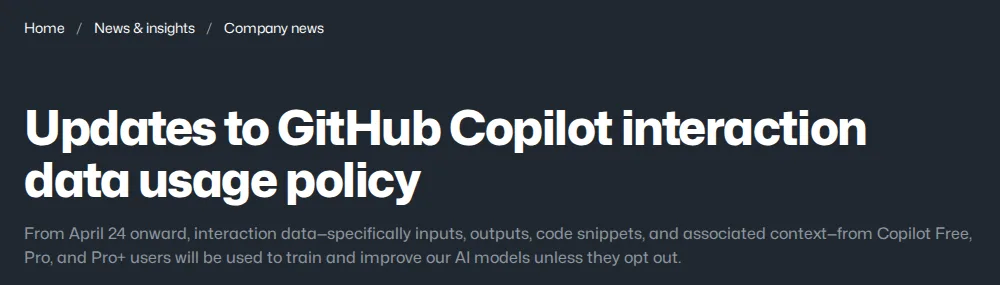
Screenshot: Updates to GitHub Copilot interaction data usage policy, The GitHub Blog, checked October 16, 2026.
Verdict: Business for any team; then check that nobody codes company repositories on a personal Free or Pro plan.
Cursor
Cursor does have an enterprise offer, with SAML single sign-on, SCIM provisioning and compliance logging in its admin tools, and it holds a SOC 2 Type II attestation plus ISO 27001 and ISO 42001 certificates. Privacy Mode, which stops training on your code, is on by default for teams and admins can enforce it; with it off, Cursor may use code and prompts to train its models. The DPA runs under the Master Services Agreement with Anysphere, Inc. We found no EU data residency option documented.
Verdict: Teams is fine for most code work as long as Privacy Mode stays enforced; Enterprise once you need SSO, SCIM and compliance logs.
What to Do Now
-
Inventory what your team is actually using: not just what you approved. Personal plans get installed without going through procurement. Use the AI tool register template to capture all tools, including shadow AI.
-
Get the DPA in place for every tool in your register. The table shows which plan comes with one. Start with the tools that touch customer data, employee data or financial records.
-
Check AI bundled into tools you already pay for: Notion AI comes with Business plans, and Grammarly team plans bought online start with training on. Review the admin settings for each.
-
Set a policy before the next tool is approved: the AI acceptable use policy template covers approved tools, data classification rules, and what employees must do before using any new AI tool.
-
Run a vendor due diligence pass: the AI vendor due diligence checklist covers security, data handling and contract terms.
What to keep on file: for each tool, the signed DPA (or the terms clause that incorporates it), a dated screenshot of the training setting, and a note of where the audit log lives and how long it keeps events.
What we could not confirm on October 16, 2026: whether ChatGPT Business offers any admin audit log outside the Enterprise Compliance API, whether Cursor offers EU data residency, and prices, which we didn't check for this comparison.
Correction (October 16, 2026): An earlier version said Notion's DPA covers only Business and Enterprise and that Notion offers no training opt-out on Free or Plus, and that Grammarly Free and Premium have no training opt-out. Notion's DPA comes with its Master Subscription Agreement, which covers Plus, Business and Enterprise and any organization use, and Notion's AI terms rule out training on that data. Grammarly Free and Premium users can opt out in their account privacy settings.
Correction (October 16, 2026): A full re-check found more errors. Cursor has an enterprise offer with single sign-on, SCIM and compliance logging; we had said it had no enterprise tier. Notion's audit log is Enterprise only, not partly on Business, and Claude's audit logs are Enterprise only. GitHub Copilot's personal plans now train on interaction data unless users opt out, and GitHub no longer lists an Individual plan. Grammarly says its extension ignores password and payment fields; we had said it reads passwords. ChatGPT Team is now ChatGPT Business, and Grammarly's plans are now Free, Pro and Enterprise. We removed figures and claims we couldn't source: the number of AI tools small teams use, that Anthropic's zero retention is the strongest control of any vendor, and that Gemini is less capable than Microsoft 365 Copilot.
Related Reading
- Privacy-first AI APIs, which don't train on your data
- AI tool register template
- AI vendor due diligence checklist
- AI acceptable use policy template
- AI governance guide for small teams
- Claude vs ChatGPT for Compliance Teams: 2026 Governance Comparison
- AI Vendor Security Incident Response: 4-Step Playbook for TypeScript AI
- AI Vendor Supply Chain Security: Checklist for Small Teams (2026)
- ChatGPT Memory Upgrade (Dreaming V3): What It Means for Business Privacy an