


On June 4, 2026, OpenAI began rolling out a rebuilt memory system for ChatGPT, announced in a post titled "Dreaming: Better memory for a more helpful ChatGPT." OpenAI's own evaluations label the new system Dreaming V3. OpenAI calls it "our most capable memory system yet."
For personal users, this is a convenience feature. For teams that use ChatGPT at work, it changes what ChatGPT keeps about your employees, clients and projects, and it deserves a written decision.
TL;DR: OpenAI started rolling out dreaming-based memory on June 4, 2026: Plus and Pro users in the US first, then more countries and Free and Go users over the following weeks. Dreaming builds memory from chat history without anyone saying "remember this." Memory and model training are separate settings, so a training opt-out does not turn memory off. Four actions: audit what memory holds, set a memory rule per account type, add memory to your acceptable use policy, and add memory questions to your OpenAI vendor review.
https://x.com/OpenAI/status/2062567556524003631
What dreaming actually does
ChatGPT memory first launched in April 2024 as "saved memories": you asked ChatGPT to remember something and it carried that forward. In April 2025, OpenAI introduced the first version of dreaming, which OpenAI describes as "a method for ChatGPT to automatically curate memories in the background by referencing chat history."
The June 2026 release builds a new memory architecture on top of dreaming. In OpenAI's words, dreaming "makes it easier for memory to include context that occurs naturally in conversation, without relying on explicit requests to remember something." OpenAI evaluated three generations: 2024 saved memories, 2025 saved memories plus Dreaming V0, and 2026 Dreaming V3.
Memory also updates over time. OpenAI's example: memory revises "You're going to Singapore in July" to "You went to Singapore in July 2026" when the trip ends.
Users can review what dreaming has built on a memory summary page, where they can see highlights, add or update information, and tell ChatGPT which topics to bring up and when.
The practical result for a business user: details mentioned in the course of work, such as a role, a client name, a project or an internal constraint, can be kept and used in later chats without the user ever saving a memory.

Who gets it, and when
OpenAI's launch post says the update "is available to Plus and Pro users in the US today, and will roll out to additional countries and Free and Go users over the coming weeks." OpenAI says recent improvements cut the compute needed to serve dreaming to Free users by about 5x.
The launch post does not mention ChatGPT Business, Enterprise or Edu. A day after launch, one r/OpenAI commenter complained: "Still no cross-chat memory for Teams/Business or Enterprise users."
OpenAI's Memory FAQ, which we read on October 10, 2026, describes the workplace side this way:
- "Workspace owners and admins can manage supported memory settings and role permissions."
- "In ChatGPT for Healthcare and ChatGPT Enterprise with Regulated Workspace, improved memory is disabled by default." Admins can make it available to the default role or eligible custom roles.
- Improved memory "is not covered under your BAA. PHI should not be entered when using this feature."
- "Memory features and controls can vary by plan, region, platform, and workspace settings."
So check your own workspace settings rather than assuming a plan has or lacks the feature. We could not find an OpenAI statement on when dreaming reached countries outside the US, including the EU.
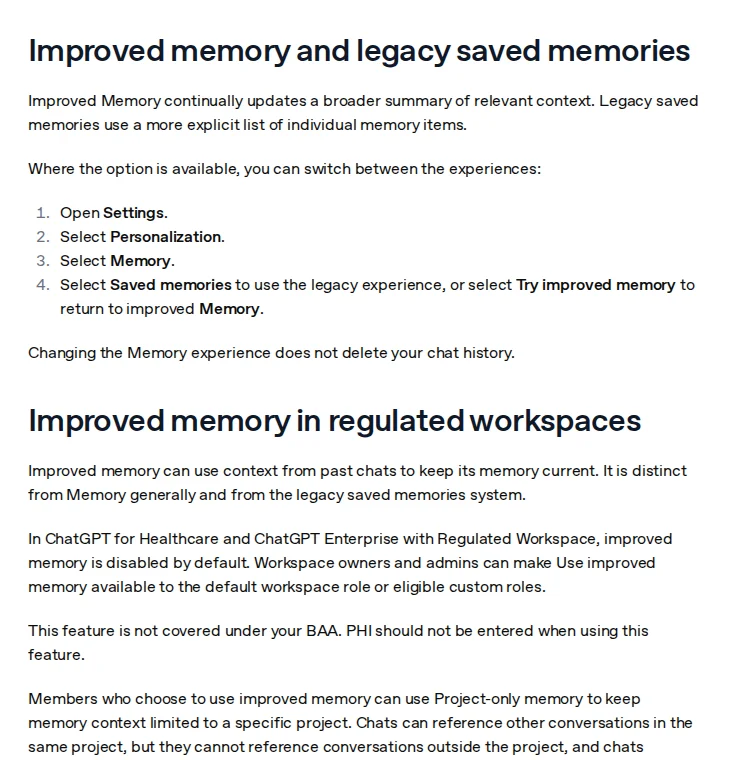 Screenshot: "Memory in ChatGPT," OpenAI Help Center, taken October 10, 2026.
The gap between training opt-out and memory
Most teams that reviewed ChatGPT privacy focused on one question: does OpenAI train on our conversations? OpenAI's Memory FAQ says that "by default, OpenAI does not use content from ChatGPT Business, Enterprise, Edu, or ChatGPT for Healthcare workspaces to train its models." For personal accounts, training is controlled by the "Improve the model for everyone" setting under Data controls.
Memory is a different setting in a different place: Settings, then Personalization. Opting out of training does not turn memory off, and turning memory off does not change training. If your team approved ChatGPT based on the training opt-out alone, that approval did not cover memory.
What data is at risk
The concern is not that memory copies raw chats. It is which facts get pulled out of them. A user describing a compliance problem might mention a client's name, the regulatory issue and the internal team handling it. A user drafting an email might name a colleague and a personnel issue. With dreaming, none of this needs an explicit "remember this."
OpenAI also says the memory summary "does not necessarily include every detail or source that Memory can reference." Checking the summary page is a good start, but it is not a full inventory.
For organizations subject to GDPR, two duties follow. Under Article 17, a data subject has "the right to obtain from the controller the erasure of personal data concerning him or her without undue delay" when one of the listed grounds applies. Articles 13 and 14 require you to tell people how their personal data is processed, both when you collect it from them and when you get it from someone else. If client or employee data goes into ChatGPT, your privacy notices and your erasure process need to cover it.
How deletion works
Deletion matters most when someone asks you to erase their data. OpenAI's Memory FAQ says:
- You can delete an item from the memory summary or saved-memory controls, delete the chat where the information came up, delete files from Library, or disconnect an app.
- "Deleting a chat alone does not necessarily delete a separate saved memory created from that chat."
- "Turning off Memory does not delete your past chats."
- "OpenAI may retain logs of deleted saved memories for up to 30 days for safety and debugging purposes."
- If you turn off Reference chat history, "information remembered from past chats is scheduled for deletion from OpenAI systems within 30 days."
- "Temporary chats do not create or update memories, even with personalization on."
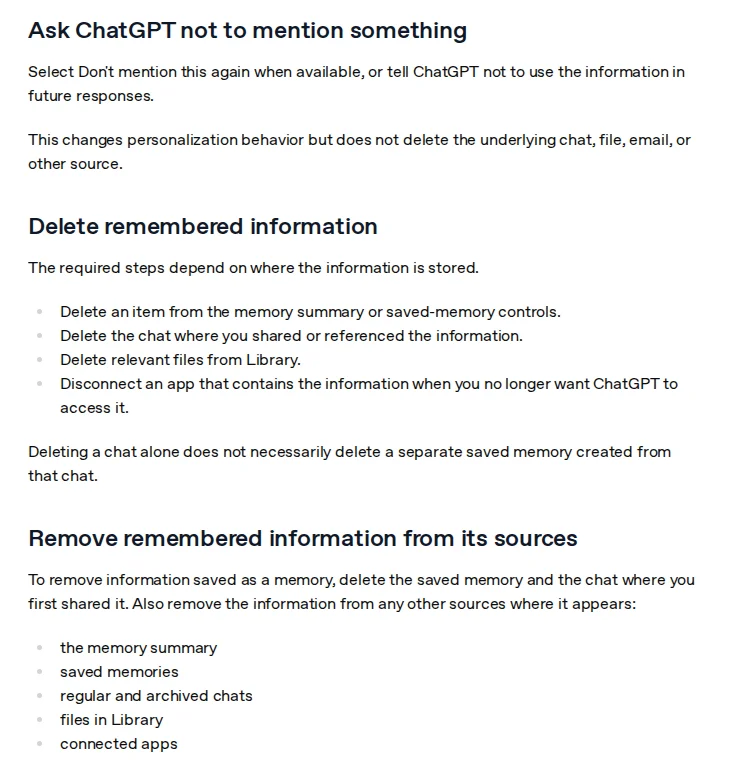 Screenshot: "Memory in ChatGPT," OpenAI Help Center, taken October 10, 2026.
For a GDPR erasure request, that means: work out which employee accounts may hold the person's data, have those users delete the memory items and the source chats, and record that OpenAI may keep deletion logs for up to 30 days. This only works if you know who discussed whom in ChatGPT, which is why the acceptable use rule below matters.
Four governance actions
1. Audit what ChatGPT memory holds for work accounts.
Have each user open Settings, then Personalization, and review the memory summary and saved memories. If client or personal data appears, delete the item and the source chat, and note what was found. Remember that the summary is not a full list.
2. Set a memory rule for each account type.
On Business and Enterprise workspaces, check which memory settings your admin console offers and decide who may use them. On regulated or healthcare workspaces, OpenAI leaves improved memory off by default and says it is outside the BAA; keep it off for anyone who handles PHI. Personal Free, Go, Plus and Pro accounts have no workspace admin, so the only control there is policy.
3. Add memory to your AI acceptable use policy.
Add a clause covering which data may not be discussed in memory-enabled chats, when to use a temporary chat instead, and how to request deletion of a memory item that holds business or personal data. The AI acceptable use policy template has the sections this clause belongs in.
4. Add memory questions to your OpenAI vendor review.
Ask how memory is stored and deleted for your plan, whether workspace admins can turn it off for all members, and how memory is covered by your data processing agreement. These questions belong in your next AI vendor due diligence review of OpenAI.
What practitioners say
The r/OpenAI thread on the launch also raised a quality question that matters for governance. One commenter asked: "How can it identify irrelevant context? That requires judgement which is usually where llms mess up."
Our take
Dreaming moves the decision about what to remember from the user to the model. That is the governance change. With saved memories, an employee had to ask ChatGPT to remember a client's name; now it can happen in the background, and the summary page may not show all of it. For a small team, the cheapest control is not technical: use a workspace plan where an admin controls memory, and tell people to use temporary chats for anything involving a named client or colleague. Do not treat a training opt-out as a privacy answer for memory; OpenAI documents them as separate settings.
How we checked this
We read OpenAI's launch post (through a text proxy, since openai.com blocks scripts), OpenAI's Memory FAQ, OpenAI's announcement on X, the GDPR text on EUR-Lex, two news reports (PCWorld and Let's Data Science) and the r/OpenAI launch thread, 8 sources in total, on October 10, 2026. We removed claims from the earlier version that no source supports, including a memory_context API parameter, a Business and Enterprise rollout "in the coming weeks," and a 30-day plus 90-day backup deletion schedule. Last reviewed: October 10, 2026.
Checklist
- All ChatGPT users in the organization have reviewed their memory summary and saved memories
- Business-sensitive or personal data found in memory deleted, with the source chats, and documented
- Memory rule decided for each account type (workspace, regulated workspace, personal)
- Workspace memory settings configured to match that rule
- AI acceptable use policy updated with a memory clause and a temporary-chat rule
- Privacy notices updated to mention AI tool memory if personal data is in scope
- OpenAI vendor review updated with memory storage and deletion questions
- Process for data subject erasure requests covers ChatGPT memory and the 30-day log retention
Related Reading
- AI agent persistent memory and GDPR compliance 2026
- Privacy-first AI APIs that don't train on your data
- Anthropic vs OpenAI GDPR compliance 2026
- AI acceptable use policy template
- AI governance guide for small teams
- ChatGPT vs Claude vs Gemini enterprise compliance 2026
- Microsoft Copilot data governance small teams 2026
- OpenAI API governance data privacy developers 2026
- AI meeting transcription data leak compliance 2026
- ChatGPT Team vs Enterprise: DPA Terms, GDPR Data Processing, and Audit L
- GDPR Article 30 for AI Tools: Record of Processing Activities Template (
- GDPR-Compliant AI Assistants: Claude, ChatGPT Enterprise, Gemini, and Mi
- Are Your AI Chats Privileged? Why ChatGPT and Claude Conversations Can Be S