Image: Pexels, used under the Pexels License.
All three tools will give a small team a data processing agreement. That stops being the deciding question once you read the terms. The real differences are whether your meetings train the vendor's models, where the recordings sit, and how easily a notetaker ends up in a call that nobody on your side invited it to.
We read each vendor's terms, privacy policy, pricing page and help center on October 15, 2026. Zoom has since folded the AI Companion name into "AI features in Zoom Workplace"; we use the old name because it's still the one on most admin screens and in most searches.
| What you need | Zoom AI Companion | Otter.ai | Fireflies.ai | Checked |
|---|---|---|---|---|
| Trains on your meeting content | No, per Zoom's terms | Yes, on de-identified recordings and transcripts | No, per Fireflies' terms | Oct 15, 2026 |
| DPA | Built into Zoom's terms for all customers | Appendix to the standard terms | Built into the terms for organizations; self-serve signing | Oct 15, 2026 |
| Where data sits | EU data centers for meeting traffic on eligible paid accounts; AI processing may be in the US | AWS, US West | US by default; Enterprise private storage can sit in the EU, processing stays in the US | Oct 15, 2026 |
| Custom retention | Auto-delete for meeting summaries | Enterprise only | Enterprise only | Oct 15, 2026 |
| Joins as an outside bot | No, built into Zoom | Yes, and can auto-join calendar events | Yes, and can auto-join calendar events | Oct 15, 2026 |
| Signal to participants | AI icon changes color in the meeting | Optional pre-meeting email to calendar guests | Bot must be admitted before it captures | Oct 15, 2026 |
| SOC 2 Type 2 | Yes, AI Companion in scope | Yes | Yes | Oct 15, 2026 |
| HIPAA | Meeting summary available with an active BAA | Enterprise add-on | Enterprise | Oct 15, 2026 |
Correction, October 15, 2026: an earlier version said Otter and Fireflies offer DPAs only on Business or Enterprise plans, that Fireflies "possibly" trains on standard plans, and told readers to pick an "Ask before joining" setting in both tools. Both DPAs come with the standard terms, Fireflies' terms rule out training, and neither tool has a setting by that name. The real controls are below.
Zoom AI Companion: no bot, no training, US processing
Zoom's terms of service say Zoom "does not use any of your audio, video, chat, screen sharing, attachments or other communications-like customer content" to train Zoom's or third-party AI models. That's the strongest training commitment of the three, and it sits in the contract rather than a blog post.
The catch is location. The feature needs a paid Zoom Workplace plan, from Pro upward, and account owners or admins switch it on or off. Zoom's own support article says that when a feature uses a third-party model, the meeting transcript is sent to that provider, and "data may be processed within U.S. based data centers". Zoom's GDPR page offers EU data centers to eligible paid accounts for real-time meeting and webinar traffic. That's the call itself, not the AI step.
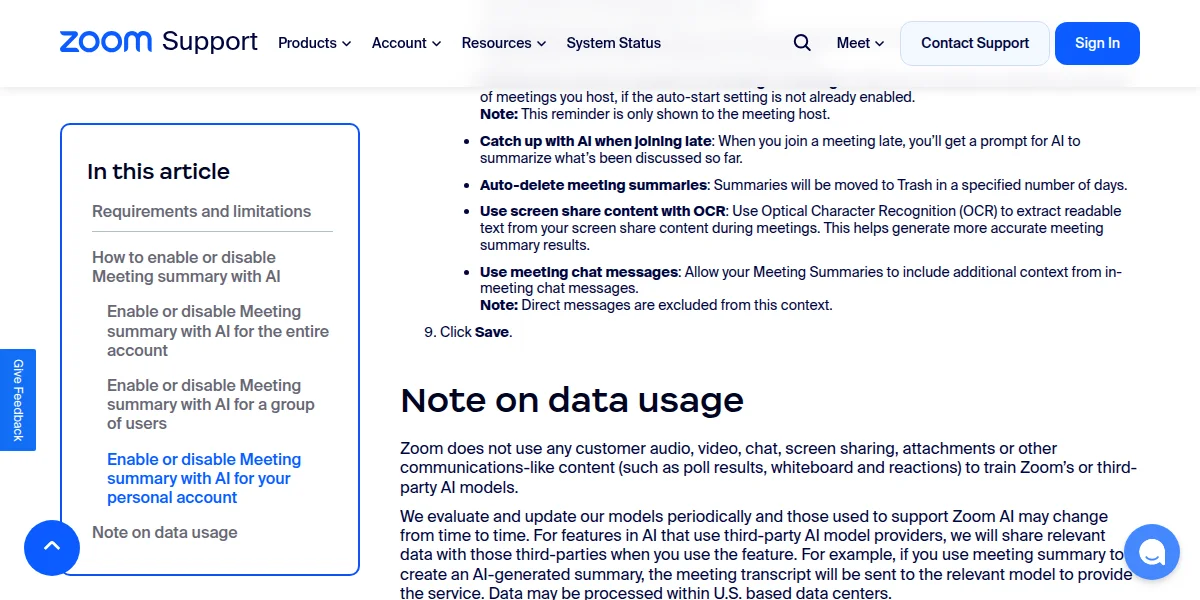
Screenshot: Enabling or disabling meeting summary with AI, Zoom Support.
Zoom's DPA is incorporated into its terms for every customer and includes the 2021 standard contractual clauses. Zoom's SOC 2 Type 2 report lists Zoom AI Companion in scope. A summary setting moves meeting summaries to Trash after a number of days you choose.
What participants see is limited. Zoom's meeting summary guide says the AI icon in the corner of the meeting window changes color while AI features are active. There's no per-person opt-out, so your own notice still has to do the work.
Otter.ai: trains on your recordings, US storage
Otter is the one tool here that says it trains on meeting content. Its privacy policy lists "training our proprietary AI technology on de-identified audio recordings and on transcriptions (which may contain personal information)" as a purpose. Otter's privacy and security page says it de-identifies the data first, that training is automatic, and that humans don't review the recordings.
For a team that discusses clients, staff or deals on calls, that's a decision to make on purpose, not by default. De-identified training data is still your meeting content leaving the purpose you collected it for.
Storage is in the US: Otter's help center says it uses AWS in a US West region. The DPA, with the 2021 standard contractual clauses, is Appendix 1 of the terms of service, so every customer gets it. The same terms say you are "solely responsible for providing any notices to, and obtaining consent from, individuals" you record.
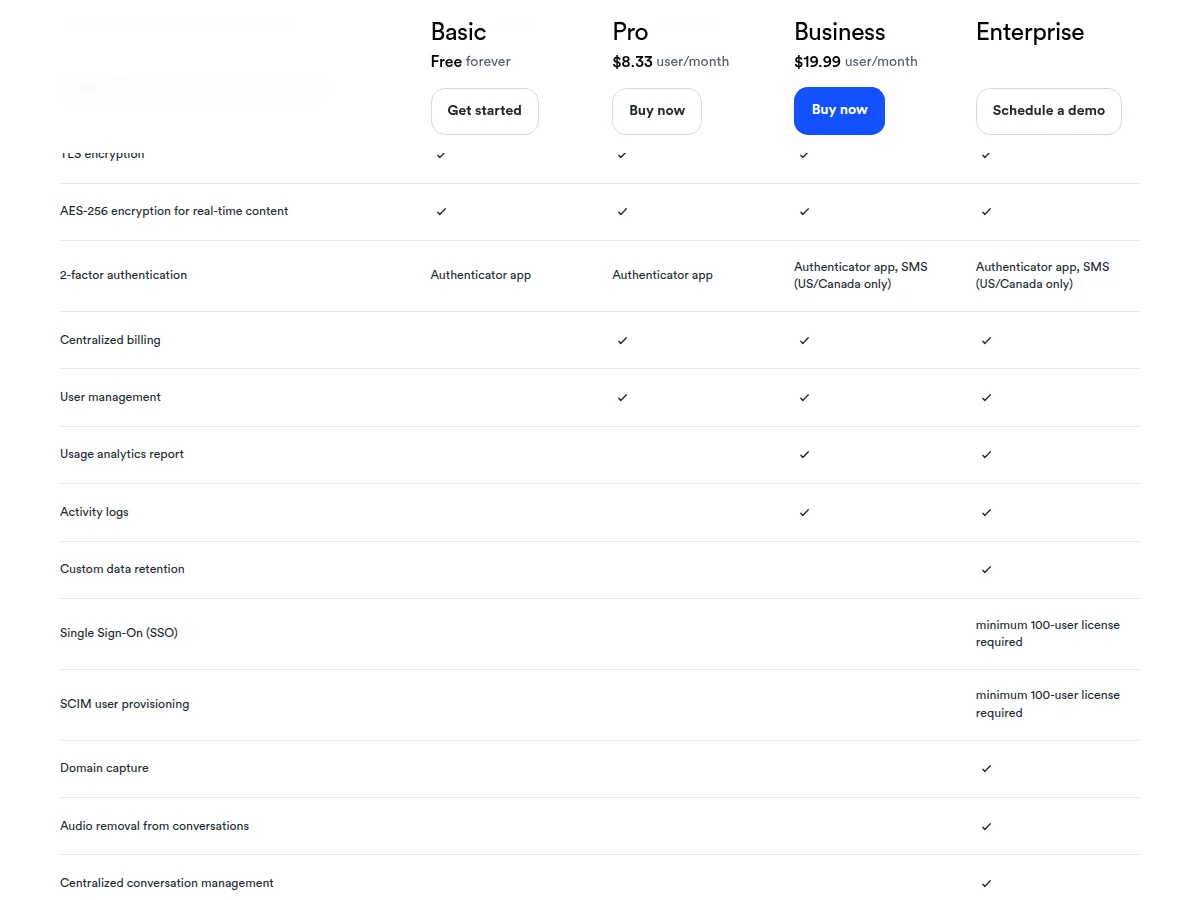
Screenshot: Otter.ai pricing, Administration and security rows, Otter.ai.
The pricing page puts custom data retention on Enterprise only, and SSO needs a minimum 100-user license. HIPAA is an Enterprise add-on. The page lists no retention control below Enterprise, so plan on deleting old transcripts yourself.
Otter is also the tool with a live lawsuit about exactly this. In August 2025 Justin Brewer sued Otter in federal court in Northern California, alleging its notetaker records meetings and feeds model training without every participant's permission. The cases were consolidated as In re Otter.AI Privacy Litigation, with an amended complaint filed on December 5, 2025. These are allegations, not findings. We couldn't open the court's later ruling on Otter's motion to dismiss, so we don't summarise it.
Fireflies.ai: no training, Enterprise for the controls
Fireflies' terms of service say it "will not use your user content to train, retrain, fine-tune or otherwise improve any generative artificial intelligence models". Its privacy policy adds that it contractually stops its vendors training on that data too.
For organizations, the terms incorporate Fireflies' DPA, and there's a self-serve page to sign it. Fireflies' data storage guide says data is stored and processed in the US on AWS and GCP by default. Enterprise private storage lets you bring your own bucket, but "your data will be stored in the EU, but processed in the US". The same guide lists SOC 2 Type 2, ISO/IEC 42001, and a listing under the EU-US Data Privacy Framework.
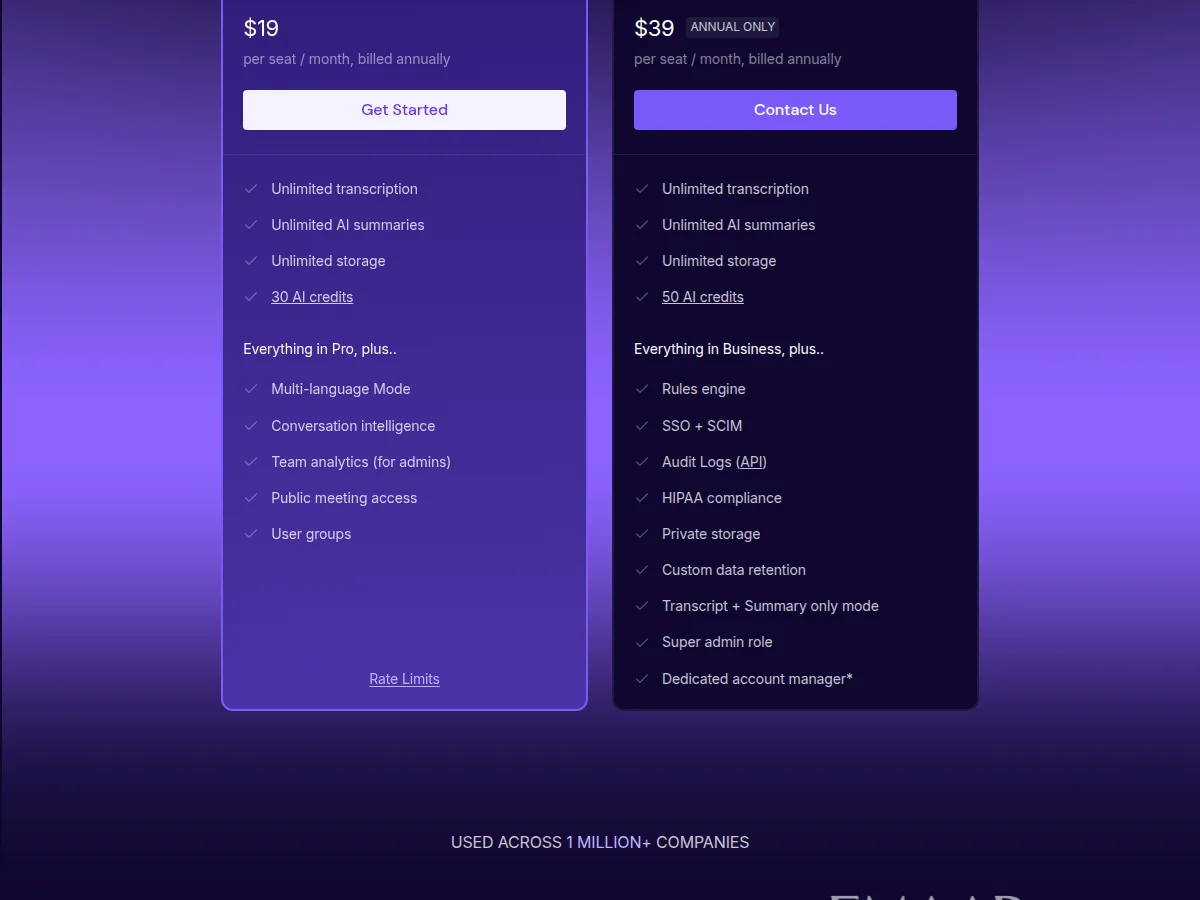
Screenshot: Fireflies.ai pricing, Business and Enterprise plans, Fireflies.ai.
The pricing page puts custom data retention, private storage, audit logs and HIPAA compliance on Enterprise, which is $39 a seat billed annually only. Business gets unlimited storage and no retention control on the pricing page.
The bot nobody invited
Both Otter and Fireflies can join meetings straight from a user's calendar. Otter's auto-join settings include joining every event with a Zoom, Google Meet or Teams link, only meetings you host, only external or only internal meetings, or only meetings you pick. Fireflies' join settings run from "all meetings with web-conf link" down to "only when I invite [email protected]".
So the risk sits with your guests as much as your staff. If a client has their notetaker set to join everything, it turns up in your call under its own name. Fireflies' auto-join guide says the notetaker must be admitted before it can start capturing, which means a waiting room gives the host a real veto.
Three settings close most of the gap:
| Tool | What to set before your next client call | Checked |
|---|---|---|
| Zoom | Keep AI features off at account level and enable them for the groups that need them | Oct 15, 2026 |
| Otter | Default auto-join to "Meetings I manually select" and turn on pre-recording emails, which warn calendar guests 5 to 10 minutes ahead | Oct 15, 2026 |
| Fireflies | Set auto-join to "Only meetings that I own" or "Only when I invite [email protected]", and use a waiting room for external calls | Oct 15, 2026 |
Headcount's video above, from September 2026, makes a point most meeting policies miss: once a notetaker has written a transcript, it's a business record that can be pulled into litigation, and deleting it afterwards doesn't undo that. Retention settings are a legal question, not housekeeping.
Notice, consent and the law
Under GDPR you need a lawful basis for processing a participant's voice and words, and consent is only one of six. Recital 43 says consent isn't valid where there's a clear imbalance between the person and the controller, which is why consent from your own staff is a weak basis. Whatever basis you choose, Article 13 means people must be told the purpose and the legal basis. As one commenter on r/gdpr put it, best practice "would be for everyone to be notified at the start of the meeting that it would be recorded and transcribed so they can object if they wish", and better still the employer runs "an Article 28 due diligence process" on the notetaker before signing up.
US law is stricter about the recording itself in some states. California Penal Code section 632, quoted in the Otter complaint, covers recording a confidential communication "without the consent of all parties". Other states set a lower bar, so check the states your participants are in.
Speaker identification adds Illinois BIPA. The law allows $1,000 for each negligent violation and $5,000 for each reckless or intentional one. Since an August 2024 amendment, repeated scans of the same person count as one violation, so the exposure is per person rather than per scan. It still adds up fast across a client roster.
Verdict by vendor
Zoom AI Companion: the safest default for a team already on paid Zoom. Nothing outside joins the call and training is ruled out in the contract. Tell EU participants that the AI step may run in the US.
Otter.ai: fine for internal meetings once you've accepted that de-identified recordings train Otter's models. For client or HR calls, either get that accepted in writing or pick another tool. Set auto-join to manual and turn on pre-recording emails on day one.
Fireflies.ai: the better third-party bot for small teams. Training is ruled out and the DPA is self-serve. Retention controls and private storage cost Enterprise money, so on Business, someone has to own deleting old transcripts.
For a policy that covers all three, the AI acceptable use policy template has a meeting-tools section you can adapt, and the AI vendor DPA tracker tracks DPA status across vendors. To find the notetakers already in use, see the shadow AI governance tools guide.