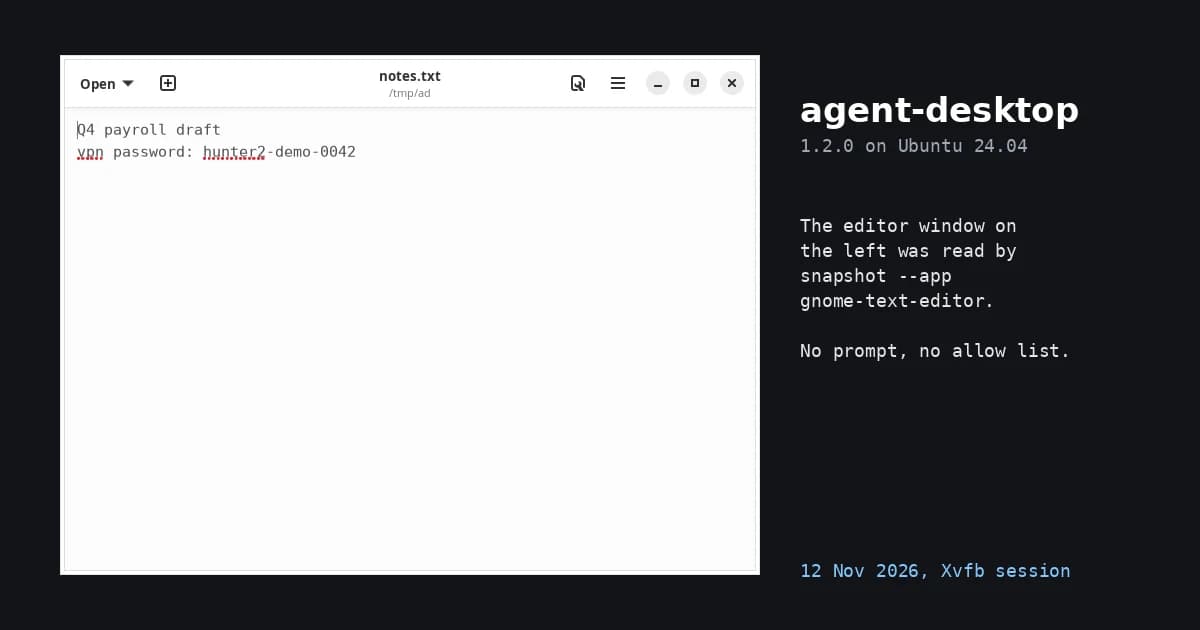
agent-desktop can read the text of any open app that registers on the accessibility bus, and nothing in the tool lets you list the apps it may touch. On 12 November 2026 I ran version 1.2.0 on Ubuntu 24.04 with a text editor holding a fake "vpn password" line, and one snapshot command returned that line with no prompt.
I installed it with npm install agent-desktop into an empty folder, started Xvfb (a virtual display) with a private D-Bus session, opened GNOME Calculator and the editor under the openbox window manager, and ran sixteen commands under strace -f -e trace=connect. All 298 connect() calls were to Unix sockets, none to an internet address.
Any app on the bus is readable, and nothing asks first
list-apps returned three entries: xdg-desktop-portal-gtk, gnome-calculator and gnome-text-editor. I aimed snapshot --app gnome-text-editor -i at the editor and got 12 refs, one of them a textfield whose value was the whole file, "Q4 payroll draft" and the password line included. I never opened the editor from the tool and never named the file.
The Linux page of the docs says why: "Linux has no permission dialog for accessibility; whether the bus answers gates everything", and status reported accessibility: granted on a fresh session. I then searched the README, SECURITY.md, the docs folder and CONCEPTS.md at the v1.2.0 tag for allow list, deny list and per-app wording. The only hits were npm's --allow-scripts flag in the install guide. Targets are picked by whatever --app or --window-id the agent passes, and the help text describes --session as selecting the snapshot namespace, not a list of apps.
agent-browser, from the same lab, can be fenced to a list of domains with --allowed-domains (see our page on agent-browser). agent-desktop has no equivalent for apps, so the session you start it in is the only boundary.
What it leaves on disk
Each snapshot writes a refmap.json under the state folder, ~/.agent-desktop by default (I pointed HOME at a temp folder). The Calculator snapshot made a file of 17,408 bytes and the editor snapshot one of 6,634 bytes, both mode 600. Searching them, the editor's file contained hunter2, so the text an agent read stays on the disk after the session. The docs say the folder is created with mode 0700 and that when a namespace passes 128 saved snapshots the oldest are removed until 96 remain.
For a team that means ~/.agent-desktop belongs on the same list as shell history: it is readable by that user, it is not cleaned when the task ends, and it can hold whatever was on screen. I did not test the trace feature. The docs say trace lines redact fields such as text, value and name, and also say session screenshots and the exported HTML that embeds them are not redacted.
It clicked 6 × 7 = through the accessibility API
From a Calculator snapshot I clicked four refs (6, ×, 7, =) and then ran get on the display ref, which returned 42. Each click result named its mechanism as semantic_api and the disposition as delivered_unverified, and the tool's own lease was held between 572 and 924 ms per click. So the tool does not claim the click worked; the agent has to read the screen again to know. I did not watch a pointer on the virtual display, but the docs say such semantic actions never move it, which is the design: a person can keep using the machine while the agent works.
Which flags stop what
| Command | Plain | With --headed |
With --force |
|---|---|---|---|
hover @…:e6 |
POLICY_DENIED: "hover moves the cursor and is disabled in headless mode" | ok, mechanism physical_synthetic, pointer moved to 507,465 |
not needed |
press alt+f4 --app gnome-calculator |
POLICY_DENIED: "blocked for safety; pass --force to override" | POLICY_DENIED, same message | ok, Calculator gone from list-windows |
mouse-click --xy=640,400 |
POLICY_DENIED (disabled in headless mode) | not run | not run |
The headed-mode doc is direct about who decides: "Get an explicit decision from the user before you retry." That is advice for the agent. When an agent runs the command line, --headed and --force are arguments it writes, and nothing checks that a person said yes. Over MCP it is split: a tool call cannot pass --headed (only the command that starts the server can), but desktop_press accepts force, and in my run on 12 November 2026 alt+f4 with force: true and no --headed went through and closed the Calculator window. Either way, a wrapper that filters arguments is my suggestion, not something the project ships.
One more refusal came from my own setup. With no window manager running, list-apps and snapshot failed with ACTION_NOT_SUPPORTED: The native window type of accessibility frame owned by pid 85720 could not be proven. The Linux troubleshooting table lists the same message and gives the same cause, a missing window manager. Under openbox a screenshot of Calculator was also refused once with details.reason: "covered" because the editor window sat on top of it; the editor screenshot above worked.
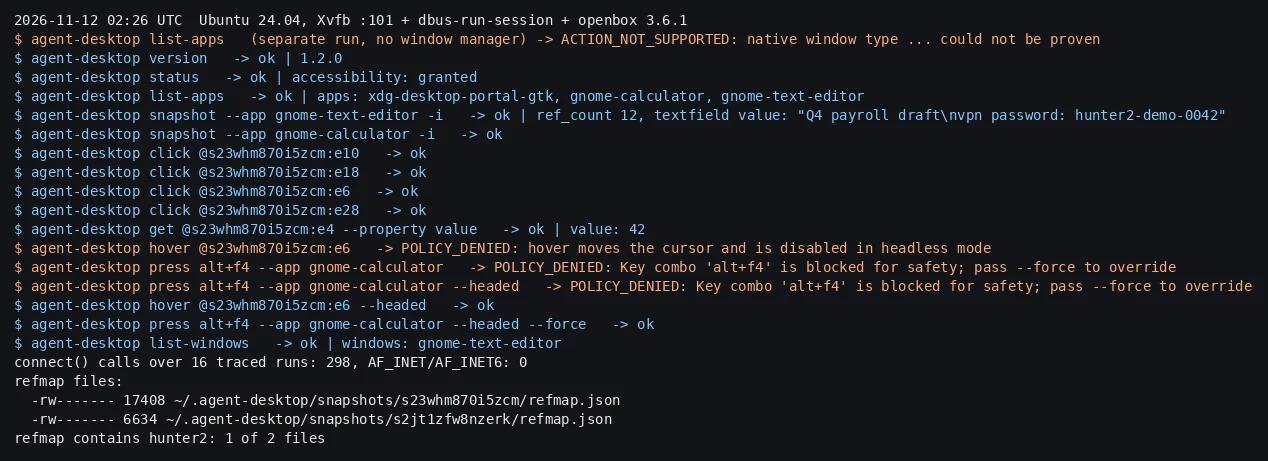
Image: our own terminal log of the run, 12 November 2026 02:26 UTC. The list-apps failure on the second line is from a separate run with no window manager.
What leaves the machine
Across the sixteen traced runs I counted 298 connect() calls, and every one was AF_UNIX: 254 to the X server socket, 28 to the session D-Bus and 16 to the accessibility bus. The mcp server, which I ran separately and asked for tools/list, returned 67 tools and opened no internet socket either. npm install itself connected to addresses that match what registry.npmjs.org resolves to on my machine.
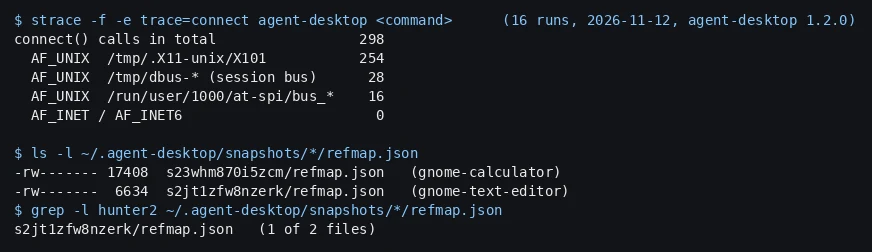
Image: our own summary of the strace output and the state folder after the run, 12 November 2026.
The code agrees with the trace. In the v1.2.0 source the TCP code is in two files: crates/core/src/system/cdp_endpoint.rs, which binds and connects on 127.0.0.1 to test a Chromium debug port, and crates/linux/src/system/x11/bounded.rs, which opens a TCP stream if DISPLAY names a host. My DISPLAY was a local socket, so that path did not run. Cargo.lock lists 166 packages and none of reqwest, hyper, ureq, curl, rustls, native-tls, openssl, tokio, sentry or posthog. The README, SECURITY.md and the docs contain no telemetry or analytics wording. That covers only the places I looked; the project makes no promise either way.
The network risk sits one step later. The tool returns the tree, screenshots and clipboard text to your agent as JSON, and whatever your agent forwards to a model leaves. The README says so in one line: snapshots, clipboard reads, screenshots, command output and debug artifacts "can contain private desktop content. Keep them out of public logs and uploads."
License and platforms
The LICENSE file at v1.2.0 is the Apache License 2.0, the GitHub API reports Apache-2.0, and the npm package declares Apache-2.0 for 1.2.0. That allows commercial use with the notice and patent terms of the licence. The repository's deny.toml allows dependencies under Apache-2.0, MIT, MPL-2.0, Unicode-3.0 and Unlicense. I read the licence field of all 160 registry crates in Cargo.lock on crates.io on 12 November: none lists MPL-2.0 (95 are MIT OR Apache-2.0, the rest MIT, Apache-2.0, Zlib, Unlicense or similar). Whether git or path dependencies add more, I did not check.
The README says the tool works on macOS, Windows and Linux, and the Linux page says X11 and Wayland sessions both work, with Ubuntu 24.04 or later the supported baseline. I tested none of that except Ubuntu 24.04.4 on X11 in a virtual display: no Wayland, macOS, Windows or real signed-in desktop. On the Linux page the Wayland rows for pointer gestures say ACTION_NOT_SUPPORTED. The project has 22,148 stars (GitHub API, 12 November 2026), and the latest release is v1.2.0 from 5 November.
What I would do with it
Use it in a display session built for the job: Xvfb or a VM with its own user, one app open, no mail, chat or password manager anywhere in that session, and a place to delete ~/.agent-desktop when the task ends. Skip it on a laptop where someone is logged in to everything, because the first snapshot --app against the wrong window reads that window. If the job is a website, agent-browser with --allowed-domains is the smaller tool, and the AI browser agents policy covers what to write down for it. For an agent that talks to it through MCP, the 67 tools are the same reach as the command line, so the MCP server checklist applies to the client that connects.
The MCP docs also say desktop_launch starts any program on PATH with any arguments and tell you to treat the server like a shell for the signed-in user.