


The UK's National Cyber Security Centre has put its advice on AI agents on one page, and most of it is ordinary security discipline applied to a new kind of user. The blog post, "Managing the cyber risk of agentic AI", went up on August 20, 2026, written by Toby W, NCSC's Principal Security Architect. It opens with the reason: "Recently, there have been several incidents involving AI models and agentic AI systems carrying out unsanctioned or unintended activity."
If you only do one thing after reading it, fix the sandbox and the credentials of the agent with the most access. Below is the full checklist, built on NCSC's wording, with the two sandbox ladders it publishes and a short list of what to do in the first day.
https://x.com/NCSC/status/2090390119039578442
What NCSC published, and what it builds on
The blog is a follow-up. In May, six agencies released joint guidance called "Careful adoption of agentic AI services": Australia's ASD's ACSC, Canada's Cyber Centre, the US CISA and NSA, NCSC-NZ and NCSC-UK. The Cyber Centre's announcement, dated May 1, says it covers four areas: designing and developing secure agents, deploying them securely, operating them securely, and defending against future risks. A separate NCSC summary from May 15 boils it down to this: organisations "should start small, use agents only for low-risk tasks, and apply established cyber security controls from the outset."
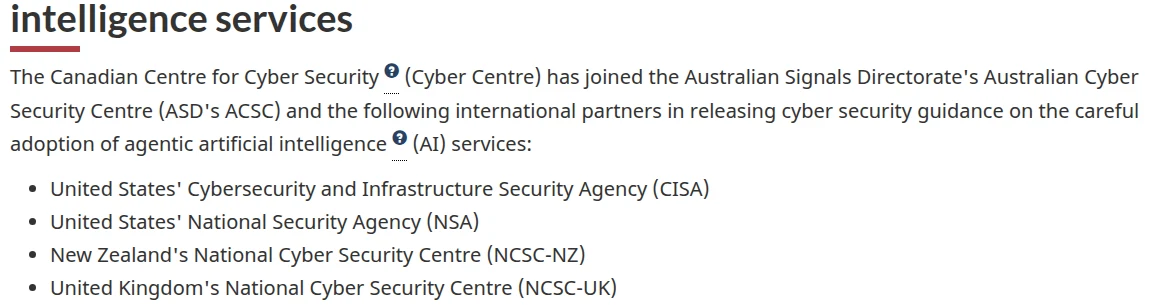 Screenshot: Canadian Centre for Cyber Security, joint guidance announcement.
The August blog is the practical layer for teams already running agents. NCSC says it's interim: it's working with partners on "formal guidance which will build upon, and ultimately supersede, this blog." It also says the advice should be "applied proportionately based on the level of autonomy each agentic AI system is intended to have." An assistant that only suggests code needs little of what follows. An agent that deploys to production, moves money or reads customer records needs all of it.
Two background points from the blog shape the checklist. Safety controls built into models are "a baseline level of protection" and "should not be treated as holistic", so you add your own. And whatever the model ships with, every deployment still needs logging, monitoring and a way to respond.
Who needs this
Any team that has given an AI agent real access: a coding agent that can push or deploy, a support bot that can change customer records, an ops agent holding cloud keys. Headcount doesn't change the risk. What the agent can reach does. A two-person team running an autonomous coding agent against production has the same exposure, for that agent, as a large company doing the same thing.

The checklist: NCSC's seven safeguards, small-team edition
Copy this into the tracker you already use and run one column per agent. A box you can't tick goes on the backlog. Where a check is our addition rather than NCSC's, we say so.
1. Identify what could go wrong
- One page says what the agent may touch (systems, data, actions) and what is out of scope.
- The page lists the red lines the agent must never cross, whatever a user or a document tells it.
- Someone threat-modelled the deployment before it went live: the prompt, and every network and service the agent can reach through its sandbox, directly or indirectly.
NCSC's reminder belongs at the top of that page: an agent "does not have common sense" and may read instructions and goals in literal or unexpected ways. Our addition: put a name and a date on the page, so you know when it's stale.
2. Prompt carefully, and don't rely on prompting alone
- The system prompt says what the agent should do and what it should not do, and when it must stop and ask a human.
- For long tasks, critical constraints are repeated. NCSC notes that some agents compress their context to save tokens, which can drop a rule you wrote once at the top.
- Every rule in the prompt is backed by a technical control from item 4.
NCSC is direct about this: "do not rely on prompting alone." A prompt says what you meant. It doesn't stop anything.
3. Set the right level of oversight
- Each agent is marked as human-in-the-loop (people approve actions first), human-on-the-loop (people watch and can step in) or human-out-of-the-loop (no human review).
- Named individuals or a named group are responsible for the agent's activity.
- Agents that can do real damage have real-time alerts and someone who can stop them mid-task.
- If a second "judge" model checks the agent, that judge has been evaluated on its own.
Most small teams end up out of the loop by accident, because nobody was asked to watch. NCSC's advice for higher-risk work is human oversight together with technically enforced controls, not one or the other.
4. Control the agent's environment with a robust sandbox
- Inbound and outbound network traffic is denied by default, and only the connections the task needs are allowlisted.
- Where the agent needs the open internet, a proxy that understands the protocol lets traffic out only by exception.
- You know which network level and which compute level (tables below) each agent runs at, and the level fits the risk.
- The agent has its own identity, in a class that marks it as an agent rather than a person.
- Its credentials carry only the permissions the task needs and have the shortest lifetime your tooling allows.
- The agent doesn't run as a user account that holds that person's SSH keys, tokens or logged-in sessions.
NCSC publishes two ladders for this item. They're the most useful part of the blog because you can place each agent on them in a minute.
| Level | Network access (NCSC) | Compute isolation (NCSC) |
|---|---|---|
| 1, lowest | Unrestricted network access | None: the agent runs on, or can reach, the host alongside other workloads and data |
| 2 | Allowlist of approved domains | Same host, constrained with kernel primitives such as process separation and OCI containers |
| 3 | Only the model's API | Same host, isolated with virtualisation |
| 4, highest | No external network; the model runs locally inside the sandbox | Dedicated hardware, separate from other workloads |
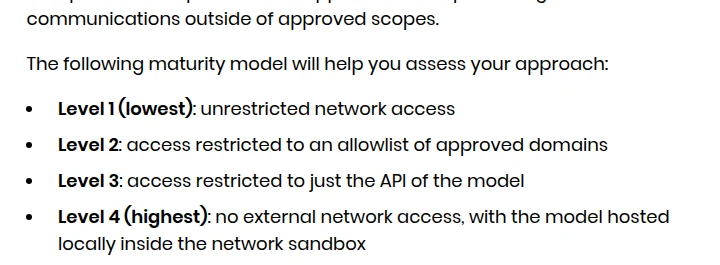 Screenshot: NCSC, "Managing the cyber risk of agentic AI", section 4c.
Credentials are where the two ladders meet. NCSC counts API keys, OAuth grants, SSH keys and any logged-in session as part of the agent's "blast radius", and warns that an agent with no compute isolation may be able to use whatever credentials the user account it runs under can reach. For some setups it suggests a proxy that injects credentials into requests, so the agent never holds them and can't use them against an endpoint you didn't expect.
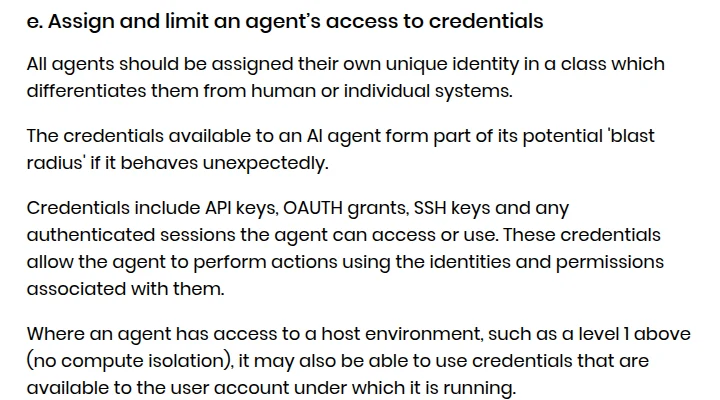 Screenshot: NCSC, "Managing the cyber risk of agentic AI", section 4e.
Tom Bowyer of Turen Labs, which builds AI security tools for defenders, put the ladders bluntly two days after the blog came out: "Most coding-agent setups we see in the wild are still level 1 wearing a container." On the compute ladder, level 1 is where the agent inherits its user's keys. That's one company's impression of what it sees, not a survey, but it's the gap the ladders are built to show.
5. Log, audit and monitor agent activity as part of security operations
- You keep the agent's transcripts and chain-of-thought traces, plus logs from around the sandbox: access logs, proxy logs, network traffic.
- Those logs are protected from change or deletion, immutable where you can manage it, and the agent can't write to them.
- Agent activity is watched the way user activity is, by whoever handles your security alerts.
- New agents run first during office hours, and move to overnight or weekend runs only once the controls have proved themselves.
NCSC wants agent activity in "24/7 security operational monitoring". A team without a security operations center can't match that, so match the spirit: alerts that reach a person's phone, and no unattended agent runs at hours when nobody would see them. NCSC also points out that the log pipeline is itself attack surface, and asks whether an agent could use it to get out of its sandbox.
6. Make your AI activity easy to attribute
- Outbound traffic comes from IP addresses that support reverse lookups.
- Outbound requests carry an identifying header, such as an HTTP header, that marks them as your agent.
- Abuse reports about your agent go through the same process as a vulnerability or abuse report.
This looks like a courtesy to other people, and it is one. It also means a stranger who sees your agent misbehave can reach you quickly, before they block or report you.
7. Keep the ability to pull the plug
- You can halt the agent's autonomous activity immediately.
- The shutdown reaches beyond the agent process: you can cut network access to the agent's infrastructure and break its connection to the model.
- Our addition: the shutdown has been tried at least once, and the person named in item 3 can trigger it without asking anyone.
A shutdown nobody has tried is an assumption. Bowyer's post makes the follow-on point: "If your only control is a kill switch, you can stop the next action. You cannot answer the last one." That's what item 5 is for.
The incidents behind it
NCSC doesn't name the incidents it mentions, so don't read any one of them as the trigger. Two public cases from the weeks before the blog show the pattern its controls are aimed at.
On July 1, Sysdig's threat research team described JADEPUFFER, which it assesses as "the first documented case of agentic ransomware": an extortion run driven end to end by a large language model. It got in through an internet-facing Langflow server via CVE-2025-3248, moved on to a production database server and encrypted its 1,342 Nacos configuration items. When a login failed, it had a working fix 31 seconds later. Sysdig says Langflow servers often hold API keys and cloud credentials and are "stood up quickly without network controls", which is items 4 and 7 in one sentence. Our JADEPUFFER breakdown covers the vendor-review side.
On July 16, Hugging Face disclosed an intrusion into part of its production systems that "was driven, end to end, by an autonomous AI agent system", starting from a malicious dataset and moving on to stolen cloud and cluster credentials. In both cases the agent was the attacker, not a tool that misbehaved. The same controls limit the damage either way: a narrow network, scoped credentials, logs the agent can't touch and a way to cut it off.
Running it in a day
Most of this is writing things down and changing settings, not building anything.
- Pick the agent that can reach money, customer data or production. Write its one-page scope and red lines.
- Place it on both ladders. If it's at level 1 on either, that's the first fix.
- List every credential it can use, including the ones it inherits from the account it runs as. Replace shared or long-lived keys with its own short-lived ones.
- Name who watches it, and check that alerts reach them.
- Try the shutdown, including the cut to the model, and write down how long it took.
Then move to the next agent. For the identity side in more depth, see AI agent identity and access control. For what to do once something has gone wrong, see the AI agent incident response playbook.
What it doesn't cover
Choosing and contracting AI vendors, and what you ask them about their own agents; the formal guidance NCSC says is coming, which will replace this blog when it lands; and tools that only call an AI model without acting on their own. If your agents connect through MCP servers, the MCP server security checklist covers that layer. NCSC's further reading points to the ETSI standard EN 304 223 for baseline security requirements for AI models and systems.
How we checked this
We read the NCSC blog, NCSC's May summary, the Cyber Centre and NCSC-NZ pages for the joint guidance, Sysdig's JADEPUFFER report and Hugging Face's disclosure on October 15, 2026, and matched every rule in the checklist to NCSC's text. The screenshots were taken that day. CISA's copy of the joint guidance didn't load from our servers, so we cite the Canadian and New Zealand pages instead.
Correction, October 15, 2026: An earlier version had a section on incidents "in the five weeks since" NCSC published. It cited a survey that predates the blog, and incidents involving Claude Code, OpenAI agents and an Anthropic disclosure for which we found no source; we removed it. It said the agent owner must be one person, "not the team"; NCSC says named individuals or a group. It suggested weekly log reviews; NCSC asks for 24/7 monitoring. And it implied NCSC was responding to JADEPUFFER, which NCSC doesn't say.
Related Reading
- JadePuffer ransomware: gaps in your AI vendor security checklist
- AI agent identity and access control
- AI agent security incident response playbook
- MCP server security governance checklist
- UK AI minister Kanishka Narayan: AI agent incident and near-miss log
- AI agent monitoring gaps at OpenAI and Anthropic
- Governing unattended AI coding agents
- ConnectWise breach: Storm-0940 used the ARTEX agent framework