Image: Unsplash.
Most small teams don't choose between these two. They already live in one suite and want to know what turning on its AI does to their compliance file. This page tracks both vendors' own documentation side by side, with the date we last checked each row, so you can copy the row you need into a DPIA or a vendor register.
The side-by-side table
All rows checked against Microsoft's and Google's own pages on October 15, 2026.
| Factor | Microsoft 365 Copilot | Google Workspace AI (Gemini) |
|---|---|---|
| Trains on your data? | No: prompts, responses and Graph data aren't used to train foundation models | Not without your permission |
| Contract terms | Microsoft Product Terms and Data Protection Addendum | Your Workspace agreement, including the Cloud Data Processing Addendum |
| Model providers | Microsoft-hosted models, plus OpenAI and Anthropic as Microsoft subprocessors | Google's Gemini models |
| EU residency | EU Data Boundary service; Anthropic models excluded from the Boundary | No processing region stated for Gemini; region settings don't apply to Gemini Notebook |
| AI management certification | ISO 42001 listed | ISO 42001 listed |
| HIPAA | Listed among Copilot's compliance offerings | Gemini can support HIPAA workloads; Gemini Notebook and Gemini in Chrome are not covered by the BAA |
| Audit trail | Purview Audit (Standard), 180 days by default, up to a year with E5-level licenses | Gemini for Workspace log events; retention fixed by Google |
| Prompt and response retention | Stored, searchable with Content search or Purview; retention policies available | 90 days to indefinite, set by admins; Vault can search and export Gemini app conversations |
| Price for the AI | Copilot Business $21 per user per month on top of a Microsoft 365 plan | Included in Business Starter ($7, limited), Standard ($14) and Plus ($22) |
What changed since the last review
Correction, October 15, 2026: the September 30 version said Google's Workspace Intelligence announcement described sovereign data controls for the US and EU, that Gemini Notebook audit logs were announced in August, and that Google's data processing terms are accepted through an Admin console menu. The announcement doesn't mention sovereign controls, the Notebook audit logs were announced on September 3, and we couldn't confirm the Admin console path. Those lines are fixed below.
- Copilot's enterprise price is now confirmed. Microsoft lists Microsoft 365 Copilot at $30 per user per month paid yearly, or $31.50 paid monthly with an annual commitment. We'd previously flagged that figure as unconfirmed.
- Gemini Notebook data sits outside your region settings. Google's privacy hub says your organization's file sharing and data region settings don't apply to data in Gemini Notebook, which stores its own copy of uploaded Drive files.
- Gemini Notebook got audit logs in the Admin console, rolling out from September 3, 2026.
- Gemini retention is an admin choice. The privacy hub lists Gemini in Workspace prompts and responses as kept for "90 days to indefinite, as determined by admins".
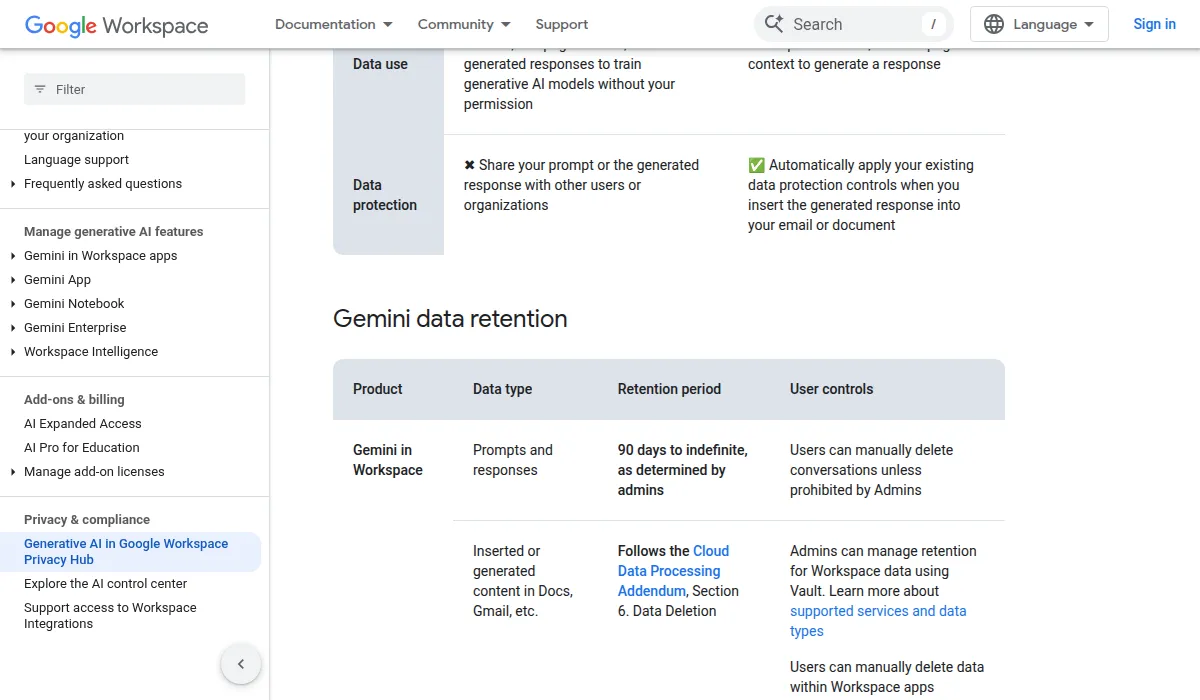
Screenshot: Generative AI in Google Workspace Privacy Hub, Gemini data retention table, Google Workspace Help.
Data processing and training
Neither product uses your organization's documents, emails or prompts to train the underlying models. Microsoft says Copilot is compliant with its "existing privacy, security, and compliance commitments to Microsoft 365 commercial customers, including the General Data Protection Regulation (GDPR) and European Union (EU) Data Boundary." Google says Workspace content "is not human reviewed or otherwise used for Generative AI model training outside your domain without permission."
The bigger 2026 change is on the Microsoft side. Copilot used to be described as running only on Azure OpenAI Service. Microsoft now offers third-party models in Copilot, including Anthropic and OpenAI models acting as subprocessors, plus Microsoft-hosted models. Admins decide whether to use the third-party models, and additional terms can apply. Our Notion AI vs Microsoft Copilot comparison covers the subprocessor settings in detail.
Google Workspace AI runs Gemini, so the model provider is Google itself. Gemini use falls under your Workspace agreement, including the Cloud Data Processing Addendum. Still check Google's subprocessor list, since it applies to the wider Workspace service.
EU data residency
Microsoft. For EU customers, Copilot is an EU Data Boundary service: EU traffic stays inside the Boundary, while worldwide traffic can be sent to the EU and other regions for model processing. Copilot became a covered workload in Microsoft's data residency commitments on March 1, 2024. Two caveats matter:
- Models provided by Anthropic as a Microsoft subprocessor are currently excluded from the EU Data Boundary.
- For tenants in the EU, EFTA and the UK, Anthropic models are off by default. On April 3, 2026, Microsoft added an admin setting that lets those tenants make Anthropic the default model for Copilot in Microsoft 365 apps. Turning it on is a residency decision to record in your DPIA.
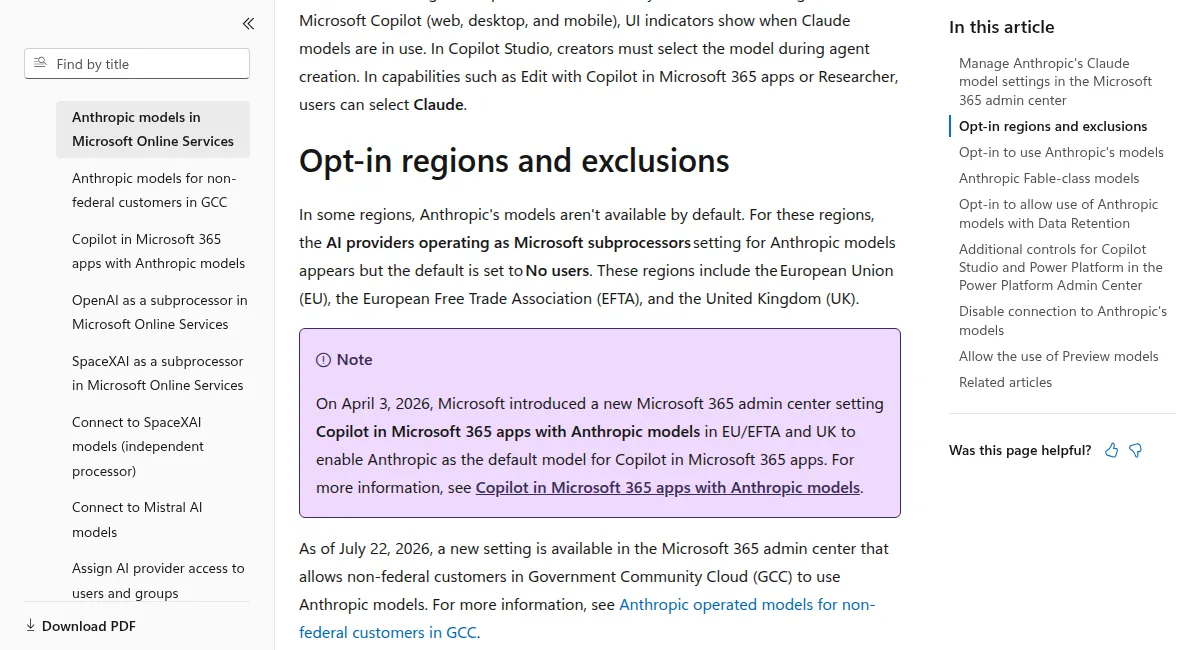
Screenshot: Anthropic models in Microsoft Online Services, Opt-in regions and exclusions, Microsoft Learn.
Google. Workspace lets admins set data regions for covered data, but the generative AI privacy hub doesn't say where Gemini processing happens by region, and it says outright that region settings don't apply to Gemini Notebook. Confirm with Google how your region setting applies to each Gemini feature before you claim EU-only processing.
Our read: Microsoft is more explicit and documents an exception you can act on (keep Anthropic off in the EU). Google needs a per-feature check, and Notebook is the one to keep away from EU personal data until Google says otherwise.
The oversharing problem
The compliance risk most often missed with Copilot isn't a leak from Microsoft. It's a leak from your own SharePoint and OneDrive permissions.
Microsoft states that Copilot "only surfaces organizational data to which individual users have at least view permissions." If you have legacy SharePoint permissions nobody cleaned up, departmental files shared broadly "just in case", or sensitive documents open to all staff, Copilot will retrieve them when someone asks. An HR file visible to all managers is retrievable by any manager who asks Copilot about pay. The AI doesn't enforce intent; it enforces permissions.
Run a permissions review before you deploy. For a small team on Business plans, that usually means a manual pass over your most sensitive sites.
Google's Workspace Intelligence has the same shape of risk. It grounds Gemini in Gmail, Chat, Calendar and Drive, and Google says responses are "grounded only in content that a user already has permission to view." Broad Drive sharing produces broad AI answers.
The same point comes up when admins first notice where Copilot puts uploaded files. In an August r/sysadmin thread, a poster was surprised that files dropped into Copilot chat land in the tenant's OneDrive storage. The top replies called that the design, not a leak. "Nothing in Copilot Enterprise's marketing says that files are kept locally. It says they're kept in the tenant," wrote u/Valdaraak. Another admin, u/joeykins82, put the selling point as "the org knows exactly where things are being uploaded." In your DPIA, list OneDrive as the place Copilot chat uploads are stored, and ask Microsoft to confirm it for your tenant.
Audit logging
Microsoft Copilot. Copilot interactions are logged automatically as part of Purview Audit (Standard); if auditing is on, there's nothing extra to configure.
- Audit (Standard) keeps records for 180 days by default.
- Keeping a log for longer than 180 days, up to one year, needs an Office 365 E5 or Microsoft 365 E5 license, Purview Suite, or the E5 eDiscovery and Audit add-on for the user who generated it.
- Microsoft calls the prompt and response the "content of interactions". It's stored encrypted, admins can search it with Content search or Purview, and Purview retention policies can cover Copilot chat interactions.
- Users can delete their own Copilot activity history from the My Account portal.
Google Workspace AI. Gemini activity has its own log events:
- In the Admin console: Reporting, then Audit and investigation, then Gemini for Workspace log events. You need the Audit & Investigation administrator privilege.
- Vault can search Gemini app conversations and export the results for eDiscovery.
- Google says administrators cannot delete log event data or change how long it's available.
- Admins choose how long Gemini conversations are kept: automated deletion after a period such as 3 months, 18 months or 3 years, or keep them indefinitely. With conversation history off, new Gemini app chats are saved for up to 72 hours.
Our read: both give you a real audit trail. Microsoft gives you more control over log retention and content search through Purview, which matters if you must show a regulator what the AI touched and when. Google gives you native Gemini log events plus Vault, with retention you can't change.
HIPAA
Both vendors document a HIPAA path, with exceptions:
- Microsoft Copilot: Microsoft lists HIPAA among Copilot's compliance offerings. Confirm with your Microsoft licensing contact that the Copilot features you plan to use are in your BAA scope.
- Google Workspace: Google says Gemini can support HIPAA workloads and has updated its HIPAA Included Functionality to include Gemini. Gemini Notebook and Gemini in Chrome are not covered by Google's BAA.
Don't assume every AI feature is BAA-covered. Features ship before coverage is updated, and both vendors already list exclusions.
Pricing
Microsoft Copilot:
- Copilot Business lists at $21 per user per month with an annual commitment ($25.20 on monthly billing), for up to 300 users, and needs a qualifying Microsoft 365 plan. A promotional $18 applies to the first year on offers between July 1 and December 31, 2026.
- Bundles: Microsoft 365 Business Standard with Copilot at $23.50 per user per month, and Business Premium with Copilot at $32.00, both paid yearly.
- Microsoft 365 Copilot for larger organizations lists at $30 per user per month paid yearly.
- A 10-person team on Copilot Business pays about $210 a month for the add-on, before the base Microsoft 365 plan.
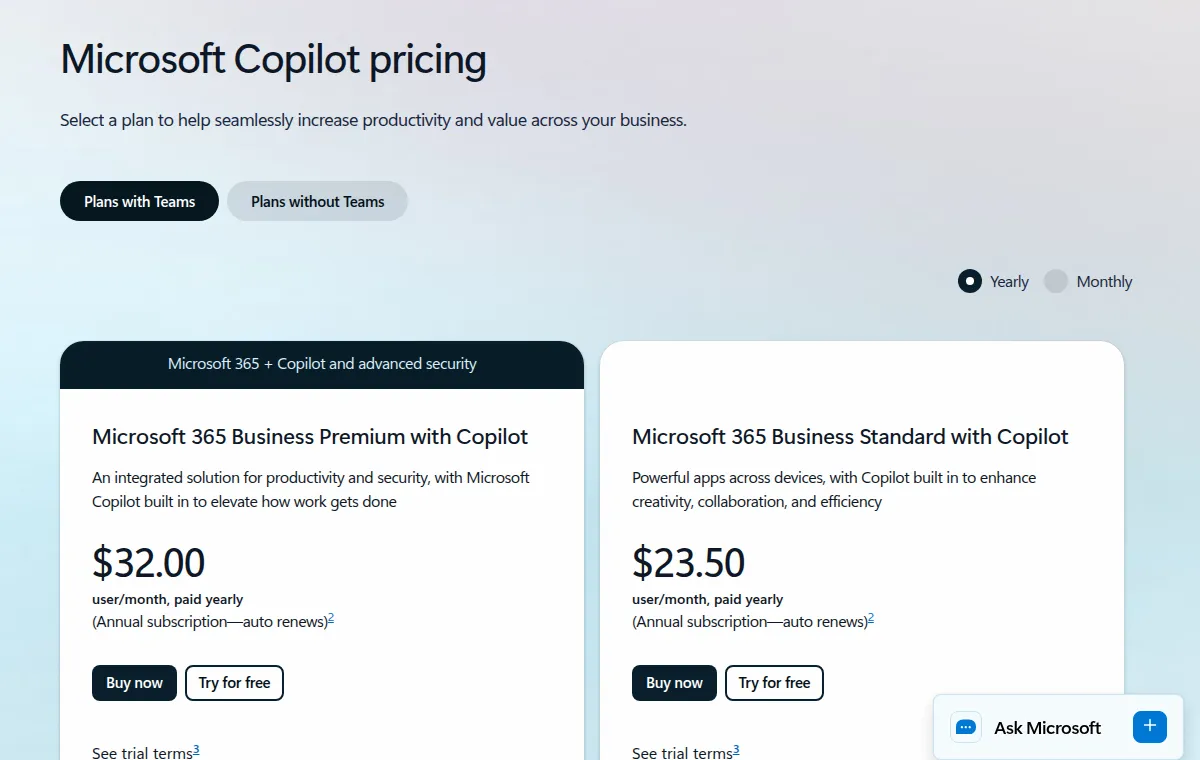
Screenshot: Microsoft Copilot plans and pricing, Microsoft.
Google Workspace with Gemini:
- Business Starter, Business Standard and Business Plus list at the prices in the table, per user per month with a one-year commitment. Enterprise is quoted.
- Starter includes the Gemini assistant in Gmail and the Gemini app, but not Gemini in Docs.
- A 10-person team on Standard pays about $140 a month, AI included. Google is also running introductory discounts for up to 20 users.
Which to choose
Microsoft Copilot: pick it if you already run on Microsoft 365 and switching costs are high, if you need retention control and content search over AI interactions, or if you want to choose model providers by user and group. Skip it until you've had time for a permissions review.
Google Workspace AI: pick it if you're on Workspace and have no Microsoft migration to justify, want AI without a separate add-on bill, and prefer one model provider in your record of processing. Keep Gemini Notebook off for EU personal data and PHI.
Video: Cybernews, "Microsoft 365 Copilot (ChatGPT) vs Google AI for Workspace". It predates the Anthropic models in Copilot.

Image: Unsplash.
Employee monitoring through AI
Can either suite's AI be used to monitor staff? Meeting summaries and similar features can surface participation signals, and using them to judge individual performance brings in employment law and, in the EU, GDPR's rules on automated decisions. Microsoft says it restricts generative AI from making "inferences, judgments, or evaluations about an employee's performance, attitude, internal or emotional state, or personal characteristics." Google Workspace has similar exposure through Meet transcription and Gemini summaries.
Under the EU AI Act, Annex III lists AI used in employment as high-risk. Regulation (EU) 2026/1744, the Digital Omnibus, moved the Annex III high-risk obligations from August 2, 2026 to December 2, 2027; it was published on July 24, 2026 and entered into force three days later. Our Digital Omnibus tracker has the full timeline. Until then, the Article 26 deployer duties aren't in force, but GDPR and national employment law already apply. Don't use AI meeting summaries or productivity signals in employment decisions without telling employees and having a person make the final call.
How to use this tracker
- Copy the rows you need into your DPIA or vendor register, with the check date.
- Record which AI providers are enabled. For Copilot, check the "AI providers operating as Microsoft subprocessors" setting. For Google, note that Gemini is the model provider and whether Gemini Notebook is on.
- Audit existing permissions: SharePoint and OneDrive for Microsoft, Drive sharing for Google.
- Update your AI acceptable use policy to say which features are approved for which data.
- Tell your team what not to paste in (personal data you have no basis for, privileged communications, unreleased financials).
Use the AI Vendor Scorecard to score Microsoft and Google against your own requirements, or run the Compliance Quiz to see which rules apply to your team.
Earlier 2026 changes
Workspace Intelligence (April 2026). Google announced Workspace Intelligence, which grounds Gemini in Gmail, Chat, Calendar and Drive. It's on by default; admins can disable data sources at the domain, OU or group level. Rollout began April 22, 2026.
Google AI control center (May 2026). A new Admin console module to manage AI and agent access to Workspace data, announced May 4, 2026.
Anthropic as a Microsoft subprocessor. Anthropic models are on by default for most commercial customers outside the EU, EFTA and UK. "Anthropic models with Data Retention" sit outside your Microsoft agreement, under Anthropic's own commercial terms and data processing agreement, and are off by default for everyone. Since July 22, 2026, non-federal GCC customers can enable Anthropic models. Microsoft's Anthropic page was last updated September 18, 2026.
Agents. When Copilot uses agents, Microsoft tells admins to check each agent's privacy statement and terms of use, and admins choose which agents are allowed. Don't assume a custom or third-party agent inherits the base Copilot terms.
What we could not confirm
- Where Gemini processing happens for EU tenants: Google's privacy hub doesn't say, and we found no region commitment for Gemini features.
- Whether every Copilot feature you plan to use is inside Microsoft's HIPAA BAA scope: Microsoft's privacy page lists HIPAA but not a feature-level scope.
References
- Microsoft Learn, Data, Privacy, and Security for Microsoft Copilot: https://learn.microsoft.com/en-us/copilot/microsoft-365/microsoft-365-copilot-privacy
- Microsoft Learn, Anthropic models in Microsoft Online Services: https://learn.microsoft.com/en-us/copilot/microsoft-365/connect-to-ai-subprocessor
- Microsoft Copilot plans and pricing: https://www.microsoft.com/en-us/microsoft-365-copilot/pricing
- Microsoft Purview, Manage audit log retention policies: https://learn.microsoft.com/en-us/purview/audit-log-retention-policies
- Microsoft Purview, Audit logs for Copilot and AI applications: https://learn.microsoft.com/en-us/purview/audit-copilot
- Google Workspace, Generative AI in Google Workspace Privacy Hub: https://knowledge.workspace.google.com/admin/generative-ai/generative-ai-in-google-workspace-privacy-hub
- Google Workspace pricing: https://workspace.google.com/pricing
- Google Workspace Updates, Introducing Workspace Intelligence, with admin controls: https://workspaceupdates.googleblog.com/2026/04/introducing-workspace-intelligence-with-admin-controls.html
- Google Workspace Updates, AI control center: https://workspaceupdates.googleblog.com/2026/05/securely-manage-AI-and-agent-access-to-Workspace-data-with-the-AI-control-center.html
- Google Workspace Help, Gemini for Workspace log events: https://knowledge.workspace.google.com/admin/reports/gemini-for-workspace-log-events
- Google Vault Help, Use Vault to search Gemini app: https://support.google.com/vault/answer/15695746
Related Reading
- Notion AI vs Microsoft 365 Copilot: compliance for small teams
- Privacy-first AI APIs, which don't train on your data
- AI acceptable use policy template
- AI tool register template
- AI vendor due diligence checklist
- Governing embedded AI in third-party tools
- AI Vendor Contract Redline Template: 12 Clauses to Add or Fix (2026)
- AI Vendor DPA Tracker 2026: 25+ Tools: GDPR DPA Status, Training Policy,
- Anthropic vs OpenAI: GDPR Compliance Differences (2026)
- ChatGPT Memory Upgrade (Dreaming V3): What It Means for Business Privacy an