Image: Pexels, used under the Pexels License.
A backup app has to read everything it protects. That's why the ConnectWise Cloud Backup breach reaches small businesses that buy their IT from a managed service provider: the app was put into their Microsoft 365 tenants by that provider, sometimes a previous one, with access to mail, files and Teams. On October 21 Microsoft said who used it and how. The group is Storm-0940, which Microsoft calls China state-aligned, and the tool was an AI agent framework called ARTEX.
Event date: October 21, 2026 (Microsoft attributes the attack). First reports: Microsoft's research post at 18:23 UTC on October 21, then Reuters at 21:16 UTC and CyberScoop at 21:58 UTC. The breach itself first surfaced on October 16, in an r/msp thread, Huntress's research and ConnectWise's first advisory.
What happened
ConnectWise Cloud Backup, formerly SkyKick, is sold to managed service providers to back up their clients' Microsoft 365 data. To do that, Huntress notes, the app holds broad access to mailboxes, OneDrive, SharePoint, Teams and directory data in every tenant it's installed in. Whoever holds its credential holds that access too.
Microsoft's account starts with a failed attack. From October 10 to 14, Storm-0940 sprayed passwords at 327 accounts across eight organizations, racking up more than 151,000 failed logons, at a peak of 2,900 a minute on October 11. Not one sign-in worked.
On October 15 the group had control of the ConnectWise app identities instead, so it no longer needed anyone's password. Between 06:13 and 08:34 UTC, the backup app obtained Microsoft Graph tokens in customer tenants from a hosting provider address, 144.172.64.128. In one tenant Huntress examined, a second ConnectWise app (Cloud Management for Microsoft Teams) added itself to the Global Administrator role and then planted new secrets on two other apps, one of them Huntress's own security app. The secrets were set to expire in 2028. The entire sequence took about five minutes.
By 19:00 UTC on October 16, Huntress had confirmed unauthorized sign-ins in 162 tenants. A day later it counted almost 1,000 Entra tenants with sign-in activity from the attacker's address, and over 300 of those sign-ins succeeded. ConnectWise disabled seven app identities at 07:00 UTC on October 17, suspended Cloud Backup by revoking its certificates, and finished a full reset of accounts and credentials on October 19.
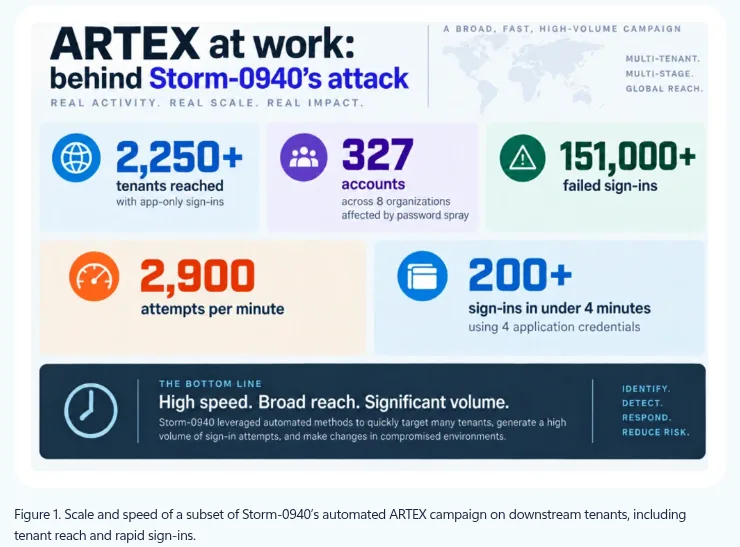
Screenshot: Figure 1 of Microsoft's Storm-0940 research post, Microsoft Threat Intelligence. Captured October 22, 2026.
Microsoft's October 21 post adds the AI part. ARTEX is an open-source penetration testing framework that can use any AI model; its agents run an attack "from reconnaissance through data exfiltration with little needed human interaction." Storm-0940 has used it against hundreds of organizations since as early as September. With it, the group tried to sign in to more than 2,250 tenants, and in several of its attacks went from first targeting to privileged cloud access in under three hours. The Hacker News reports that ARTEX was made closed-source after attackers used it against South Korean financial institutions; Microsoft says groups in several regions now run it.
Correction, October 23, 2026: an earlier version said the group tried to sign in to more than 2,250 tenants at 2,900 attempts a minute. Microsoft's post gives two separate figures: more than 2,250 tenants in the sign-ins after the ConnectWise compromise, and a peak of 2,900 failed logons a minute on October 11 in the earlier password spray against 327 accounts.
None of the techniques is new. OAuth app abuse is a typical part of Storm-0940's toolset, Microsoft says; this time ARTEX ran it "to machine speed." Igor Tsyganskiy, a Microsoft executive vice president, wrote on LinkedIn that "a wave of AI-driven cyberattacks has been ongoing" since early October, and called this one of many. Microsoft also says the attack didn't come through any flaw in its own systems.
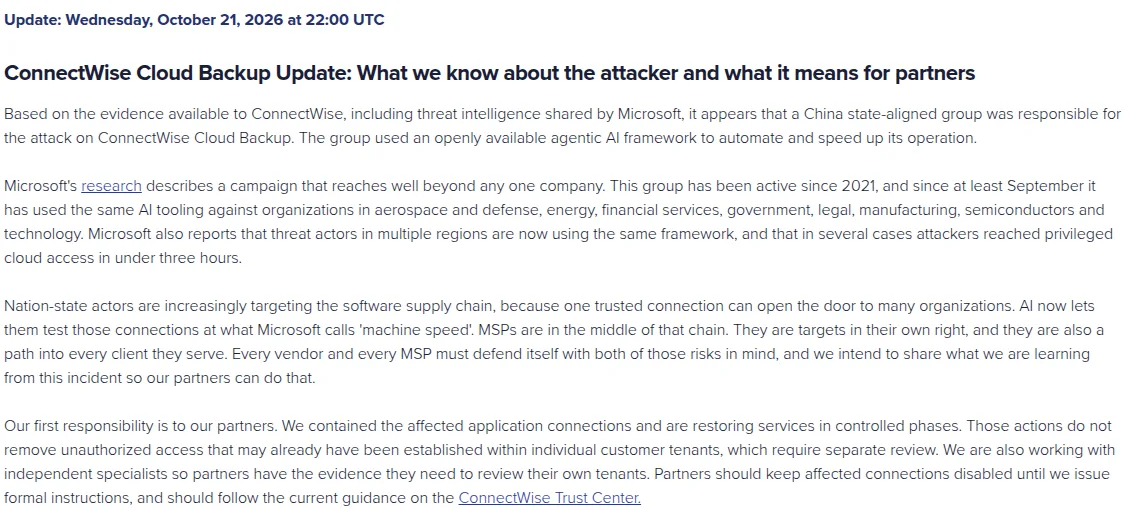
Screenshot: Cloud Backup advisory, ConnectWise Trust Center. Captured October 22, 2026.
ConnectWise backed Microsoft's finding that evening. "MSPs are in the middle of that chain," its advisory says. "They are targets in their own right, and they are also a path into every client they serve." Restoration started in phases on October 21 and, by the company's estimate, will take several days.
https://www.reddit.com/r/msp/comments/1x7gw61/
Who this applies to
Any Microsoft 365 tenant where ConnectWise Cloud Backup or a ConnectWise Cloud Management app was ever consented, by you or by an IT provider. Microsoft tells admins to review tenants where the apps "are currently or were previously installed or authorized, even if the integration is no longer in use." On r/msp, one provider that scanned all its client tenants found the app in two that had it before the provider took them on: "We found 2 of which have this app before they started with us."
The service suspension covers Cloud Backup, SaaS Security and Cloud Management. ConnectWise says existing backup archives "remain encrypted, isolated, and preserved, with no indication of compromise," but that its own containment doesn't remove access an attacker may already have set up inside a customer tenant. Those tenants, it says, "require separate review." If an MSP runs your Microsoft 365, ConnectWise has told resellers to make sure the guidance reaches the administrator of each customer tenant. Ask yours, in writing, whether that review has been done for you.
What to do now
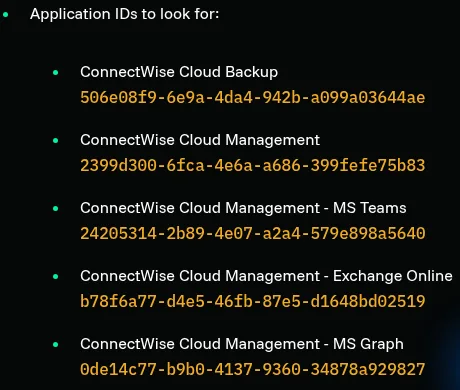
Screenshot: list of application IDs to look for, Huntress. Captured October 22, 2026.
- Find the apps by ID, not by name. In the Entra admin center, open Enterprise applications, then All applications, and search each ID below. Older tenants may show them as "SkyKick Cloud Manager."
| App (as ConnectWise lists it) | Application ID |
|---|---|
| ConnectWise Cloud Backup | 506e08f9-6e9a-4da4-942b-a099a03644ae |
| ConnectWise Cloud Management | 2399d300-6fca-4e6a-a686-399fefe75b83 |
| Cloud Management - MS Teams | 24205314-2b89-4e07-a2a4-579e898a5640 |
| Cloud Management - Exchange Online | b78f6a77-d4e5-46fb-87e5-d1648bd02519 |
| Cloud Management - MS Graph | 0de14c77-b9b0-4137-9360-34878a929827 |
| Cloud Management - Partner Center | 412dcf96-176d-4b3a-a1b0-4981ad66971e |
| Cloud Management - SharePoint Online | b2b55f5b-7758-4719-8d8f-88ae172e6bdb |
- Disable, don't delete. Open Properties, set "Enabled for users to sign-in?" to No, save, and note who did it and when (UTC). Deleting removes the consent and the evidence. Disabling pauses your backups; ConnectWise keeps the backups it already holds. Leave the apps off until ConnectWise publishes reconnection steps for your service.
- Read the right sign-in log. Under Monitoring, Sign-in logs, open the Service principal sign-ins tab and filter by each app ID. The default User sign-ins tab won't show this activity. Look for 144.172.64.128 and any address outside Microsoft and Azure ranges, from October 15 at least, and back to October 1 if your logs go that far.
- Hunt for what was left behind. In the Entra audit log, search for "Add member to role", "Update application" and "Add service principal credentials". Then check the secrets and certificates on every app registration and enterprise app, security and management tools first, for any added since October 13 that you didn't create. Export the evidence before you remove anything.
- Check Conditional Access exclusions. If a policy exempts one of these apps from a location block, the attacker's infrastructure isn't blocked there either.
- Log it as an incident. A clean result doesn't prove nothing was read: app-only directory reads through Microsoft Graph leave no audit trail. Record what you checked in your incident response plan. If personal data could have been exposed and you're under UK GDPR, the ICO's rule applies: "If a risk is likely, you must notify us, as soon as possible, and where feasible within 72 hours."
Our take
We'd treat any third-party app with tenant-wide mail and file access as an admin account that never logs off, because that's how the attacker used it. App-only sign-ins involve no user and no MFA prompt, so the sign-in protections most small teams rely on don't apply to them. The practical fix is dull: ask your MSP for a list of every app it has consented in your tenant, with the permissions each one holds, and put that list in your vendor review. Once this incident is closed, remove the ones nobody can explain.
The AI angle matters less than the headlines suggest. ARTEX didn't invent a new attack; it ran old ones faster than a person could answer an alert. Plan your response time on that basis. One admin on r/msp summed up the checking well: "It seems I can't find anything suspicious but I'm wondering if I missed it or there's just nothing..." That doubt is the reason to disable first and investigate second.
What we could not confirm
Microsoft hasn't said how many customers were compromised, and both Microsoft and ConnectWise say a sign-in alone doesn't prove data was taken. The tenant counts above are Huntress's, from the tenants it can see; we haven't verified them independently. We didn't read ConnectWise's technical PDF or the Reuters story, and use no fact from either. ConnectWise hasn't given a date for full restoration.