Image: Pexels.
Use this if your team pays for an AI API by the token, or runs an agent that calls one in a loop. On October 22, CISA and four allied agencies published Managing AI Token Consumption for Operational Resilience. It's voluntary, and CISA tags it for small and medium businesses among others. Our verdict: half of it is a settings page you can finish in an afternoon, and the half about failover across providers is for teams whose work stops when the API does.
Event date: October 22, 2026, CISA publication date; New Zealand's NCSC posted it on October 23. First report we found: ExecutiveGov, October 23, 21:15 UTC.
What the agencies published
The document is ITSM.00.125 from the Canadian Centre for Cyber Security, written with CISA, the Australian Signals Directorate's Australian Cyber Security Centre, New Zealand's National Cyber Security Centre and the UK's National Cyber Security Centre. We read the full 14-page PDF and the web version.
Screenshot: Managing AI token consumption for operational resilience (ITSM.00.125), partnering agencies, page 1. Captured October 24, 2026.
Its audience line is broad: "Organizations, despite size or sector, should use this guidance" before "signing service level agreements or contracts." CISA's own summary page uses "super intelligence (SI)", the federal executive branch's term for AI; the guidance itself says AI throughout.
The scale it describes is easy to check against your own logs. A basic question "may use hundreds of tokens," while document analysis or multi-step automation can run "in the tens of thousands." And "agentic workflows compound costs, with each step reprocessing prior content and tool outputs."
What denial-of-wallet means here
The guidance names two attacks. A denial-of-tokens attack burns through your token allocation or trips rate limits so legitimate users get locked out, "through automated prompts, abuse of publicly accessible AI interfaces or tools." A denial-of-wallet attack goes for the budget. Its two examples are prompts with "complex inputs" that "result in long outputs," and "creating AI loops," where the tool feeds its own output back in.
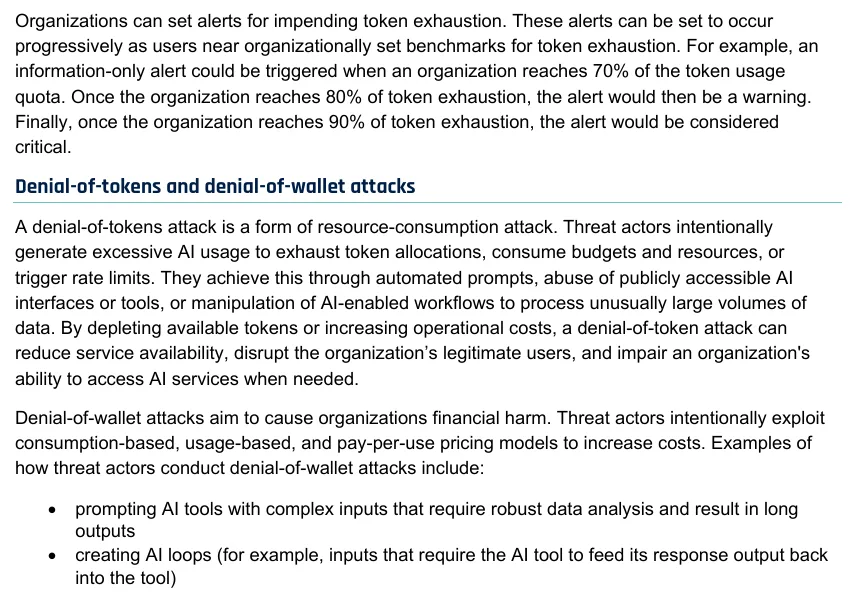
Screenshot: ITSM.00.125, page 6, alert thresholds and attack definitions. Captured October 24, 2026.
If you have a public chatbot, a free trial, or an API endpoint that wraps a model, you're the target it describes. An internal-only tool behind SSO mostly faces the other risk on the list: your own code looping.
The playbook: seven steps
These follow the guidance's recommendations, in the order we'd do them at a team of ten, with our own defaults added where it stops short.
- Set a hard cap per key, then three alerts. The guidance's example is an information alert at 70% of quota, a warning at 80% and critical at 90%. On a $1,000 monthly budget that's $700, $800 and $900. Give each environment and each customer-facing feature its own key so one runaway can't drain the rest.
- Put a step limit on every agent loop. The training list includes "binding agentic loops" and "applying a cap on output length." In code, that's a maximum number of tool calls per task and a
max_tokenson every request. Retries need a cap too (see the Reddit story below). - Sort your AI uses into three tiers. Tier 1 is mission critical (the guidance's examples are cyber defence and incident response), tier 2 is operational work such as compliance, tier 3 is productivity like drafting email and summarizing meetings. When you hit the cap, tier 3 waits. Our suggestion for a small team: put whatever a customer sees in tier 1.
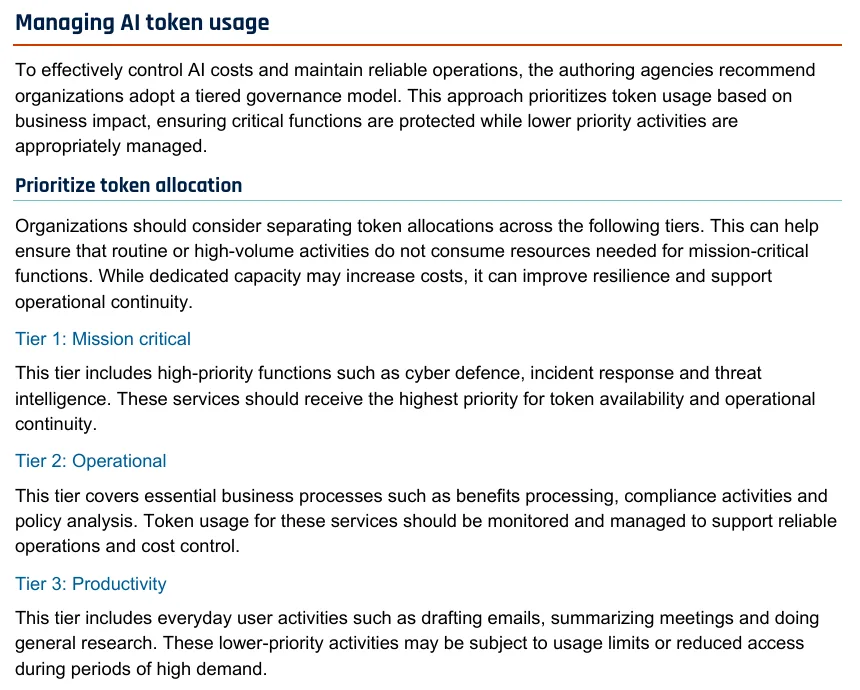
Screenshot: ITSM.00.125, page 9, "Prioritize token allocation." Captured October 24, 2026.
- Route every model call through one place. The guidance calls AI proxies "an increasingly practical way" to "enforce quotas, apply guardrails and support chargeback." If calls are scattered across SDKs, you can't see which feature is spending.
- Treat a token spike as a security signal. It says to watch unusual increases "as a potential indicator of data exfiltration," and to send token telemetry to your SIEM alongside identity, cloud and API logs. Without a SIEM, a daily per-key usage report in the team channel does the same job badly but cheaply.
- Right-size the model and cache the static part. Use the lowest-cost model that meets the need, set the reasoning or effort level to what the task needs where the API offers one, and put "static or reusable context information toward the beginning" so caching works. Output tokens "are typically more expensive," so long answers you don't read are the first thing to cut.
- Read the pricing page before you sign. Check how input, output and cached tokens are priced and what the quota limits are. Ask the vendor about reliability and quotas. A second provider for failover is worth it only if an outage stops revenue.
Our take: steps 1, 2 and 4 are where small teams actually lose money. The headline attack is real for public endpoints, but the more common bill shock is self-inflicted.
What to log
- Tokens in, out and cached per request, tagged with feature, key and customer.
- Daily spend per key against its cap, and every alert that fired.
- Agent runs that hit the step limit, with the task that triggered them.
- Any human approval for a consequential AI action; the guidance asks for "human authorization for consequential AI-driven actions."
- Provider outages and what you did instead, if anything.
For what a full audit trail for agent calls looks like, see our TypeScript AI agent logging patterns.
What people said
The self-inflicted version has a good public write-up. On r/LLMDevs, vigilAPI described an $11,400 month nobody could explain. One cause was "A retry helper someone added during an incident, without a cap," which "quietly turned one call into forty. Ran for six weeks." Another was a prompt that grew "from 1.2k to 9k tokens" over small edits. The top reply, from gently_wry_porfirio: "The uncapped retry helper is a classic." The poster's fix was the guidance's step 4: one proxy URL for all provider traffic.
What we could not confirm
The guidance gives no dollar figures, and no case of a denial-of-wallet attack on a named organization. It doesn't say which providers support hard caps or per-key quotas; check your own provider's console. There is no embed here: we found no video or post from the agencies about this publication beyond their web pages. For the budget controls in more detail, see our AI spend governance guide.