If your security team turned Fathom down, the replacement that gets approved fastest is usually the notetaker inside the suite you already pay for: Copilot in Microsoft Teams, "Take notes for me" in Google Meet, or Zoom's meeting summary. None of them adds a vendor, and Microsoft, Google and Zoom each rule out training on your meeting content in writing. If you need a standalone tool, Fireflies on its $39 Enterprise plan is the easiest yes: its terms say it won't train generative AI on your content, and SSO, SCIM, audit logs and custom retention all come in that one tier. We read every vendor's terms, help center, trust center and pricing page on October 30, 2026. We did not install or run the tools.

Image: Unsplash, used under the Unsplash License.
Where Fathom loses points in a review
Fathom's terms, last updated March 4, 2026, say it may "use and create de-identified data generated from your User Content to train, customize or improve our in-house artificial intelligence models". That is on until someone opts out in account settings. Fathom's help center adds that organizations on Team Edition can opt out every user from Organization Settings, and that its AI subprocessors (Anthropic, OpenAI, Google) are contractually barred from training on your data.
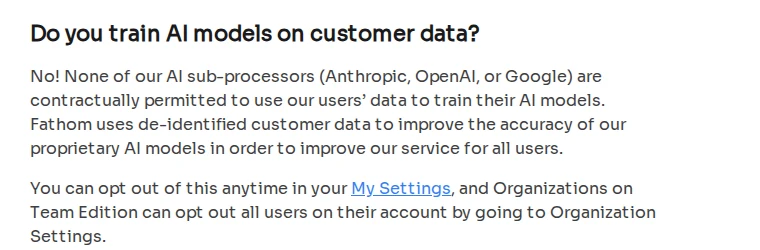
Screenshot: "Is Fathom secure?", Fathom Help Center, October 30, 2026.
The rest of a typical questionnaire goes the same way. The help center says "All Fathom data is stored in the United States", with a DPA for EU and UK users on request. The trust center lists 30 subprocessors, Google Cloud Platform as the primary cloud, every one of them in the USA. Fathom has SOC 2 but not ISO 27001, and its help center calls SOC 2 "similar". It isn't, if your customer's questionnaire asks for ISO 27001 by name.
SSO, SCIM provisioning and custom data retention sit on the Enterprise plan, which has no public price on the pricing page. Team is $15 per user a month billed annually, with a two-user minimum. The same page lists bot-free capture as a beta for Mac, so on Windows the notetaker joins the call as a participant.
Two of Fathom's own documents also disagree on deletion. The help center says backups are cleared 7 days after you delete an account; the terms say copies "may persist in database backups for up to 30 days". Ask which number the DPA uses before you sign.
Admins also find Fathom hard to block. One wrote on Microsoft Q&A on June 24, 2025 that "Fathom AI does not appear in the Teams Admin Center under 'Manage Apps'", so it couldn't be blocked there.
The alternatives side by side
| Tool | Trains on your meetings | SSO and SCIM | Custom retention | Where data sits | Bot in the call | Checked |
|---|---|---|---|---|---|---|
| Fathom | Yes, de-identified, until you opt out | Enterprise, price on request | Enterprise | US only | Yes; bot-free is a Mac beta | Oct 30, 2026 |
| Granola | Yes, anonymized, until you opt out; off by default on Enterprise | Enterprise, $35 | Enterprise, workspace-wide | US (AWS) | No | Oct 30, 2026 |
| Read AI | Not without explicit opt-in | Enterprise+, $29.75 annual, 5 licenses minimum | Enterprise+ | AWS US; EU or Canada on request | Yes, can auto-join | Oct 30, 2026 |
| Fireflies | No, per its terms | Enterprise, $39, annual only | Enterprise | US; Enterprise private storage in the EU, processed in the US | Yes; Chrome extension records without it | Oct 30, 2026 |
| tl;dv | No customer data used to train the AI | "available to all users" (type not stated) | Not stated on the pages we read | Europe | Not covered on the security page | Oct 30, 2026 |
| Teams with Copilot | No training of foundation models | Your Microsoft 365 sign-in | Purview retention | EU Data Boundary for EU users, except Anthropic models | No | Oct 30, 2026 |
| Google Meet | Not without your permission | Your Workspace sign-in | Vault, Meet retention policy | Not checked for this post | No | Oct 30, 2026 |
| Zoom meeting summary | No, per Zoom's terms | Your Zoom sign-in | Auto-delete for summaries | AI step may run in US data centers | No | Oct 30, 2026 |
Granola: no bot, no audio, Enterprise for the defaults
Granola doesn't join the call at all. Its security page says you start it by hand ("it won't auto-join or auto-record anything"), it picks up your microphone and the meeting audio on your computer, and sends it to transcription providers "like Deepgram and Assembly". It "doesn't store the audio from meetings", only the transcript and notes, which sit in a US-hosted AWS private cloud.
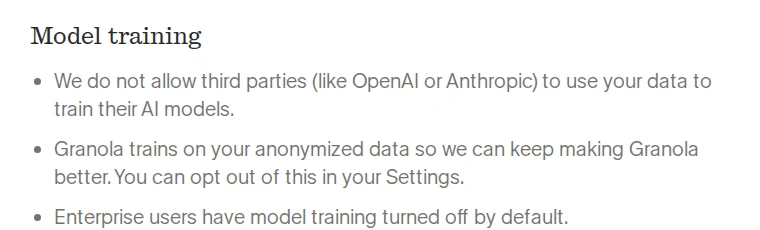
Screenshot: "Security at Granola", Granola, October 30, 2026.
Training works like Fathom's: on by default, opt out per user, except that "Enterprise users have model training turned off by default." The pricing table puts SSO, SCIM, an audit API, HIPAA-compliant workspaces, workspace-wide auto-deletion and the workspace-wide training opt-out on Enterprise at $35 per user a month. Business at $14 has none of those. SOC 2 Type II and a DPA come with every plan.
The weak spot is the flip side of having no bot: there is no Granola participant for anyone else in the call to see. The pricing table lists "Let people know you're using Granola" as per user on Basic and Business, and admin-enforceable only on Enterprise. Below Enterprise, telling the other side is each user's job. In its favor, the same security page links post-mortems of three resolved vulnerabilities, including one in its iOS beta app.
Some IT teams have already made this trade. One admin in an r/sysadmin thread on blocking notetakers wrote on November 7, 2025: "We got an AI notetakers for them that meet our data privacy requirements vs them shadow ITing their own solutions", listing enterprise Zoom, Notion "as well as enterprise Granola."
Read AI and Fireflies: the bot-based options
Read AI's training answer is the closest to Fireflies' among the bot tools. Its help article on data, updated October 25, 2026, says meetings aren't used for training "without your explicit opt-in", apart from a Customer Experience Improvement Program that "About 10 to 15 percent of users choose to join." You can switch off transcript storage and still get summaries, it is SOC 2 Type II, and it signs BAAs. The trust center lists AWS in the US, with "EU/Canada available on request".
What worries reviewers is how Read AI spreads. Its own help article explains that people who receive a meeting report get "an invitation to sign up so they can view the summary", and onboarding then asks whether it should join every meeting on their calendar. The r/sysadmin thread above opened on that exact problem: staff "signing up for things like read.ai or otter.ai, connecting it to their calendars, and then the notetakers are auto joining meetings." Domain capture, SAML, SCIM and custom retention are all on Enterprise+, $29.75 per user a month billed annually with at least five licenses. Budget for that tier or don't bother.
Fireflies' terms, updated September 28, 2026, say it "will not use your User Content to train, retrain, fine-tune or otherwise improve any generative artificial intelligence models." The same clause lets it "derive usage, statistical, and other data" from your content for internal purposes, so read that sentence with your lawyer rather than stopping at the headline. Its storage guide says data is stored and processed in the US by default; Enterprise private storage puts it in the EU "but processed in the US". It lists ISO/IEC 42001 and the EU-US Data Privacy Framework. The pricing page bundles SSO and SCIM, audit logs, HIPAA, private storage and custom retention into Enterprise at $39 per seat a month, annual only.
tl;dv if the data has to stay in Europe
tl;dv's security page says "All our data centers are located in Europe" and "No customer data is used to train the AI." It also says it splits meetings into small pieces and shuffles their order before Anthropic processes them, and that you can choose to host the AI in Europe or the US. It is SOC 2 Type II and run by a German company, tldx Solutions GmbH. Pro is €18 per seat a month billed annually and Business €29, per its pricing page.
Two things on that page need a question before you sign. It says SSO "is available to all users" without saying whether that means SAML or just Google and Microsoft sign-in. And it still shows an "EU US PRIVACY SHIELD" badge, six years after the Court of Justice invalidated the Privacy Shield decision on July 16, 2020 in Case C-311/18. A stale badge proves nothing about the product, but a reviewer will ask about it, so ask first.
Built-in notetakers: no new vendor, two settings to check
Teams. Copilot in meetings needs an add-on Copilot license. Microsoft's Copilot privacy page says prompts, responses and Graph data "aren't used to train foundation LLMs", and EU traffic stays in the EU Data Boundary, except that Anthropic models "are currently excluded". The default meeting policy is "On with saved transcript required", so transcripts are kept. If you don't want them kept, set Set-CsTeamsMeetingPolicy -Identity <policy name> -Copilot Enabled, which gives "Only during the meeting": speech-to-text data "isn't saved after the meeting". Purview can still retain the Copilot prompts and responses.
Google Meet. "Take notes for me" needs an eligible Workspace edition. Google's Workspace privacy hub, updated October 6, 2026, says Workspace "does not use customer data for training models without customer's prior permission or instruction." Notes land in the organizer's Drive and follow your Meet retention policy in Vault. The setting to change is consent: admins can require every participant to give explicit consent before notes, recording or transcription start, and "This setting is off by default."
Zoom. Zoom's terms say it does not use audio, video, chat or similar content "to train Zoom or third-party artificial intelligence models". The meeting summary needs Zoom Workplace Pro or above, can auto-delete summaries after a set number of days, and is available under an active BAA. The catch for EU teams: when a third-party model runs, "Data may be processed within U.S. based data centers." Our Zoom, Otter and Fireflies comparison has the participant-notice details.
What ten seats cost with SSO and retention
This is our own arithmetic from the list prices on October 30, 2026, at the cheapest tier that has SSO, SCIM and custom retention together.
| Tool | Tier | List price | 10 seats, 12 months |
|---|---|---|---|
| Read AI | Enterprise+ (5 licenses minimum) | $29.75 per user a month, billed annually | $3,570 |
| Granola | Enterprise | $35 per user a month (billing period not stated) | $4,200 |
| Fireflies | Enterprise (annual only) | $39 per seat a month | $4,680 |
| Fathom | Enterprise | Not published | Ask sales |
| tl;dv | Not confirmed | Business €29 per seat a month, billed annually | Ask whether SAML is included |
The built-ins cost nothing extra on Meet and Zoom if your edition already includes them; Teams needs the Copilot add-on for each user who wants it.
Our pick for each
- Teams with Copilot: the default for a Microsoft 365 shop. Switch the policy to "Only during the meeting" unless you want transcripts kept.
- Google Meet: the default for a Workspace shop, once the admin consent setting is on.
- Zoom meeting summary: fine for US teams on Pro or above; EU teams should note the US processing.
- Fireflies Enterprise: the easiest standalone yes, because the no-training promise is in the terms and every control is in one tier.
- Granola Enterprise: our pick when bots in client calls are the objection. Skip Business for company use; the training and notice defaults are per user there.
- Read AI Enterprise+: good training terms, but only worth it with domain capture switched on.
- tl;dv: the one to shortlist if data must stay in Europe, after it answers the SSO and Privacy Shield questions in writing.
What the vendor pages left open
Fathom publishes no Enterprise price and gives two deletion windows, 7 and 30 days. Granola doesn't say whether the $35 Enterprise price is billed monthly or annually. Read AI's help article calls its improvement program "opt-out by default" and then says 10 to 15 percent of users "choose to join", which reads like opt-in; get the answer in writing. tl;dv's security page doesn't say which plan has custom retention or how the notetaker joins calls. We did not check Google's data-region options for Meet notes. Before you send any of these to your security team, log the one you pick in your AI tool register and check its DPA status against our AI vendor DPA tracker.