This is for teams whose developers use Warp, the terminal that has grown into an agent workspace, and for whoever has to answer "were we affected?" this week. On October 26, Warp's CEO said an attack through one of its vendors reached "a limited amount of agent trace and telemetry data," for a small share of its users. What Warp held on your team in the first place depends on the plan each developer is on and on three switches in Settings > Privacy. Our verdict: on Free, Build or Max plans, assume AI sessions can sit on Warp's servers. Either move work use to Business, which has zero data retention, or turn the switches off on every machine.
What Warp has said so far
Zach Lloyd, Warp's founder and CEO, posted the statement on X on Monday, October 26. Warp "became aware" of the attack on Friday, October 23, describing it as "an active and narrow-banded exploitation of a vendor in Warp's infrastructure." He said the attack appears to have come from "an agent swarm," likely starting with a hole in a vendor dependency, and that Warp is working with CrowdStrike and has engaged law enforcement.
Warp's statement, October 26:
https://x.com/zachlloydtweets/status/2114800787716972873
Three points matter for a small team:
- Scale. "An upper bound of roughly 1% of Warp users." BleepingComputer notes Warp's website claims at least 800,000 users.
- Notification. Warp says it has notified everyone it has positively identified as impacted, and that anyone affected "will receive instructions from us on action they need to take." If nobody on your team has heard from Warp, you are probably not among them. Probably is the honest word, since the investigation is still running.
- Content. Warp hasn't said whether the traces included source code, prompts or credentials, as BleepingComputer pointed out. That's the question your team needs answered, and the one Warp hasn't answered yet.
It's the second AI coding tool breach in two weeks. The week before, an OpenCode breach hit about 1.4% of its users, with unauthorized charges of up to $1,700 for some. Our OpenCode checklist covers the key rotation side.
What your Warp plan sends to Warp
Warp's privacy docs split this by plan. With "Help improve Warp" on, Warp may collect "AI interactions and console inputs that power our AI features," on top of usage analytics. Whether you can turn that off depends on what you pay.
| Warp plan | Price (Warp pricing page) | Can you use AI with telemetry off? | AI interaction and console data |
|---|---|---|---|
| Free | $0 | No: telemetry "must be enabled to use AI features on the Free plan" | Collected while telemetry is on |
| Build, Max | $20 and $200 a month | Yes: paid plans "can opt out at any time" | Collected unless the user turns telemetry off |
| Business | $50 per user a month, up to 25 seats | Yes | Not collected: covered by Warp's Zero Data Retention agreement |
| Enterprise | Custom | Yes | Not collected: covered by Warp's Zero Data Retention agreement |
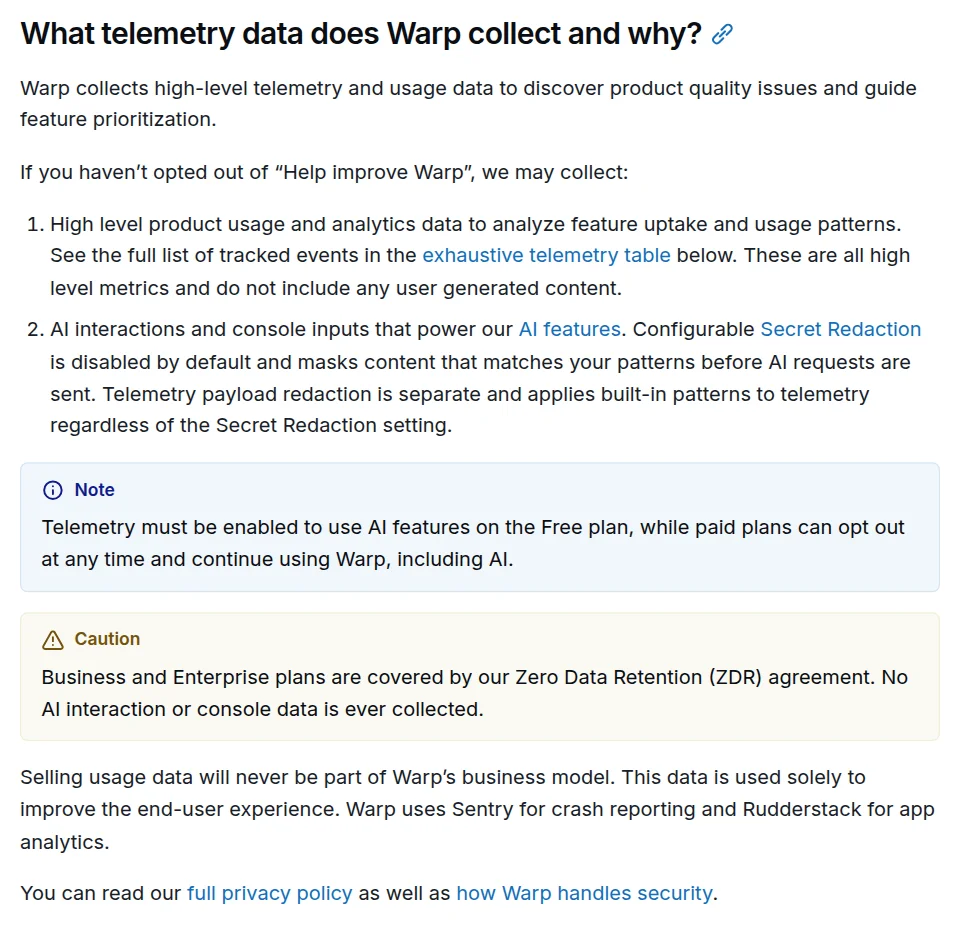
Screenshot: Warp docs, "Privacy and data control", captured October 28, 2026.
The practical problem is the personal plan. A developer who installed Warp on a work laptop and signed in with a personal Free account has been sending AI interactions to Warp the whole time, because that's the price of using AI on Free. Warp's privacy policy also lists "training, fine-tuning and improving the performance of models" among the uses of the data it collects, and it sets no fixed retention period, only criteria.
The setting that isn't in the privacy docs
Telemetry is one switch. Warp's privacy page in the app has a second one that matters more for agent work: Store AI conversations in the cloud. We read Warp's client source, which is public under AGPL v3, at the commit on main on October 28. The setting defaults to on. Its description, in the code:
- On: "Agent conversations can be shared with others and are retained when you log in on different devices." Warp adds that the data "is only stored for product functionality" and not used for analytics.
- Off: "Agent conversations are only stored locally on your machine, are lost upon logout, and cannot be shared. Note: conversation data for ambient agents are still stored in the cloud."
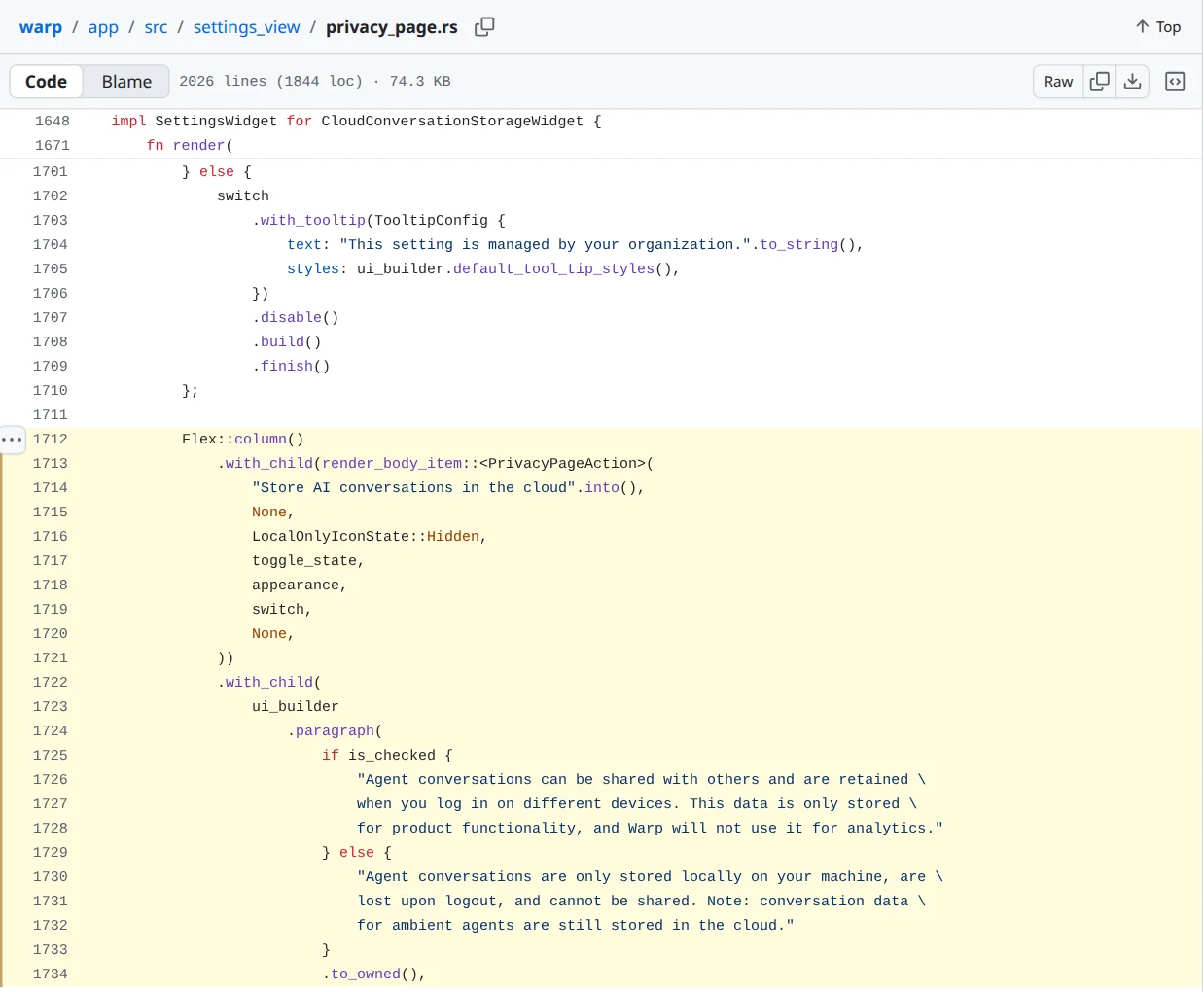
Screenshot: GitHub, warpdotdev/warp, app/src/settings_view/privacy_page.rs at commit eafc6d1, captured October 28, 2026.
So turning telemetry off doesn't by itself keep agent conversations off Warp's servers, and the docs page on privacy doesn't mention this switch. An organization can lock it: the code shows the toggle greyed out with "This setting is managed by your organization." We don't know whether "agent trace" in Lloyd's statement means these stored conversations, telemetry, or something else. Warp hasn't said.
The checklist
- Find every Warp install and its plan. Ask developers directly, and check your device management inventory if you have one. Note which accounts are personal Free, Build or Max and which are on your Business or Enterprise team.
- Check for Warp's notice. Warp says anyone affected will receive instructions from it. Ask everyone to search their inbox, including personal addresses used to sign in to Warp. Treat unexpected "security" emails claiming to come from Warp with suspicion until you've checked them against Warp's own channels.
- Rotate secrets that went through agent sessions, if you were notified. Tokens, keys or connection strings pasted into an agent prompt, or printed in a terminal while an agent was reading it, could be in a trace. If you're notified, or can't rule it out for a high-value credential, rotate it with the service that issued it, then check that service's logs for use you don't recognize.
- Turn off the two telemetry switches on paid personal plans. Settings > Privacy (or search "privacy" in the Command Palette), then turn off "Help improve Warp" and "Send crash reports". On the Free plan, this turns off AI, so the real fix there is item 6.
- Turn off "Store AI conversations in the cloud" unless the team actually shares agent conversations. Remember the note in Warp's own code: ambient agents keep storing conversation data in the cloud either way.
- Move work use to a team plan with zero data retention. Business covers up to 25 seats and comes with "admin-configurable data controls" and SAML SSO. If that isn't in the budget, write down that Warp's AI features on personal plans aren't approved for client code.
- Turn on Secret Redaction with your own patterns. Warp's docs say it's "disabled by default". It masks matching content before AI requests leave the machine, so add patterns for your key formats.
- Ask Warp three questions in writing. Did the exposed traces include prompts, command output or file contents? Which vendor was involved, and is it in your subprocessor list? Were any Business or Enterprise customers affected? Keep the replies with your vendor file.
How Warp compares with Copilot, Claude Code and Cursor
None of these tools is the same, but each keeps something from agent sessions, and the defaults differ.
| Tool | What it keeps from AI sessions by default | How to keep it off the vendor's servers |
|---|---|---|
| Warp | AI interactions with telemetry on; agent conversations with cloud storage on (both default on) | Business or Enterprise (zero data retention), or turn both switches off on a paid plan |
| GitHub Copilot Business, Enterprise | IDE chat, completions and CLI: "Not retained by default". Other surfaces: up to 28 days. Coding agent session logs: "retained for the life of the account" | Use IDE chat and completions for sensitive repos; treat coding agent logs as kept for as long as the account exists |
| Claude Code, commercial (Team, Enterprise, API) | 30 days on Anthropic's side; transcripts also stored locally "in plaintext" for 30 days; cloud sessions keep the transcript | Zero data retention on Claude for Enterprise, by arrangement |
| Cursor | With Privacy Mode off, it "may use and store codebase data, prompts"; Privacy Mode is on by default for team members | Team plan, or Privacy Mode on for every individual account |
Claude Code's local transcripts are a different exposure: a vendor breach won't reach them, but malware on the laptop can, which is the risk our Claude token theft piece deals with. The policy side, which plans to approve and which to block, is in our AI coding tools policy.
What people asked
On Hacker News, the question most teams have came up the morning after the thread opened. "So did they inform users who are impacted ?" one user asked. The account zachlloyd replied: "yes, we are directly reaching out to folks who we identify as impacted." Nobody in the thread had an answer yet to what the traces contained.
What we could not confirm
We don't know what "agent trace" covers: stored conversations, command output, file contents or only metadata. We don't know which vendor was exploited, or whether any Business or Enterprise customer was among those affected. We read Warp's client source but didn't run the app or watch its network traffic, so the defaults above come from the code and the docs, not from a test of a live install. Our reading of the code is as of commit eafc6d1 on October 28, and Warp can change it in any release.