Use this if someone on your team runs Ollama anywhere other than their own laptop: a GPU box under a desk, a cloud VM that feeds a chatbot or an automation tool, a Docker container somebody started "just to test." Ollama's local API has no login at all. That's fine while it listens only on 127.0.0.1, which is the default. It stops being fine the moment the port answers from somewhere else, and this month there's fresh evidence that attackers are looking for AI servers. Our verdict: find every Ollama you run and where it listens, fix the Docker ones first, and put a real login in front of anything that has to be shared.
Why now: On October 23, 2026, JPCERT/CC, the Japan Computer Emergency Response Team Coordination Center, added a "Case E" to its advisory on the run of break-ins at Japanese organizations: attack attempts using AI penetration-testing platforms, naming Cairn, CyberStrikeAI and ARTEX. The same day, TrendAI published in Japanese its analysis of three attackers' servers. The English edition followed on October 27, and The Hacker News reported it that evening. One of the three operators had AI services on its target list.
What the Japan reports found
JPCERT's Case E says the tools were aimed mainly at web applications open to the internet, probing for vulnerabilities and for sloppy setups, including theft of configuration and backup files. The attempts also hit WSUS servers exposed to the internet. The advisory lists nine source IP addresses with the dates they were seen. Its fixes are the familiar ones, plus a line worth taping to a monitor: if a service or a management function isn't needed on the internet for the business, stop publishing it. JPCERT also notes that BI tools and employee-only systems, things nobody meant for the public, were among the victims.
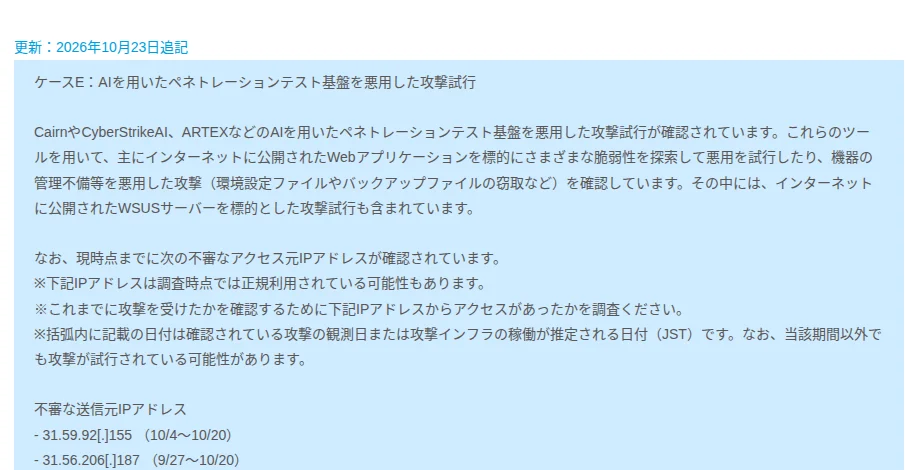
Screenshot: JPCERT/CC, JPCERT-AT-2026-0030, Case E as added on October 23, 2026 (Japanese). Captured October 28, 2026.
TrendAI rebuilt three attackers' operations from files they had left in open directories on their own servers. The headline case used CyberStrikeAI, an open-source AI pentest tool, with 44 agents sharing the work, and ran validation against at least 19 organizations, at least 16 of them in Japan. Even there, the deepest intrusion started at "an unauthenticated, publicly accessible administration interface."
The case that matters here is the second one. That operator was a human using an LLM to plan and write tools, and its target lists "included AI workflow platforms, LLM preprocessing platforms, and inference services." TrendAI found tools "intended to hijack access to others' AI services" and infers the goal was "to obtain large amounts of inference capacity at low cost." Several hundred attempts against one cluster all ended in errors, so this isn't a story about a mass breach of AI servers. It's a story about AI servers being on the list. TrendAI's fourth defensive priority reads like a ticket you could file today: "Check whether internal AI services, including inference, workflows, and GPU infrastructure, are externally exposed."
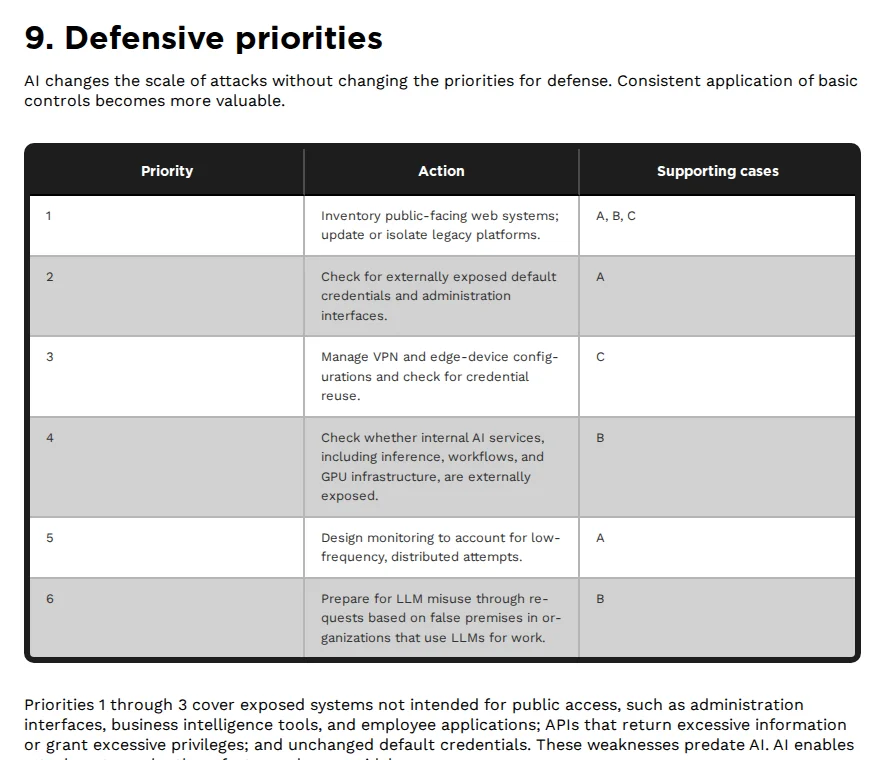
Screenshot: TrendAI, "Not Only ARTEX: The Different Levels AI is Used in Attacks Targeting Japan", section 9, October 27, 2026. Captured October 28, 2026.
How many servers are we talking about? In January, SentinelOne and Censys reported 175,000 exposed Ollama hosts in 130 countries, reachable "without authorization, monitoring, or billing controls." SentinelOne's summary of the economics: "The victim pays the electricity bill and infrastructure costs while the attacker receives the generated output."
What we checked
On October 28 we read Ollama's documentation and tested the Ollama server on one of our Linux machines.
- There's no login on the local API. Ollama's API docs say so in one line: "The local API at http://localhost:11434 does not require authentication." The same API reference lists endpoints to list models, generate text, pull new models and delete them. Whoever reaches the port gets all four.
- The default is safe. Ollama "binds 127.0.0.1 port 11434 by default." Our server, version 0.32.1, was listening on 127.0.0.1:11434. From the same machine,
/api/versionand/api/tagsanswered with no key or token, and/api/tagslisted the installed model. The same request to the machine's own LAN address failed with curl exit code 7, "Failed to connect to host." Nothing else on the network could reach it. - The documented ways to share it don't add a login. The FAQ explains how to change the bind address with
OLLAMA_HOST, how to put Nginx in front, and gives one-line ngrok and Cloudflare Tunnel commands. None of those examples includes a password or any other access check. That's fine for a doc page and risky for a work machine. - A signed-in server can lend out your cloud account. Signed in, Ollama "authenticates cloud requests for you," and the docs add: "This also works through the local API." Our reading: an exposed server that's signed in gives strangers your Ollama cloud models as well as your GPU. The off switch is
OLLAMA_NO_CLOUD=1, after which the log shows "Ollama cloud disabled: true". - Docker is where the safe default breaks. Ollama's Docker page starts with
docker run -d -v ollama:/root/.ollama -p 11434:11434 --name ollama ollama/ollama. Docker's docs say that a port published without a host address goes to all host addresses, and that "Publishing container ports is insecure by default." On a machine using ufw, Ubuntu's firewall, Docker routes container traffic before ufw's rules run, "effectively ignoring your firewall configuration." The firewall you think is guarding that box may not be.
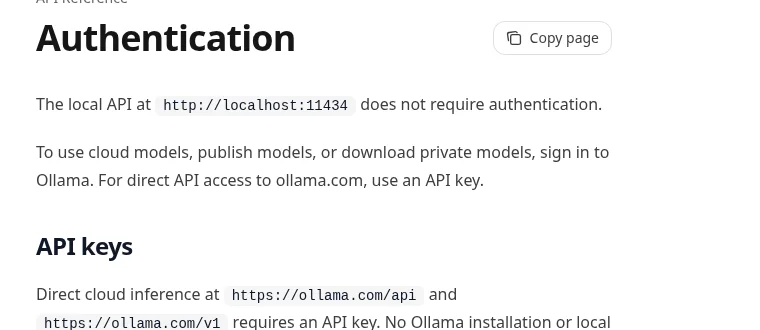
Screenshot: Ollama documentation, API Reference, Authentication. Captured October 28, 2026.
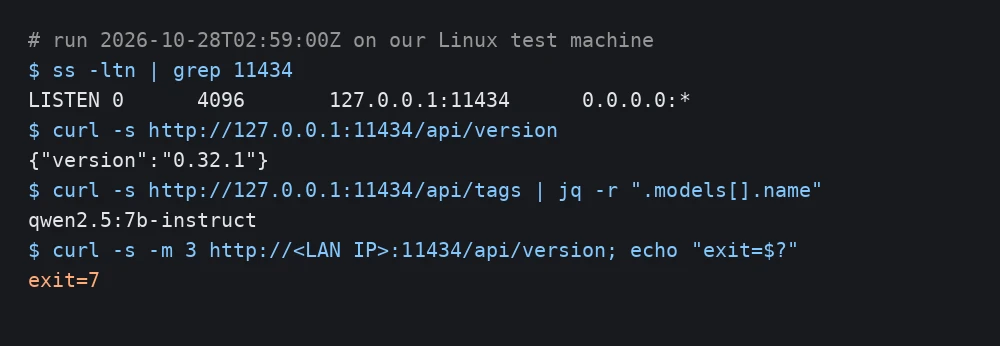
Image: AI Policy Desk. Our terminal output, October 28, 2026, 02:59 UTC; the LAN address is masked.
One detail we enjoyed. CyberStrikeAI is still public on GitHub, now under the AIPentest account, Apache 2.0 licensed, with more than 8,000 stars on October 28. Its example config listens on 0.0.0.0, every network interface, on port 8080, and TrendAI's write-up of the Japan case mentions the operator's "exposed management console." Attackers leave ports open too.
Steps, in order
- Find every Ollama you run. On Linux,
ss -ltnp | grep 11434. On a Mac,lsof -nP -iTCP:11434 -sTCP:LISTEN. On Windows,netstat -ano | findstr 11434. For containers,docker ps --format "{{.Names}} {{.Ports}}". An address of 0.0.0.0,*,[::]or a public IP means more than that one machine can reach it. Then ask the team, because the box under somebody's desk won't show up in your cloud console. - Test from outside. From a phone on mobile data, or any network that isn't yours, run
curl -m 5 http://<your-public-ip>:11434/api/versionagainst your own addresses and nobody else's. A version number in the reply means the internet can use that server. A timeout, or curl exit code 7, is what you want. - Close it. Remove
OLLAMA_HOST=0.0.0.0from the service settings, or set it to 127.0.0.1, and restart. In Docker, publish to loopback with-p 127.0.0.1:11434:11434; Docker's docs say that with the localhost address in the flag, "only the Docker host can access the published container port." Don't count on ufw for Docker ports. - If other people need it, put a login in front. A reverse proxy that checks a password or your single sign-on, or a VPN only your team can join. An odd port number isn't a login. Skip the FAQ's tunnel one-liners on work machines unless the tunnel has its own access rule.
- Turn cloud off on shared servers. Set
OLLAMA_NO_CLOUD=1, or"disable_ollama_cloud": truein~/.ollama/server.json, restart, and look for the log line. Nobody on a shared GPU box needs your account's cloud models by accident. - Check the rest of the AI stack the same way. TrendAI's list was workflow platforms, preprocessing platforms and inference services, not Ollama by name. Whatever your team hosts to feed or run models, give its port the same two checks.
- If you run public web apps, check your logs for JPCERT's addresses. Copy the nine Case E addresses from the advisory into a file, remove the
[.]defanging, and rungrep -F -f jpcert-case-e.txt /var/log/nginx/access.log*or the equivalent for your server. JPCERT warns that some addresses may have been in legitimate use when it checked them, so a hit means look closer, not "we've been breached." TrendAI is withholding its own indicators while investigations run.
What to log
Give each AI server one row in your AI risk register or tool inventory:
| Field | What to write |
|---|---|
| Host and owner | Machine name and the person who runs it |
| Software and version | For example, Ollama 0.32.1 |
| Listens on | 127.0.0.1:11434, or whatever step 1 showed |
| Outside test | Date, network you tested from, result (reply, timeout, exit code 7) |
| How people log in | VPN, reverse proxy with SSO, or local only |
| Cloud features | On or off, and how it was turned off |
| Last checked | Date, and rerun after any change to Docker, the firewall or the router |
Keep web server logs long enough to look back, too. TrendAI says the CyberStrikeAI operator throttled its traffic to each target to avoid detection, so one organization's logs may show only a few requests.
What people said
On r/hacking, u/truthfly, who built a scanner after the January research came out, posted the same first check we'd give: "If you see 0.0.0.0:11434 on a host that shouldn't be public, you probably want to fix that now". They also wrote that by their last count, "it was already 181,000+ exposed instances," above the published figure.
https://www.reddit.com/r/hacking/comments/1qtqobb/175k_publicly_exposed_ollama_servers_so_i_built_a/
What we could not confirm
We didn't scan the internet, and we can't say whether any Ollama server in Japan was among the AI services TrendAI's second operator went after: the report names categories, not products. The 175,000 figure comes from research published in January 2026, and the 181,000 count is one Reddit user's. We tested one Ollama version on Linux, not Docker Desktop on a Mac or Windows. JPCERT's nine addresses are the ones it has published, not a complete list.
Related Reading
- CISA AI Token Guidance: A Denial-of-Wallet Playbook
- ARTEX AI Hacking Arrests in Korea: Extortion Playbook
- ConnectWise Cloud Backup Breach: What to Check in M365
- LiteLLM 1.107.0 malware and Railway leak: keys to rotate
- AI Risk Register Template: Free, Scored and Pre-Filled
- NCSC's 7-Point Agentic AI Security Checklist for Teams