On December 9, 2026, Microsoft switches Claude in Copilot to All users for every EU, EFTA and UK tenant that never saved an Anthropic choice, and for every tenant still on the retiring "All users for Microsoft 365 apps only" option. To keep Claude off or limited, someone with the AI Administrator or Global Administrator role has to open Copilot > Settings > View all > AI providers operating as Microsoft subprocessors > Anthropic in the Microsoft 365 admin center before then and save No users or Specific users and groups.
The two regions don't end up in the same place. Microsoft's EU and EFTA notice, MC1546438, moves Claude processing into the EU Data Boundary in "early December". The UK notice, MC1546435, says UK tenants "aren't in scope" for the Boundary, and Microsoft's own subprocessor list gives Anthropic's processing location as the United States.
This page is for the person who looks after a 10 to 50 seat Microsoft 365 tenant and also keeps the GDPR paperwork.
What changes for Claude in Copilot on December 9, by the option saved today
Microsoft's Learn page Enable Claude models only for Copilot experiences in Microsoft 365 apps, updated November 20, 2026, lists five starting positions. We added the two right-hand columns from the two Message Center notices and the subprocessor list.
| Saved before December 9 | Selected from December 9 | EU and EFTA: where Claude is processed | UK: where Claude is processed |
|---|---|---|---|
| No selection made | All users | Inside the EU Data Boundary once Microsoft moves it ("early December" per MC1546438) | United States (subprocessor list, November 4, 2026) |
| All users for Microsoft 365 apps only (Word, Excel, PowerPoint) | All users | Same as above | Same as above |
| All users for all Copilot and generative AI experiences | All users | Same as above | Same as above |
| Specific users and groups for all Copilot and generative AI experiences | Specific users and groups | Same as above, for those people only | Same as above, for those people only |
| No users | No users | Claude not used | Claude not used |
The first row is "No selection made", which is not the same as "No users", yet Microsoft's other Learn page, Claude models from Anthropic in Microsoft Online Services, says that in the EU, EFTA and UK the setting "appears but the default is set to No users". A tenant whose page shows No users may never have saved it. Neither page says how to tell the difference, so we'd treat any No users you didn't click yourself as "No selection made".
Learn also says the apps-only option is on by default for EU, EFTA and UK tenants created after March 25, 2026, and that before mid-September 2026 it was called "Allow Anthropic models in Copilot experiences within Microsoft 365 apps". Newer tenants are on the row that becomes All users without anyone having chosen it.
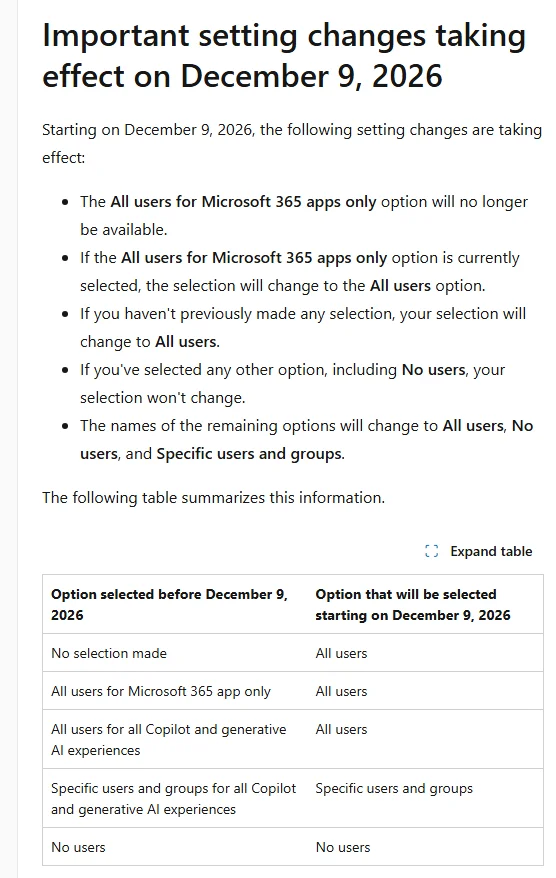
Source: Enable Claude models only for Copilot experiences in Microsoft 365 apps, section "Important setting changes taking effect on December 9, 2026", Microsoft Learn (updated November 20, 2026), captured November 21, 2026.
After the switch the three remaining options are renamed All users, No users and Specific users and groups. If you record the setting in your GDPR Article 30 record of processing for AI tools, use the new names from December 9.
EU and EFTA versus the UK: MC1546438 and MC1546435 side by side
Microsoft sent both notices on November 9, 2026, both titled "Action may be required: Claude models in…". We read them line by line, MC1546438 from the mc.merill.net archive and MC1546435 from the MWPro copy. The mechanics are identical. The data lines are not.
| MC1546438 (EU and EFTA) | MC1546435 (UK) | |
|---|---|---|
| Who it covers | "EU Data Boundary-eligible tenants in the EU and EFTA" | "tenants in the UK" |
| Rollout rows | Early December: processing moves into the EU Data Boundary. December 9: enablement | December 9: enablement only |
| Data location line | Processing "moves into the EU Data Boundary automatically once available" | "Tenants in the UK aren't in scope for the EU Data Boundary", with a pointer to the subprocessors list |
| Same in both | AI Administrator or Global Administrator role; same admin center path; Data Retention models excluded; Claude can be disabled any time after December 9 | Same |
For EU and EFTA tenants the problem is timing. Microsoft gives three descriptions of when Claude enters the Boundary: "By the end of 2026" in the November 5 Copilot blog by Charles Lamanna, "starting in December 2026" on Learn, and "Early December 2026" in MC1546438. None of them promises it happens before the December 9 switch, and MC1546438 says plainly: "Until early December 2026, Claude models aren't covered by the EU Data Boundary processing commitment."
For UK tenants there is no timing question, only a location. The Microsoft Online Services Subprocessors list that Microsoft's Claude page links to, in its current issue dated November 4, 2026, has one row for Anthropic:

Source: Microsoft Online Services Subprocessors, date of issue November 4, 2026, page 6, section 3 "Artificial Intelligence Subprocessors", downloaded and cropped November 21, 2026.
The Register's Richard Speed linked to the same Microsoft document and summed up the UK position on November 10: leaving the setting untouched "means opting in". One correction to coverage you may have seen: Notebookcheck's November 14 piece says nothing changes in the EU. MC1546438 says the opposite. EU and EFTA tenants with no selection get All users on December 9 too.
The checklist: eleven checks before December 9
Run these in order. Steps 1 to 6 happen in the admin center; steps 7 to 11 are the paperwork and the places the switch doesn't reach.
- 1. Find who holds AI Administrator or Global Administrator. Nobody else can change this page.
- 2. Open Copilot > Settings > View all > AI providers operating as Microsoft subprocessors > Anthropic and write down the option shown and the date.
- 3. If it shows No users and you want Claude off, select No users again and click Save. Microsoft's table only promises to keep a selection someone made.
- 4. If you want a trial, create a Microsoft Entra ID security group (nested groups work), add the pilot users, choose Specific users and groups, and save. Microsoft's user and group access page says the assignment is enforced across Copilot and Copilot Studio.
- 5. If the page shows All users for Microsoft 365 apps only, decide now. Left alone, it becomes All users across every Copilot experience and Copilot Studio on December 9.
- 6. Take a screenshot of the saved page with the date in the file name and attach it to the vendor entry for Microsoft. Microsoft doesn't ask for this; we suggest it as the simplest proof of what you chose before the switch.
- 7. Check the separate Anthropic models with Data Retention control. Learn says these models, such as Claude Fable 5 and Claude Mythos 5, run under Anthropic's own Commercial Terms and DPA, with Anthropic storing most inputs and outputs for up to 30 days. They are off by default, this change doesn't touch them, and we'd keep them off until someone has read Anthropic's terms.
- 8. If anyone builds agents in Copilot Studio, open the Power Platform admin center, pick each environment, then Settings > Product > Features, and check the Anthropic toggle. Microsoft's Power Platform page says the two admin actions are separate. The same page says PCI DSS coverage doesn't apply when Anthropic models in Copilot Studio handle cardholder data, so keep card data out of those agents.
- 9. Tell the helpdesk how Copilot Cowork picks models, which differs by region. Microsoft's Cowork models page says that for an organization inside the EU Data Boundary "only GPT models are supported", so EU and EFTA users won't see Claude in Cowork until that note changes. In the UK, Cowork's Auto picker chooses from the models your organization has enabled, so once Claude is on, users can get Claude answers without picking Claude; the same page adds that in some regions and for scheduled tasks Auto uses the default model instead.
- 10. Update the processor entry for Microsoft in your record of processing: Anthropic, PBC as a Microsoft subprocessor, the users or group in scope, and the processing location for your region from the table above.
- 11. Add a line to your AI acceptable use policy naming which Copilot models staff may use, if it lists approved tools by name.
Which Claude in Copilot option we'd pick for a 10 to 50 person team
Daniel Bradley, a UK Microsoft MVP, wrote on November 10 that he has "worked with many organisations using Copilot who have opted to turn off Claude models because of where their data was processed". December 9 removes that reason for EU and EFTA tenants and leaves it in place for the UK, so the answer splits by region.
For EU and EFTA, we'd pick Specific users and groups with a pilot group of three to five people now, and move to All users after Microsoft's Learn page drops the "currently excluded from the EU Data Boundary" line. Once processing is inside the Boundary, Claude joins the Microsoft-operated models that the November 5 blog says already process data there. Switching everyone on before that line changes leaves a window where Claude runs outside the Boundary, and nothing on Microsoft's side says how long it lasts.
For the UK, we'd pick No users until whoever signs off your data protection impact assessment has seen the US location in the subprocessor list, then a named group. The Microsoft DPA still applies, so this is a documentation step rather than a reason to avoid Claude for good. Do it now, not after a user asks why Copilot answered in a different style.
Outside the EU, EFTA and UK nothing changes on December 9. Learn says Claude is already on by default for most commercial tenants there, so the same Anthropic page is worth one look if nobody has opened it. The Anthropic vs OpenAI DPA comparison covers Anthropic's own terms if you are weighing the Data Retention models.
What the switch leaves alone: Data Retention models, GCC and Copilot Studio
For Copilot Cowork, what No users costs depends on the region. Learn warns that "some features are only available when Claude models are enabled", and Microsoft's subprocessor overview names Cowork as one that uses Anthropic models. For a UK team that relies on Cowork, No users takes Claude out of it, so test the setting on one account before saving it for everyone. In the EU and EFTA, Cowork supports only GPT models inside the Boundary today, so No users changes nothing there yet; the November 5 blog says Claude reaches Cowork in the Boundary by the end of 2026.
Anthropic models with Data Retention keep their own off-by-default setting (step 7 above). Government clouds aren't in either notice: non-federal GCC has had its own Claude setting since July 22, 2026, and Claude isn't offered in federal GCC, GCC High or DoD. Copilot Studio keeps its second switch in the Power Platform admin center, and that page, dated October 12, 2026, still lists Anthropic models in Copilot Studio as outside EU Data Boundary commitments.
For the wider Copilot picture, our Notion AI vs Microsoft 365 Copilot comparison and Microsoft 365 vs Google Workspace for GDPR describe Anthropic as outside the Boundary, which stays true for EU tenants until Microsoft completes the move.
What Microsoft's pages don't settle yet
- How a never-saved tenant looks in the admin center. A Learn screenshot or line that shows "no selection" next to a saved No users would settle it; until one exists, save your choice again.
- When Boundary processing for Claude starts. It is settled when the "currently excluded from the EU Data Boundary" line leaves the Claude page on Learn or a Message Center post announces availability.
- Whether Copilot Studio moves into the Boundary with the rest of Copilot. The November 5 blog promises Claude "across Copilot experiences, including Copilot Cowork" without naming Copilot Studio, and the Power Platform page still excludes it.
- Whether the next subprocessor list gives Anthropic an EU location. The November 4 issue still says United States, and EEA and UK admins are told about new issues through the Message Center.
Checked: Microsoft Learn's two Claude pages (both updated November 20, 2026), the user and group access page, the AI subprocessor overview, the Power Platform external models page and the Cowork models page; MC1546438 and MC1546435 through public archives; the November 5 Copilot blog; the Microsoft Online Services Subprocessors list of November 4, 2026; and coverage by The Register, Notebookcheck, Our Cloud Network and Schneider IT Management, on November 21, 2026. We have no EU, EFTA or UK test tenant, so nothing here describes the admin center from our own use.
Your dates between now and December 9
- By Friday, November 27: run checks 1 to 6, so a saved choice is in place with a dated screenshot.
- Tuesday, December 1 to Tuesday, December 8: open the Learn page Claude models from Anthropic in Microsoft Online Services and the Message Center each morning, looking for the EU Data Boundary line to change. EU and EFTA teams widen the pilot group only after it does.
- Wednesday, December 9: reopen the Anthropic page, confirm the options now read All users, No users and Specific users and groups, and that your saved choice is still selected.
- Thursday, December 10: update the record of processing with the new option name and, for EU and EFTA tenants, the processing location Microsoft has confirmed by then.
Related reading
- GDPR-compliant AI assistant for employees: EU data and DPA compares where Copilot, ChatGPT, Gemini and Claude process EU data, the question December 9 reopens.
- AI vendor DPA tracker 2026 lists the DPAs and subprocessor terms to file next to the Microsoft entry.
- Disable Gemini in Chrome and Copilot in Edge: policy names is the browser-side companion if you are switching AI features off by policy.