Image: Pexels, used under the Pexels License.
This is for whoever got told "stop people pasting customer data into ChatGPT" and has to make it true on real devices. There are two different jobs hiding in that request. One is a full block. The other is letting staff use the ChatGPT workspace you pay for while shutting out their personal accounts. The tools for each are different, and the second one can't be done in browser policy alone.
Evergreen playbook, not a news item. Checked against OpenAI, Google, Microsoft and Fortinet documentation and our own test on October 26, 2026.
Pick the job first
| Goal | What to use | What you need | What it misses |
|---|---|---|---|
| Nobody uses ChatGPT | DNS or firewall block, plus browser URLBlocklist | Control of DNS or the firewall, managed browsers | Phones on mobile data, unmanaged laptops off your network |
| Only our paid workspace | Proxy or SASE that injects the ChatGPT-Allowed-Workspace-Id header | ChatGPT Enterprise, TLS inspection, your root certificate on devices | Traffic that never passes through the proxy |
| Nobody uses it logged out | Block URLs starting with chatgpt.com/backend-anon/ at the proxy | TLS inspection | Same as above |
If you skip the policy conversation and go straight to blocking, people will route around it. Write down which job you are doing in your shadow AI policy before you touch a firewall.
What we saw when we loaded ChatGPT
On October 26, 2026 we loaded chatgpt.com in headless Chromium, logged out, and recorded every request for 12 seconds. We ran it twice: 529 requests the first time, 296 the second. Every one went to a single hostname, chatgpt.com. Scripts, styles and API calls all came from there.
The logged-out product showed up as a request to chatgpt.com/backend-anon/beacons/home. Chromium labelled it a fetch, not a page navigation. That detail matters below.
From the same machine, chat.openai.com answered with an HTTP 308 redirect to https://chatgpt.com/. The two app hostnames OpenAI lists for phones, ios.chat.openai.com and android.chat.openai.com, both resolved to Cloudflare. desktop.chatgpt.com, which OpenAI lists for the desktop app, returned no A record from our resolver that day.
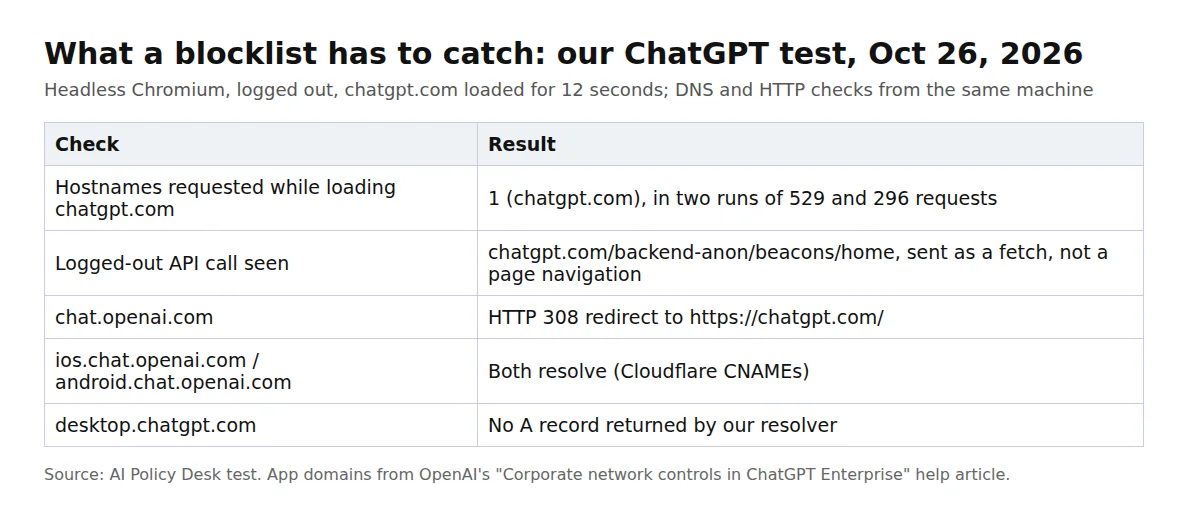
Source: AI Policy Desk test, October 26, 2026.
So for the web app, a blocklist with chatgpt.com and chat.openai.com covers what we saw. Our shadow AI detection guide has a wider DNS list for other AI tools.
Route 1: browser policy (Chrome, Edge, Intune)
Chrome and Edge both read a policy called URLBlocklist. In Chrome's pattern format a bare hostname also matches its subdomains, and "an optional . (dot) can prefix the host field to disable subdomain matching." So two entries are enough:
{
  "URLBlocklist": ["chatgpt.com", "chat.openai.com"]
}
On Linux that file goes in /etc/opt/chrome/policies/managed/. On Windows, Microsoft's guide to configuring Edge with Intune uses a Settings Catalog profile; in Group Policy terms the setting is called "Block access to a list of URLs." Edge limits the list to 1000 entries.
One line in Microsoft's documentation is worth reading before you rely on this: the policy "doesn't prevent the page from updating dynamically through JavaScript." That's why a path rule in the browser is a weak way to stop logged-out use: the backend-anon request we saw was a script fetch, not a page load. Block the whole hostname in the browser, and handle path rules at the proxy.
The ChatGPT desktop app has its own browser
Don't skip this part if the ChatGPT desktop app is installed anywhere. OpenAI says ChatGPT desktop's in-app browser "is based on Chromium and inherits its enterprise policy framework." It uses Chrome's policy names, but reads them from its own location:
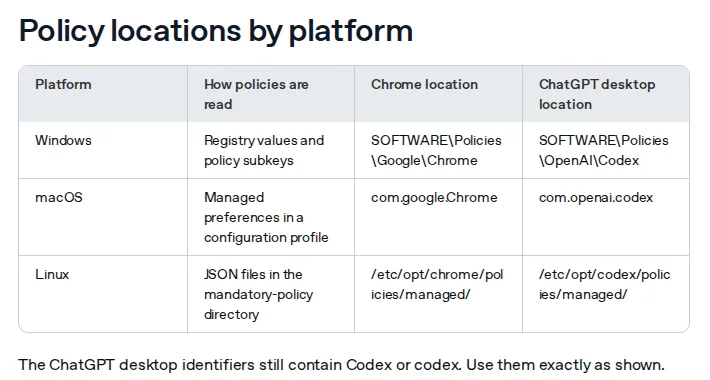
Screenshot: OpenAI Help Center, "Managing ChatGPT desktop browser policies with MDM", policy locations table. Captured October 26, 2026.
On macOS, "A profile targeting Chrome's domain does not target ChatGPT desktop." On Windows the app falls back to Chrome's policy key only if it can't open its own; a readable ChatGPT desktop key, "including an empty one, stops fallback." OpenAI's Intune instructions for Windows use a PowerShell script under Platform scripts that writes to HKLM:\SOFTWARE\Policies\OpenAI\Codex. To check a device, open chrome://policy inside ChatGPT desktop.
If you came here looking for how to block ChatGPT Atlas: OpenAI retired it, and it was scheduled to stop working on August 9, 2026. Our AI browser agents policy covers the agent features that replaced it.
Route 2: DNS and the firewall
DNS or firewall rules catch every browser and app on your network, managed or not. Block chatgpt.com, chat.openai.com, and the three app hostnames OpenAI publishes: android.chat.openai.com, ios.chat.openai.com and desktop.chatgpt.com.
Know what you're giving up. OpenAI warns that blocking those app domains "blocks all traffic to the applications, meaning no one will be able to access ChatGPT via these platforms, regardless of whether they are using a personal or an Enterprise account." A DNS block can't tell your workspace from someone's free account. If you pay for ChatGPT, you want route 3.
Route 3: allow only your company workspace
OpenAI calls this Workspace Blocking. You add a custom HTTP header, ChatGPT-Allowed-Workspace-Id, to requests to https://chatgpt.com/*, with your workspace ID as the value. "Only the workspaces listed in the header will be accessible, and any other workspaces (including personal workspaces) are filtered out by the system."
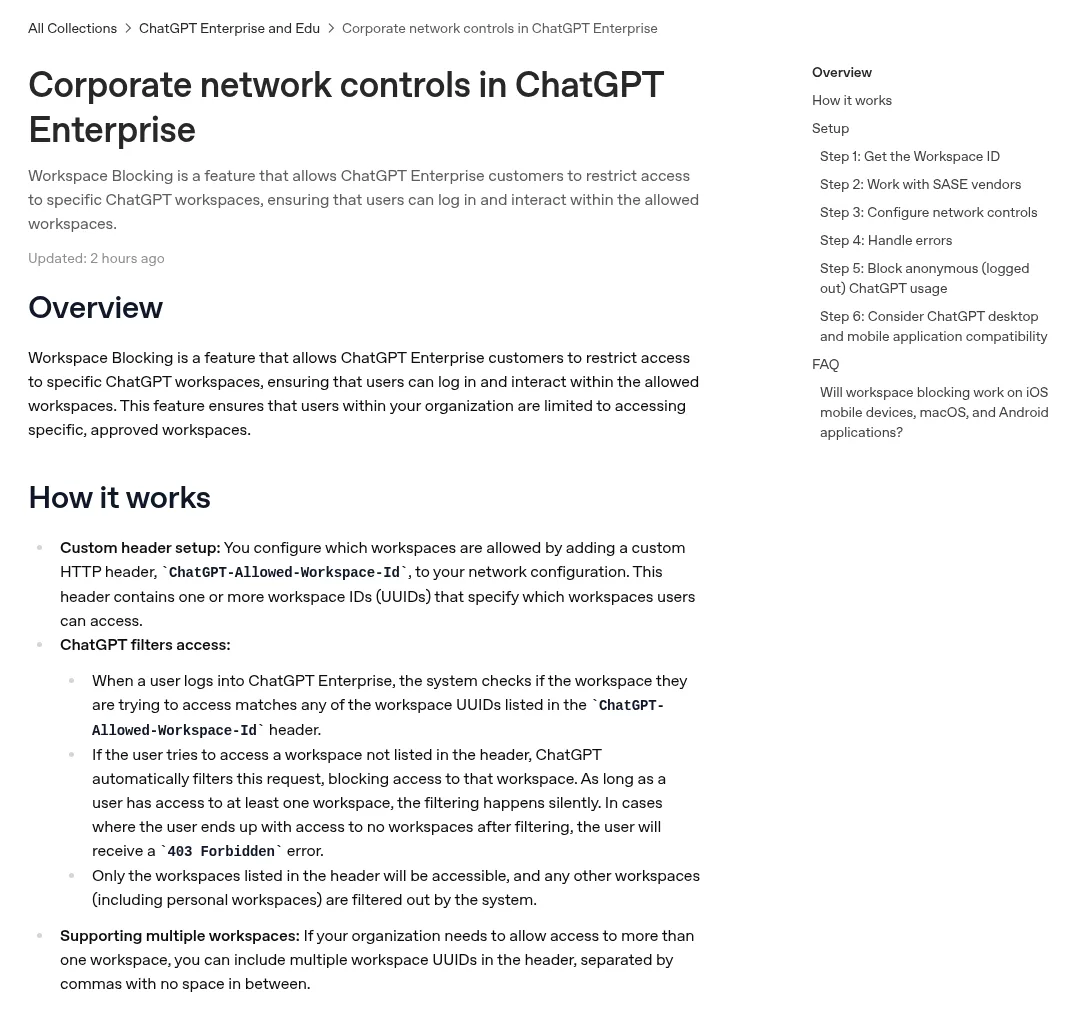
Screenshot: OpenAI Help Center, "Corporate network controls in ChatGPT Enterprise". Captured October 26, 2026.
Setup, in OpenAI's order:
- Get the workspace ID. It's a UUID in the ChatGPT Enterprise admin settings. More than one workspace goes in as a comma-separated list with no spaces.
- Insert the header at the network edge. OpenAI points you to your SASE vendor. Fortinet's guide for FortiSASE is explicit that "SSL deep inspection must be enabled" and that "Certificate inspection is not sufficient, because HTTP headers can only be inserted when the payload is decrypted." Fortinet applies the header to chatgpt.com and *.chatgpt.com.
- Expect two errors. A user left with no allowed workspace gets a 403 Forbidden. A malformed workspace ID makes every request with that header fail with 400 Bad Request, so test with a pilot group.
- Block logged-out use. ChatGPT works without an account, so block URLs that start with
https://chatgpt.com/backend-anon/at the proxy. - Handle the apps. ChatGPT's desktop and mobile apps use certificate pinning. For them to work through TLS inspection, OpenAI says you need to add your own certificates to the pin list and distribute them via MDM.
One thing we couldn't settle: OpenAI documents the header for ChatGPT Enterprise. Fortinet's guide says a workspace ID is available with "ChatGPT Enterprise or ChatGPT Team", and ChatGPT Team has since been renamed ChatGPT Business. If you're on Business, ask OpenAI before you build on it. Our Team vs Enterprise comparison covers what else differs.
What admins say
https://www.reddit.com/r/sysadmin/comments/1pf08g7/restrict_chatgpt_access_to_company_plan_only
In an r/sysadmin thread from December 5, 2025, an admin with a small group on ChatGPT Business asked how to stop people logging out and using personal plans. The top technical answer was the header: "If you do SSL inspection you can add the ChatGPT-Allowed-Workspace-Id header to requests." Another admin wished OpenAI offered company URLs instead: "This would make everyone's lives so much easier having to route enterprise users to companyname.chatgpt.com or similar url."
Phones and personal devices
Every route above works only on traffic you can see: managed browsers, managed devices, or traffic through your DNS, firewall or proxy. A personal phone on mobile data never touches any of them. That gap belongs in your ChatGPT usage policy for employees, not your firewall. Say which accounts are allowed for work data, and what happens to work data typed into anything else.
Rollout checklist
- Write the decision (full block, workspace-only, or allowed) into your AI acceptable use policy.
- Add chatgpt.com and chat.openai.com to URLBlocklist for Chrome and Edge, and the same list to the ChatGPT desktop location if the app is installed.
- For a full block, add the five hostnames to DNS or the firewall.
- For workspace-only, set up header injection and the backend-anon block on a pilot group, with TLS inspection and pinned certificates in place.
- Check one device of each type: chrome://policy, a personal login attempt, a logged-out chat, and the mobile app.
- Re-run the check when OpenAI changes its apps. The desktop policy article was updated on the day we checked.
Our take
Before you build a block, check which job you were actually given. "Stop personal ChatGPT" and "stop ChatGPT" sound the same in a meeting and need different tools. The first needs TLS inspection, and if you don't have a proxy or SASE service that can decrypt traffic, you can't do it today. In that case a full block plus a clear policy is more honest than a URLBlocklist entry that the desktop app ignores.
Related Reading
- Shadow AI Policy for Small Teams: Detection and Governance
- Shadow AI Policy Template: Free and Ready to Copy
- ChatGPT Team (Business) vs Enterprise: DPA, SCIM, Logs
- ChatGPT usage policy for employees: copy-paste template
- AI Browser Agents (Atlas, Comet): Policy for Small Teams
- AI Acceptable Use Policy Template for Small Teams
- Google Personal Intelligence Ads: Workspace vs Free Gmail