 Image: Pexels, used under the Pexels License.
Someone on your team is pasting work into an AI tool you never approved. Usually it's not defiance. The tool is free, it's fast, and nobody gave them an approved alternative. That's shadow AI, and a small company rarely has an IT person whose job is to notice.
This guide is the version we'd use at that size. Ask first, check what the survey missed with DNS and expense data, sort tools into three tiers, and give people a way to get a tool approved. We tested the DNS step ourselves on 12 AI domains on October 13, 2026, and it turned up two ways a naive block list fails.
What IBM's 2025 breach report actually says about shadow AI
IBM's Cost of a Data Breach report is the number everyone quotes, and it gets quoted loosely. An earlier version of this guide did too, so here are the findings with their real scope. The study covered 600 organizations that had a breach between March 2024 and February 2025.
| Finding | Figure | What it applies to |
|---|---|---|
| Breaches linked to shadow AI | One in five organizations (20%) | All studied organizations |
| Extra breach cost with heavy shadow AI | $670,000 on average | High shadow AI vs low or none |
| Customer PII exposed | 65% with shadow AI, 53% overall | Breached organizations |
| Intellectual property exposed | 40% with shadow AI, 33% overall | Breached organizations |
| Policies to manage AI or detect shadow AI | Only 37% | Studied organizations |
| Breaches of AI models or apps | 13%, and 97% of those lacked AI access controls | A separate finding, not shadow AI |
Sources: the IBM newsroom release and IBM's summary. The last row matters because the 97% figure is often attached to shadow AI. It belongs to the 13% of organizations whose own AI models or apps were breached. Cybersecurity Dive's write-up adds that only 34% of organizations with AI governance policies regularly check their networks.
The $670,000 is an average across companies of every size, not a small-business estimate. What it tells a small team is direction, not price: data sent to tools nobody reviewed is data you can't find or contain when something goes wrong.
How shadow AI gets into a small team
We'd look for it along five routes:
- Browser chatbots. ChatGPT, Claude, Gemini, Perplexity and similar tools need only a browser and a personal email address.
- AI features in tools you already approved. Note apps, CRMs, meeting tools and chat apps have added AI buttons since you last reviewed them. Our guide to governing embedded AI in third-party tools covers this case.
- Coding assistants. IDE extensions send code to a vendor for completions, including whatever secrets sit in that code.
- Function-specific tools. Meeting note takers, writing tools for marketing, resume screeners for hiring. Each has its own data terms.
- Personal paid subscriptions. A personal Plus or Pro plan used for work never shows up in company expenses.
Find it: survey first, then check the gaps
Ask. A one-page form: which AI tools do you use for work, for what, and with what kind of data? Frame it as an inventory so you can approve good tools, not as an audit. People who found a tool that saves them hours tend to say so if they don't expect trouble. Put the answers into an AI register.
Check expenses. Search card statements and expense reports for OpenAI, Anthropic, Google, Microsoft, Perplexity and the meeting or writing tools you know of. This finds paid tools on company cards and nothing else.
Check DNS. If your office router, firewall or DNS filter keeps query logs, search them for AI domains. This is where we ran our own test.
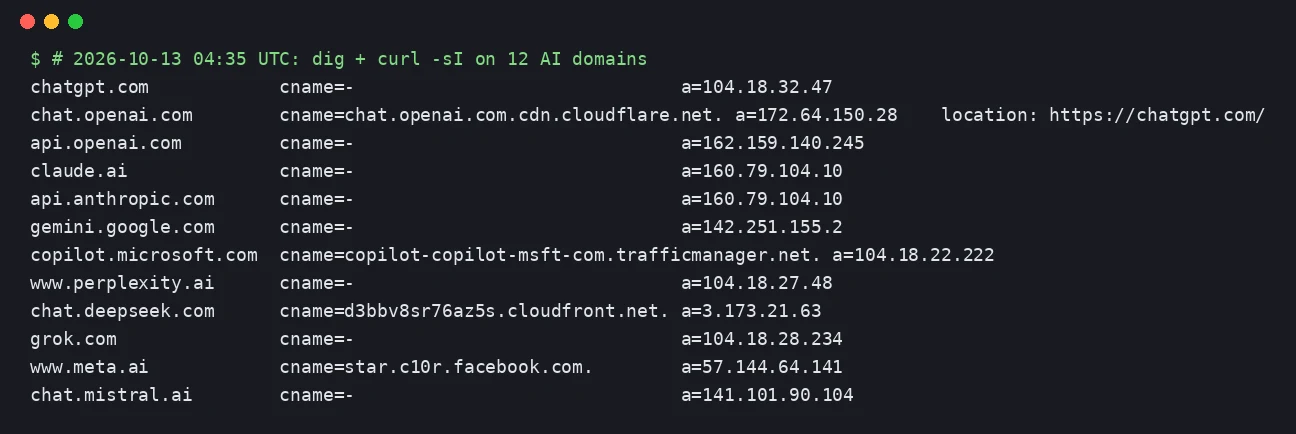 Screenshot: our terminal, dig and curl -sI on 12 AI domains, October 13, 2026 04:35 UTC.
Two results changed how we'd write the list:
- chat.openai.com now redirects to chatgpt.com. A list built a couple of years ago around openai.com will log the redirect and miss the actual sessions. Search for both, plus api.openai.com for scripts and integrations.
- Several services sit on shared CDN addresses. chatgpt.com, perplexity, grok and Copilot all resolved into Cloudflare's 104.18.x range; DeepSeek's chat sat behind CloudFront; Meta AI resolved to a Facebook host; Gemini resolved to a Google address. Blocking or searching by IP would catch unrelated sites. Match on domain names.
We also noticed claude.ai and api.anthropic.com resolved to the same address, which is one more reason to work from names. The list we'd start with:
chatgpt.com  chat.openai.com  api.openai.com
claude.ai  api.anthropic.com
gemini.google.com
copilot.microsoft.com
perplexity.ai
chat.deepseek.com
grok.com
meta.ai
chat.mistral.ai
Add the meeting, writing and coding tools your survey turns up. Re-check the list every quarter; the redirect above shows domains move.
Know the blind spot. None of this sees a personal phone on mobile data. In an r/sysadmin thread this month, one admin put it bluntly: "If you allow personal devices in the building, there's literally nothing you can do." Another argued that "the real fix is stopping company data and work logins from succeeding on unmanaged devices". Both are right, and that's why the survey and the policy carry more weight than the logs.
Sort tools into three tiers
A yes/no list fails because it's either too loose or too strict. Three tiers give people an answer for the task in front of them:
| Tier | Meaning | Typical examples |
|---|---|---|
| 1. Approved | Reviewed for data handling and contract terms; fine for normal work data | A business plan of a chatbot with training on your data switched off, your own API deployment |
| 2. Limited use | Public or low-sensitivity data only | Free consumer chatbots, browser assistants with no contract |
| 3. Prohibited | Data terms you can't accept, or no way to stop your prompts being kept or trained on | Tools with no deletion terms or no business contract |
Then add the request path. Anyone can ask for a new tool; one named person reviews it against the tiers and answers within five working days; every decision goes in a log. Without a path, people stop asking and keep using the tool anyway. Our third-party AI tool risk assessment template is the review form we'd use.
Write a policy people will follow
Two pages, four parts:
- Approved tool list with conditions, kept where people look (wiki, Notion, the onboarding doc).
- Data rules by tier. Public information can go into any approved tool. Customer personal data, source code, contracts and finances go only into Tier 1. Regulated data such as health records or card data needs its own controls.
- Request process as above: named owner, five-day answer, logged decision.
- Accidental exposure reporting. Report within 24 hours. A first report is a training conversation, not a disciplinary one, and hiding an exposure is treated as worse than the exposure. Say this explicitly or people stay quiet.
Our shadow AI policy template has these four parts written out as a policy you can copy or download as a Word file, and the AI acceptable use policy template covers the wider rules. If an exposure becomes an incident, use the AI incident response plan template.
Low-cost enforcement

- DNS filtering by domain. A DNS filter such as Cloudflare Gateway (Cloudflare Zero Trust has a free plan) can block Tier 3 domains on company devices and networks and send people to a page naming the approved alternative. It does nothing for personal devices.
- Sign-in rules. If your company accounts run through Microsoft Entra, Google Workspace or another identity provider, require managed devices for work apps. That's the r/sysadmin advice above, and it protects the data rather than chasing the tools.
- Browser extension control. On managed devices, MDM can allow or block extensions, which covers many coding and writing assistants.
- DLP. If you already pay for a suite with data loss prevention, turn on its rules for sensitive data going to AI sites before buying anything new.
Regulated data: check the contract, not the plan name
For health data under HIPAA, the question is whether you have a Business Associate Agreement with the AI vendor. OpenAI's help page says an organization must sign a BAA before using its API with protected health information, and eligible API organizations can accept it self-serve. Anthropic's BAA covers what it calls HIPAA-ready services, such as its first-party API and Enterprise plans. Neither page describes a BAA for personal accounts, so a clinic worker using a personal chatbot for patient notes is outside both. IBM's 2025 report put the average healthcare breach at $7.42 million, the highest of any industry.
For personal data under GDPR or US state privacy laws, the issue is the same in shape: an AI vendor processing customer data for you needs processor terms. Personal accounts don't come with them. Our ChatGPT Team vs Enterprise comparison covers the business plans.
 Image: Pexels, used under the Pexels License.
Remote teams and contractors
DNS logs only see your network. For a remote team, run the survey as a standing async check-in (a pinned form or a short monthly question in your team chat) rather than a one-off. Put the AI policy into contractor agreements too, since contractors work on their own devices and accounts and your MDM never reaches them.
Review cadence
- Monthly: scan DNS and expense data for new AI domains and charges; classify anything new.
- Quarterly: re-run the survey, re-check the domain list, review the request log for tools people keep asking for, and check whether approved vendors changed their data terms or added AI features.
- Yearly: review the whole stack against your data rules. Our AI governance metrics guide has the numbers worth tracking.
Our take
We'd spend the first week on the survey and the approved tool, not on blocking. The r/sysadmin thread is a fair picture of where pure enforcement ends up: either you control every device, or someone takes out a personal phone. A small team rarely controls every device.
The DNS check is still worth an afternoon, mostly to check the survey's honesty and to catch tools nobody thought to mention. Build the list from names, include chatgpt.com, and don't trust a list you haven't re-run this quarter. If you only do one technical control, make it "work accounts only on managed devices". It protects the data whichever AI tool someone opens.
How we checked this: on October 13, 2026 we re-read IBM's release and summary of its 2025 Cost of a Data Breach report and Cybersecurity Dive's coverage, read OpenAI's and Anthropic's BAA pages and Cloudflare's Zero Trust docs, ran dig and curl on 12 AI domains, and read an October r/sysadmin thread on blocking AI tools. We corrected three IBM figures from the earlier version and removed state-law claims we couldn't source. Last reviewed: October 13, 2026.
Related Reading
- AI Acceptable Use Policy Template for Small Teams
- Governing Embedded AI in Third-Party Tools
- Third-Party AI Tool Risk Assessment Template
- AI Incident Response Plan Template
- ChatGPT Team vs Enterprise: Compliance Comparison
- Your Coworker Is Fact-Checking You With AI Mid-Conversation
- AI Agent Data Controls Register: A Free Template
- AI meeting transcription apps: the data risks
- AI browser agents: governance policy for small teams
- AI employee monitoring disclosure laws: state tracker