Source: Unsplash stock photo, free to use under the Unsplash license.
On or after December 9, 2026, Claude Microsoft 365 connector write tools that are still blocked by default turn on at Needs approval. Any of the 11 send, calendar and Teams tools nobody has set individually moves to Needs approval too, unless the whole connector is set to Blocked. That covers Team and Enterprise organizations that added the connector before November 9, 2026, so an Owner who wants a tool to stay off has to open Organization settings > Connectors > Microsoft 365 and save Blocked for it before then.
The same date ends Anthropic's limit on those 11 tools, which send email, set automatic replies, change calendars or post in Teams. After it, members can pick Always allow for one of them only if an admin set that tool to Always allow first. Our recommendation for a 10 to 50 person team: block the two inbox rule tools, keep everything that sends or invites on Needs approval, and use Always allow only for drafts and categories.
This is Anthropic's connector inside Claude. The other December 9 change, Microsoft turning on Claude models inside Copilot for EU, EFTA and UK tenants, is a separate switch in the Microsoft 365 admin center, and that checklist covers it. Microsoft's own Copilot controls in the same tenant are in our Copilot data governance checklist.
Which Claude Microsoft 365 connector setups change on December 9
Anthropic's setup article and security guide describe the change in pieces. We put them in one table.
| Your situation | What happens on or after December 9, 2026 | What to do before then |
|---|---|---|
| Team or Enterprise, connector added before November 9, 2026, tool never set | Tools blocked by default turn on at Needs approval; any of the 11 not set individually goes to Needs approval, even if the connector default is No restriction | Save Blocked, Needs approval or Always allow for each tool |
| Same, tool already saved by an admin | Setting kept; Blocked stays Blocked | Check that it was saved on every Microsoft 365 connector |
| Same, Always allow saved before November 9 | Doesn't end the limit until an admin saves it again | Save it again now if you want it |
| Whole connector set to Blocked | Tools stay blocked | Nothing |
| Connector first added after November 9, 2026 | No limit to remove; admins already choose per tool | Review the settings anyway |
| Organization with HIPAA enabled | Outside these changes; no notice; the limit stays | Nothing for December 9 |
| Free, Pro, Max or Ultra plan | Not part of the change; users can already choose Always allow for these tools | See the personal-plan step below |
Two lines trip people up. Removing the connector and adding it again "usually keeps the organization's original install date", so it doesn't get you out of the change. And organizations that used the connector before write tools, or before the Teams write tools launched in September 2026, have "some" tools blocked by default; Anthropic's pages don't list which ones.
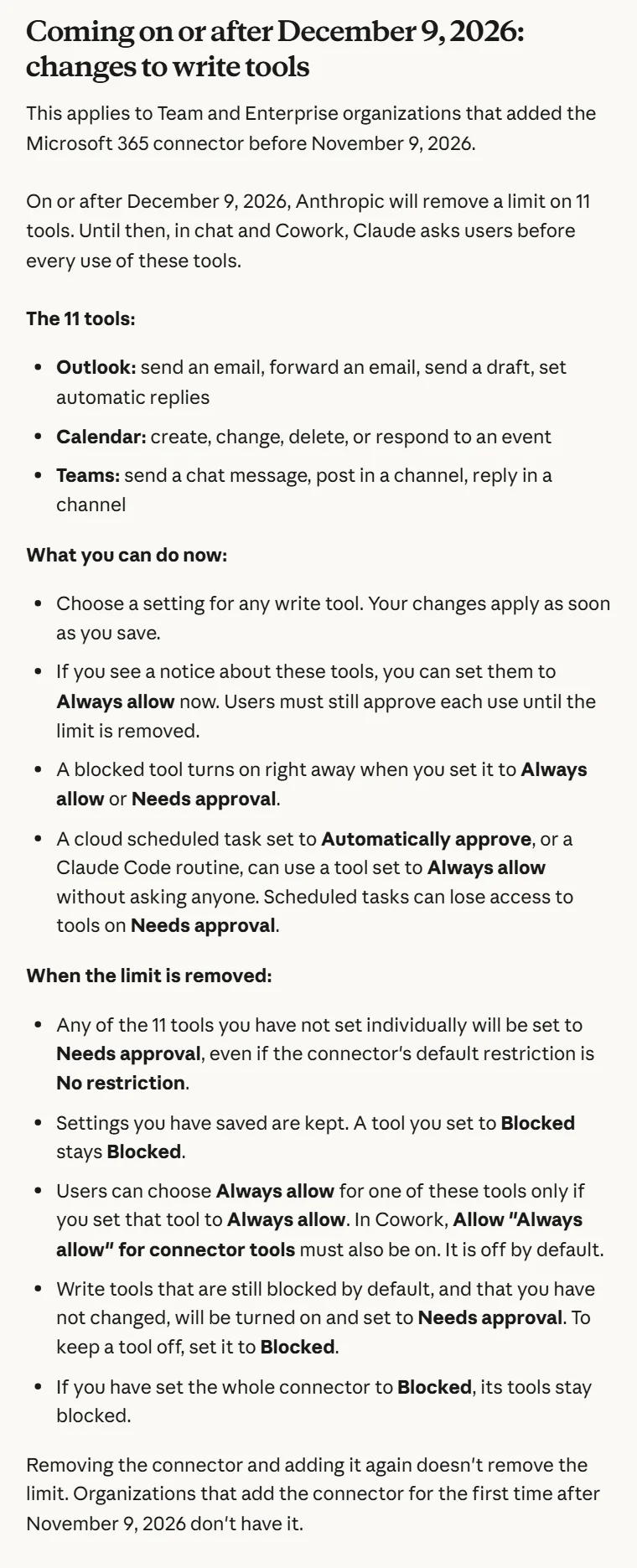
Source: Set up the Microsoft 365 connector, section "Coming on or after December 9, 2026: changes to write tools", Claude Help Center, captured November 23, 2026.
The 35 Claude Microsoft 365 connector write tools, and the setting we'd pick
The security guide lists 35 write tools, each with the Microsoft Graph permission it uses. We grouped them by what they touch and added a setting for a team without a security operations function. The settings column is our recommendation, not Anthropic's.
| Group (count) | Tools | Graph permission | In Anthropic's 11? | Our setting |
|---|---|---|---|---|
| Send mail (3) | outlook_send_mail, outlook_forward_mail, outlook_send_draft |
Mail.Send | Yes | Needs approval |
| Drafts (5) | outlook_create_draft, outlook_create_reply_draft, outlook_create_reply_all_draft, outlook_update_draft, outlook_delete_draft |
Mail.ReadWrite | No | Always allow |
| Delete and restore (3) | outlook_trash_thread, outlook_untrash_thread, outlook_batch_delete_messages |
Mail.ReadWrite | No | Needs approval |
| Categories on messages (3) | outlook_modify_labels, outlook_modify_thread_labels, outlook_batch_modify_labels |
Mail.ReadWrite | No | Always allow |
| Category list (3) | outlook_create_label, outlook_update_label, outlook_delete_label |
MailboxSettings.ReadWrite | No | Always allow |
| Inbox rules (2) | outlook_create_filter, outlook_delete_filter |
MailboxSettings.ReadWrite | No | Blocked |
| Automatic reply (1) | outlook_set_vacation |
MailboxSettings.ReadWrite | Yes | Needs approval |
| Calendar (4) | outlook_create_event, outlook_update_event, outlook_delete_event, outlook_respond_to_event |
Calendars.ReadWrite | Yes | Needs approval |
| Files (7) | sharepoint_upload_file, sharepoint_update_file, sharepoint_create_folder, sharepoint_rename_item, sharepoint_move_item, sharepoint_copy_item, sharepoint_delete_item |
Files.ReadWrite.All | No | Needs approval |
| Teams messages (3) | teams_send_chat_message, teams_send_channel_message, teams_reply_channel_message |
ChatMessage.Send, ChannelMessage.Send | Yes | Needs approval |
| New Teams chat (1) | teams_create_chat |
Chat.Create | No | Needs approval |
That comes to 11 tools on Always allow, 2 Blocked and 22 on Needs approval. Drafts stay in the mailbox until someone sends them, and sending a draft is outlook_send_draft, one of the 11. Categories only tag mail. Apart from discarding drafts and editing the category list, everything that sends, invites, deletes received mail or changes a shared file keeps a person in the loop.
Calendar tools stay on approval for a reason Microsoft spells out: creating an event with attendees sends invitations to all of them, and the Graph documentation says that behavior "can't be configured". Files are broad too. The sharepoint_* tools work in any OneDrive or SharePoint library the member can edit, and the connector can't be scoped to chosen sites, because Sites.Selected isn't supported.
Why outlook_create_filter is the one to block
An inbox rule keeps running after the chat ends. Microsoft's Graph page for creating a rule uses a forwarding rule as its example, and Microsoft's Defender playbook says "malicious inbox rules are common during business email compromise (BEC) and phishing campaigns", used to forward mail to external accounts, hide incoming mail and delete traces.
Three details from Anthropic's pages make this tool different from the rest. It isn't one of the 11, so the per-use limit never covered it. It isn't in the list of actions Claude confirms before running, which names sending, forwarding, Teams messages, calendar changes and automatic replies. And in "Automatically approve" mode, Anthropic says actions run unless a check flags them or the organization requires approval, adding that "the check can miss risky actions".
The admin who started the Hacker News thread on November 17 is the Claude admin for an organization of about 140 employees, "many of whom have Claude accounts", and had kept Exchange write access off "out of fear of prompt injection attacks".
An email that talks Claude into a forwarding rule is that attack in its plainest form: prompt injection through tool output, the first attack in our MCP server security checklist. Few small teams need Claude to write inbox rules, so we'd block both rule tools and revisit if someone asks.
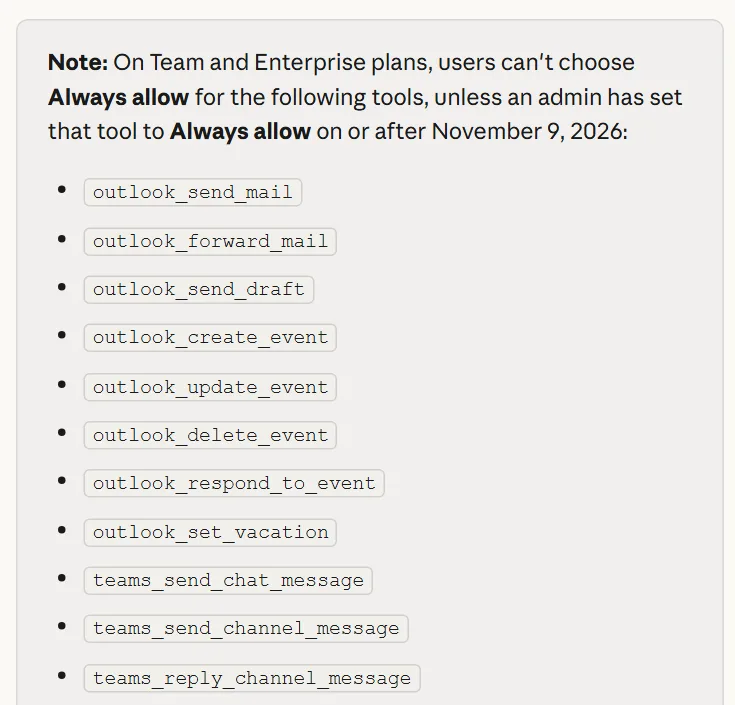
Source: Microsoft 365 connector security guide, note under "Write tools", Claude Help Center, captured November 23, 2026. outlook_create_filter is not on the list.
Scheduled tasks and Always allow: what breaks under Needs approval
Needs approval has a cost Anthropic states in one line: "Scheduled tasks can lose access to tools on Needs approval." The flip side is that a tool on Always allow can be used "without asking anyone first", including by a cloud scheduled task set to Automatically approve and by a Claude Code routine.
So before you save, ask who runs a scheduled task that writes. If one person has a Monday task that drafts a status email, drafts on Always allow covers it, and they still press send. If a task uploads a weekly report to SharePoint, that is the case for setting sharepoint_upload_file to Always allow while leaving update, move and delete on Needs approval. Our AI agent governance policy has an authorization register for writing down which task holds which tool.
Cowork has its own gate. Members can pick Always allow there only when the organization setting Allow "Always allow" for connector tools is on, and Anthropic says it is off by default. Leave it off unless you have a named reason.
Locks outside Claude: Entra, forwarding and personal plans
Claude's settings are one layer. Three Microsoft-side controls hold even if someone changes a Claude setting later.
- Revoke MailboxSettings.ReadWrite on the M365 MCP Server for Claude enterprise application in Microsoft Entra if you never want Claude touching mailbox settings. Anthropic says a revoked permission returns "Failed to call tool". The cost: the same permission covers the category list and automatic replies, so those three tools and
outlook_set_vacationstop working too. Granting admin consent again restores the default permission set, so recheck after any re-consent. - Set automatic external forwarding to Off in the outbound spam policy in Microsoft Defender. Microsoft says this "disables any Inbox rules (users) or mailbox forwarding (admins) that redirect messages to external addresses", and recommends choosing On or Off explicitly rather than the system-controlled default, whose behavior differs by organization.
- Set Assignment required to Yes on both Claude enterprise applications, M365 MCP Server for Claude and M365 MCP Client for Claude, and assign a pilot group. Microsoft notes that Global Administrators can sign in regardless.
Personal plans need their own line. On Free, Pro, Max and Ultra, Anthropic's December limits don't exist and users can choose Always allow for these tools; our Claude vs ChatGPT compliance comparison covers how those consumer plans also differ on training and retention. On Enterprise, the Restrict verified-domain connectors to your enterprise setting stops people connecting your Microsoft 365 domain from a Claude account outside your organization; Team plans don't have it, so Assignment required is the control there. If your AI acceptable use policy lists approved tools, add a line saying work Microsoft 365 accounts connect only to the company Claude organization.
What Anthropic's pages don't settle yet
- Which tools the in-product notice counts. The notice quoted on Hacker News says "15 tools" turn on; the Help Center names 11 limited tools and "some" blocked by default. Settled when the Help Center lists the blocked-by-default tools, or by reading your own Tools tab.
- What a member sees for a tool outside the 11 set to Needs approval, and whether they can pick Always allow for it. The pages describe that choice only for the 11.
- How to tell from the audit trail that Claude made a change. Only emails carry an attribution header; "file writes, calendar writes, and Teams messages aren't currently tagged". Anthropic says the connector's Graph calls appear in your Microsoft 365 audit log.
Checked: Anthropic's security guide, setup article, user connection article and verified-domain article, and Microsoft Learn pages for the Graph rule, mailbox settings, event and send mail APIs, the Graph permissions reference, the Entra permission and assignment pages, the Defender inbox rule playbook, the compromised account guide and the external forwarding page, on November 23, 2026. We have no Claude Team or Enterprise organization with the connector, so nothing here describes the admin screen from our own use.
What to do before December 9
- By Friday, November 27: open Organization settings > Connectors > Microsoft 365, check every Microsoft 365 connector in the list, and save a setting for each of the 35 tools using the table above. Anthropic keeps saved settings on December 9; a tool you leave alone gets its default.
- The same day: set
outlook_create_filterandoutlook_delete_filterto Blocked, and set external forwarding to Off in Defender. - Monday, November 30: run
Get-InboxRule -Mailbox <user> -IncludeHiddenfor anyone who already uses Claude write tools, the command Microsoft's compromised account guide gives, and look for rules nobody remembers creating. - By Friday, December 4: ask Claude to "Draft an email to myself, but don't send it", Anthropic's own test, from a pilot account, and confirm a send still asks for approval.
- Thursday, December 10: reopen the Tools tab and confirm the settings you saved. If a scheduled task stopped writing, give only that tool Always allow.
Add the inbox rule check to your AI incident response plan as a first step for any report that Claude did something in a mailbox. If you also run agents on laptops in the same tenant, the Agent 365 local agent discovery guide covers what Microsoft Defender can see.
Related reading
- AI agent API token leak playbook covers revoking access and checking the blast radius when an agent credential leaks.
- NCSC's agentic AI security checklist turns seven UK safeguards for agents that act on your behalf into checks.
References
- Anthropic, Microsoft 365 connector security guide, Claude Help Center.
- Anthropic, Set up the Microsoft 365 connector, Claude Help Center.
- Anthropic, Connect to Microsoft 365, Claude Help Center.
- Anthropic, Restrict verified-domain connectors to your Enterprise, Claude Help Center.
- Microsoft, Create rule (messageRule), Microsoft Graph v1.0.
- Microsoft, Create event, Microsoft Graph v1.0.
- Microsoft, Microsoft Graph permissions reference.
- Microsoft, Alert classification for suspicious inbox manipulation rules, Microsoft Defender XDR.
- Microsoft, Respond to a compromised email account, Microsoft Defender for Office 365.
- Microsoft, Control external email forwarding, Microsoft Defender for Office 365.
- Microsoft, Review and revoke permissions for an application, Microsoft Entra.
- Hacker News, Microsoft 365 write tools default "on" in Claude on Dec 9, November 17, 2026.