To opt a personal Gemini account out of training, open Settings, then History, and untick "Chat content including text & uploads", so you don't have to turn History off to do it. Google announced that setting on November 16 and is rolling it out over the coming weeks. Leave History on, because once the update reaches your account, turning it off keeps your future chats with Google for around two months instead of 72 hours, and those chats never show up in your history for you to delete.
Until the new box appears, turn off Keep Activity on any personal account that touches work. That is the older advice, and on November 19 the guide ranking second on Google for "gemini opt out of training", a Gizbot piece from August 18, 2025, still gave it as the whole answer, because Keep Activity was the only lever until Google announced the split on November 16 and said it would roll out "in the coming weeks". A Google Workspace account sits on different terms, covered in the third column below.
The settings, before and after November 16
| Personal account before Nov 16 | Personal account after the update | Workspace account (as of Nov 19) | |
|---|---|---|---|
| Control | One Keep Activity switch for history and training | History and training are separate settings | Admin controls conversation history |
| Chat-content training | Tied to Keep Activity | "Chat content including text & uploads", on by default if you are over 18 | Not used for training without permission |
| Audio, Gemini Live video and screenshares | Separate setting, off by default (added August 2025) | Separate box, off by default | Not listed separately; the hub says chats and uploaded files aren't used for training without permission |
| Kept when History is off | 72 hours | Around two months | Up to 72 hours |
| Kept when History is on | Until auto-delete; Google's Nov 16 post says you'll "still be able to change how long history is saved" | Until auto-delete: 3, 18 or 36 months, or never; 18 months default | Admin picks 3, 18 or 36 months; 18 months default |
| Human-reviewed chats | Google's Nov 16 post announces no change to review | Up to 3 years, even after you delete them | Not human reviewed without permission |
| Who can change it | The user | The user | The Workspace admin |
The middle column comes from Google's help page Manage & delete your history in Gemini Apps and the Gemini Apps Privacy Hub, both read on November 19. The 72-hour figure for the old setup is what the privacy hub said in an archived copy from November 12, as TechCrunch reported on November 17; 9to5Google quoted the same 72 hours the day before. The Workspace column is from Google's Generative AI in Google Workspace Privacy Hub.
If you are over 18, the help page says chat-content training is on unless you untick it. And if you already had Keep Activity off, both new settings start off, according to TechCrunch and 9to5Google, so the people who did the careful thing before don't have to act again for training. They do have to decide about History.
Why History off is no longer the private choice
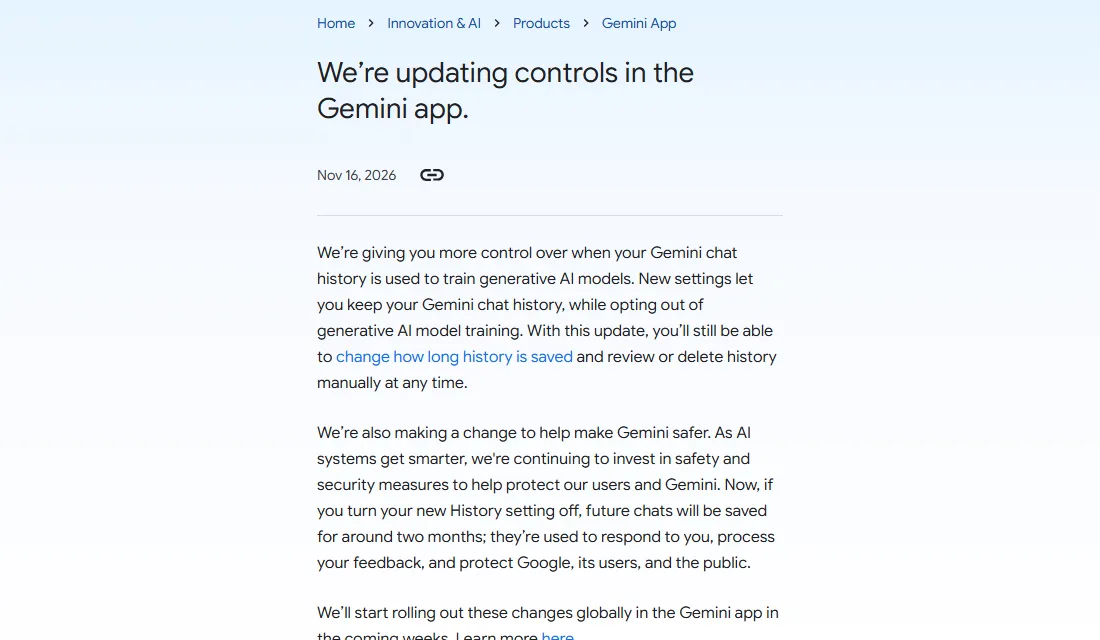
Google's announcement on blog.google, captured November 19, 2026.
Google's blog post gives the reason in one line: with History off, "future chats will be saved for around two months" and used "to respond to you, process your feedback, and protect Google, its users, and the public." The help page adds that this history "won't appear in your Gemini History". The privacy hub applies the same window to temporary chats and says temporary chats are not used to train Google's AI models.
Once the update reaches an account, a cautious user has two ways to run Gemini:
- History off: chats stay about two months on Google's side, you can't see or delete them, and they aren't used for training unless you send feedback.
- History on, training box unticked, auto-delete at 3 months: chats stay up to three months, you can see them, and you can delete any chat, a day or all of it at once from Settings, then History. The help page says deletion starts "immediately".
The second is the better deal for anyone who might paste something they regret. You trade one extra month at the outer edge for the ability to delete on the same day. TechCrunch put the change next to its rivals: OpenAI says it may keep temporary ChatGPT chats up to 30 days, and Anthropic keeps Claude incognito chats 30 days by default, so Gemini's new history-off window is about double both.
What neither setting stops is human review. The privacy hub says that with the training setting off, future chats "will be reviewed and used to improve Google services in other ways", and that reviewed chats are kept for up to 3 years, separated from your account, even if you delete them later.
The checklist for a personal Google account
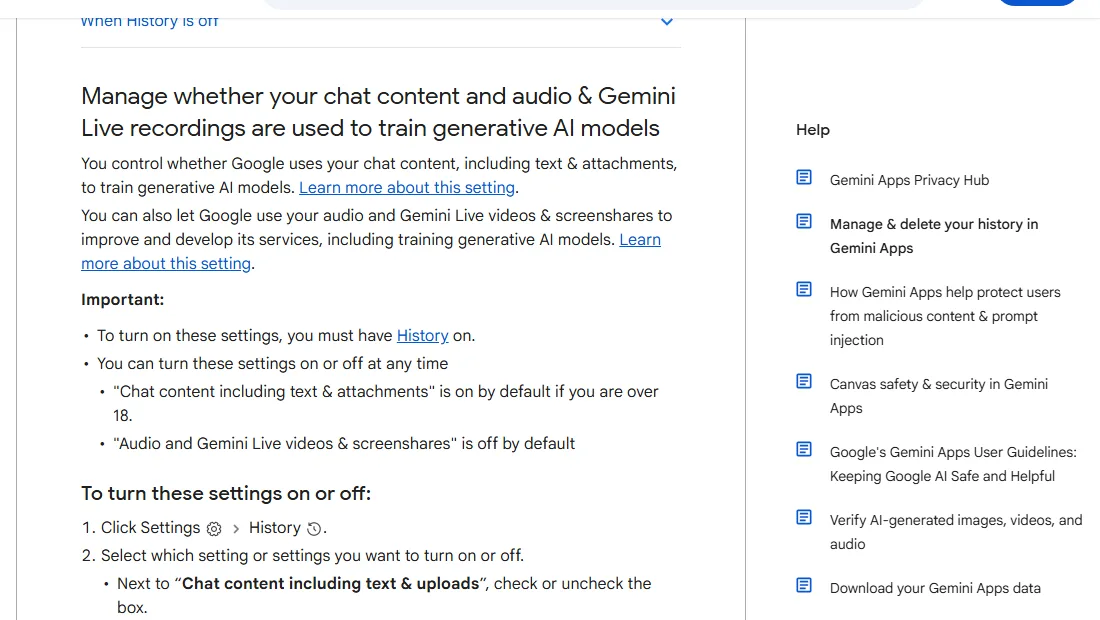
The "Manage & delete your history in Gemini Apps" help page, captured November 19, 2026.
Work through this on each personal account someone on the team uses for work, on a computer at gemini.google.com:
- Open Settings, then History. If you still see a single Keep Activity switch, the update hasn't reached the account yet. Turn Keep Activity off now if the account is used for anything work-related, or keep company work out of it until the new boxes appear; 9to5Google says Google is emailing users as the update rolls out.
- Leave History on once the new settings appear. If it is off, turn it on, for the reason above.
- Untick "Chat content including text & uploads", then click Turn off. The help page says you need History on to change this box at all.
- Leave "Audio and Gemini Live videos & screenshares" unticked. It is off by default. The privacy hub says that if chat-content training is on, Google still trains on Gemini Live transcripts and attachments even with this box off, so the audio box alone protects little.
- Set auto-delete to 3 months. Click "Deleting history older than … months" and pick 3; the default is 18.
- Don't use the thumbs-up or thumbs-down buttons on work chats. The privacy hub says future chats won't be used for training with the setting off "unless you provide feedback", and reviewed feedback is kept up to 3 years.
- Delete anything sensitive the same day from Settings, then History.
Steps 3 and 5 are the ones that change what Google holds; step 4 needs no action on most accounts.
The checklist for Workspace accounts
If your team pays for a qualifying Workspace edition, the admin owns these controls and the user may not even see the retention period, as the personal-account help page warns. Google's Workspace privacy hub says three things a small team can rely on:
- Chats and uploaded files in the Gemini app "won't be reviewed by human reviewers or otherwise used to train generative AI models without your permission."
- Gemini app prompts and responses are kept "up to 36 months, as determined by admins", and admins choose auto-delete after 3, 18 or 36 months, with 18 as the default.
- With conversation history off, new chats are kept "for up to 72 hours".
On November 19 the Workspace hub still said 72 hours while the consumer pages had already changed, and Google's November 16 post only talks about "the Gemini app" without naming Workspace. We did not find a statement either way on whether the longer retention reaches Workspace accounts.
For the admin, the call is the same as for personal accounts: conversation history on, auto-delete at 3 months, unless you have a records reason to keep more. Write that number into your AI data retention policy next to the other tools' retention periods. If Gemini also runs inside Chrome on company laptops, the policy names are in our Gemini in Chrome and Copilot in Edge checklist.
The policy line to change this week
If your AI policy says "turn off Keep Activity", as the second-ranked how-to for this search still did on November 19, keep that line until the new settings reach your accounts, then replace it with something like:
Client, employee and customer data goes only into Gemini through our Workspace accounts. If you use Gemini on a personal Google account for anything work-related: until your account shows the new History settings, turn Keep Activity off. Once it does, keep History on, untick "Chat content including text & uploads", set auto-delete to 3 months, and delete sensitive chats the same day.
The first sentence does the real work, because a personal account's chats can still be human reviewed and kept for 3 years whatever the boxes say. Our comparison of ChatGPT, Claude and Gemini tiers shows the same split between personal and business plans at the other two vendors. If you would rather block personal accounts on company devices than manage them, our guide to blocking ChatGPT or allowing only your company workspace shows the browser-policy and network approach for ChatGPT.
What we'd do on a five-person team
Send the policy line on Friday, November 20, and have anyone whose account still shows the old Keep Activity switch turn it off that day. Check each personal account again when Google's email reaches it, or on Tuesday, December 15, about four weeks after the announcement, if no email has come. Paying for Workspace is worth it once anyone pastes client material into Gemini at all; the training and review terms are the difference, not the features.
Google's move to separate history from training is the right design, and the longer History-off retention is the price nobody asked for. If your team runs on free Gmail addresses, our Personal Intelligence piece covers the other October change: connected Gmail data can now shape ads on free accounts, while Workspace accounts can't turn the feature on.
What we couldn't confirm
- Whether the new split has reached any given account. We didn't sign in to a test account; the steps above follow Google's help page as published on November 19.
- Whether personal accounts on a paid Google AI plan get different defaults. The help page names an age rule (over 18) for the default and no plan rule, and we found no plan-based exception.
- How long Google keeps chats for an account still on the old Keep Activity switch. The privacy hub said 72 hours on November 12 and Google's pages now give the new figure; we couldn't tell which one applies to an account the update hasn't reached.
- Ars Technica's and The Register's November 17 reports were not read for this piece; the old and new retention figures rest on Google's own pages, TechCrunch and 9to5Google.
Checked: Google's blog post, both Gemini help pages and the Workspace privacy hub on November 19, 2026.
Related reading
- Microsoft 365 Copilot vs Google Workspace AI compliance compares training, DPA and data location terms for Copilot and Gemini.
- Privacy-first AI APIs that don't train on your data lists API terms with zero or short retention, if you'd rather build than use the app.
- Zoom AI Companion vs Otter vs Fireflies applies the same training and retention questions to meeting notetakers.